Today we’ve an excellent project from our forums to share with you: JonathonDuerig, known as duerig on the forums, posts about the standalone book scannerhe has built, controlled by a Raspberry Pi 2 and using the Raspberry Pi TouchDisplay as an interface. It’s a large and fairly imposing object, based on TheArchivist DIY book scanner and using Tenrec Builders‘ open source book-scanningsoftware, Pi Scan.
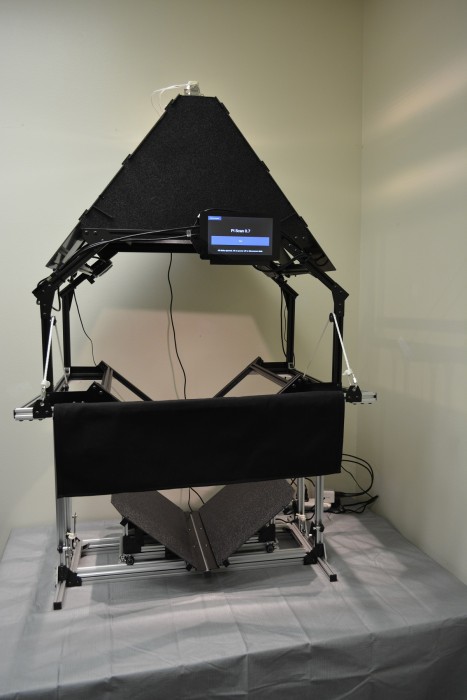
Books rest on a V-shaped cradle that the scanner’s operator lifts up towards asimilarly shaped 3mm glass platen by pulling down on a handlebar, thus pressingflat the pages, which are evenly lit from above. The Raspberry Pi controls twoCanon PowerShot ELPH 160 cameras, each angled perfectly to capture one of thevisible pages of the book. The Pi allows the user to set the zoom level for eachcamera, automatically sets and locks focus, and captures the images, saving themto an external SD card. The scanner’s touchscreen interface is made with Kivy, aPython GUI development system for touchscreen devices.
Looking at this build and the projects it draws on, I was pretty astonished bysomething that regularly bowls me over when I’m looking at open source projects,and by which I hope I never stop feeling awed. The level of duerig and others’commitment to the overall open book scanning project and its quality and integrityis remarkable. We are proud that Raspberry Pi is a useful tool to communities likeyours and projects like this.
 Bruce's Blog