Google I/O 2016 Preview: A Chrome/Android merger? Project Tango? VR?
Google I/O is Google’s annual launch party where the company shows off its biggest products andteaches developers how to be a part of the Google ecosystem. The event takes place from May 18 to20 at the Shoreline Amphitheatre in Mountain View, California.
Google I/O this year is definitely weird. It’s in an all-new location, and the big news that we wouldexpect to happen at I/O—a new version of Android—has already been released. As a result, there isreally nothing that we would put at a 100 percent lock for I/O—we just aren’t sure what Google is goingto do. The schedule gives us some vague idea of what we can expect to see, but since Google likes toavoid spoiling its announcements, the schedule isn’t always a comprehensive list until after theopening-day keynote. While we aren’t making guaranteed predictions, we can at least offer a list ofpossibilities based on projects we know are in the works at Google HQ.
This is the first Google I/O since Google became a subsidiary under Alphabet, but we’re going toassume most of the other Alphabet companies aren’t going to join in on the fun. None of the divisions inAlphabet are really “new”—the groups have all been inside Google for some time. Even when theywere part of Google, most groups didn’t participate in Google I/O. Now that they’re separated evenfurther, we expect their non-participation in I/O to continue. The one exception is Google X (Now just”X”), which famously demoed Google Glass at the show in 2012.
After the N Developer Preview, what’s left for Android?
The Android L Developer Preview was announced at Google I/O 2014, and it immediately became thebiggest news of the show. The Android M Developer Preview was announced at Google I/O 2015, andstole the show there, too. The Android N Developer Preview was announced in early March with asurprise blog post. What does that leave for Google I/O 2016?
It’s a good bet a fresh version of the Android N Developer Preview will be released at the show, butthat’s usually not a huge deal—the second preview build introduced the Vulkan graphics API and a fewother features, and we wouldn’t expect the third build to be a much bigger deal. We’ve heard about newHTC-built Nexus devices in the works, but given that Android N has a Q3 2016 release date, I/O is tooearly to hear about those devices. We might hear about what sugary snack the “N” in “Android N”stands for. We’re hoping for more important news, though.
The great Chrome OS merger and desktop Android
The Wall Street Journal, TechCrunch, Business Insider, andRecode have all independently heard of a Chrome andAndroid merger that would result in Android becomingGoogle’s flagship desktop and laptop operating system. Themove would turn Android into Google’s “everything” OS,allowing it to run on watches, phones, tablets, laptops,desktops, TVs, and cars.
Android would need a brand new interface to work on a PCwith a mouse and keyboard, just as it has a brand newinterface for cars, TVs, and watches. We saw what seemslike the beginnings of this with Android N’s floating windowmode, a feature that is hidden and unfinished in the currentAndroid N Developer Preview. Perhaps Google I/O could be the coming out party for the multi-windowfeature or for the entire Android-on-PCs strategy.
The original Wall Street Journal report mentioned a release date of 2017, with “an early version”arriving in 2016. Google’s big demos usually happen at Google I/O, so could we see a demo of thedesktop version? Google would certainly want to get developer feedback on a major new interface likethis, and there would probably be lots of new APIs to talk about. It would also explain why we got arandom March release for Android N—Google didn’t want to overwhelm everyone by launching bothAndroid N and announcing a new desktop interface (and possibly a replacement for Chrome OS) atGoogle I/O.
Google Play comes to other desktop platforms?
Code inside Chrome OS suggests Google is planning to bring Google Play to its current desktopoperating system. The Google Play Store was being brought to Chrome OS as a Chrome extension viaGoogle’s “App Runtime for Chrome (ARC)” project. Chrome extensions run not just on Chrome OS, butalso on every desktop version of Chrome. If a Play Store on Chrome OS was released with this, itwould also be possible to have the Google Play Store run on Windows, Mac OS, and Linux. GooglePlay on other platforms is pure speculation on our part, but it would be technically possible, andit would line up with Google’s typical strategy.
On mobile, Google takes a “horizontal” strategy with iOS. It has its Android operating system, whichgets priority support for most Google apps, but it also makes 67 different apps for iOS. Wherever usersare, they can jump into the Google ecosystem. Android moving to the desktop would necessitateGoogle building desktop apps, and getting those apps on rival desktop OSes would mirrorGoogle’s mobile strategy. The Google Play Store on rival platforms would be an even more intenseplatform invasion. It doesn’t happen on iOS because the OS is strictly controlled by Apple, but thosecontrols don’t exist for Windows, OS X, and Linux.
Google would have a good pitch for developers, saying that Android code could be used on watches,phones, tablets, cars, televisions, the new Android desktop OS, Chrome OS, Windows, Mac OS, andLinux. It could also bootstrap developer interest for its fledgling Android-based desktop OS by tellingdevelopers they also get access to Chrome OS, Windows, Mac, and Linux users. Users that boughtgames or apps on one platform could bring them to all the others without a lot of extra work.
Google Play comes to China
With a population of 1.35 billion people, China is the world’s biggest market. It’s also a market thatGoogle Play doesn’t really do business in, thanks to past disagreements with the Chinese government.
Reports from several reliable outlets have said that Google is working with the Chinese governmentand plans to launch Google Play in China this year. According to Reuters, the plan involves a version ofthe Play Store “set up specifically for China, and not connected to overseas versions of GooglePlay.” There’s no telling if this will be announced at Google I/O, but being able to tell a room full ofdevelopers that they can now easily sell apps to an extra billion people seems like a win for Google.
Android is open source and available to anyone without restrictions, but the Google Play Store, GooglePlay Services (Google’s developer APIs), and other Google apps are not. To be a part of Google’secosystem, device manufacturers must sign an MADA (Mobile Application Distribution Agreement)contract with Google. When we last saw one of these confidential contracts in 2011, Google “bundled”all the Google apps together—if you wanted one you needed to include all the others. It also includedan anti-fragmentation clause that banned participants from taking “any actions that may cause or resultin the fragmentation of Android,” including creating or distributing “a software development kit (SDK)derived from Android or derived from Android Compatible Devices.” This is widely interpreted as “youaren’t allowed to use Android on any product without also including Google Play.”
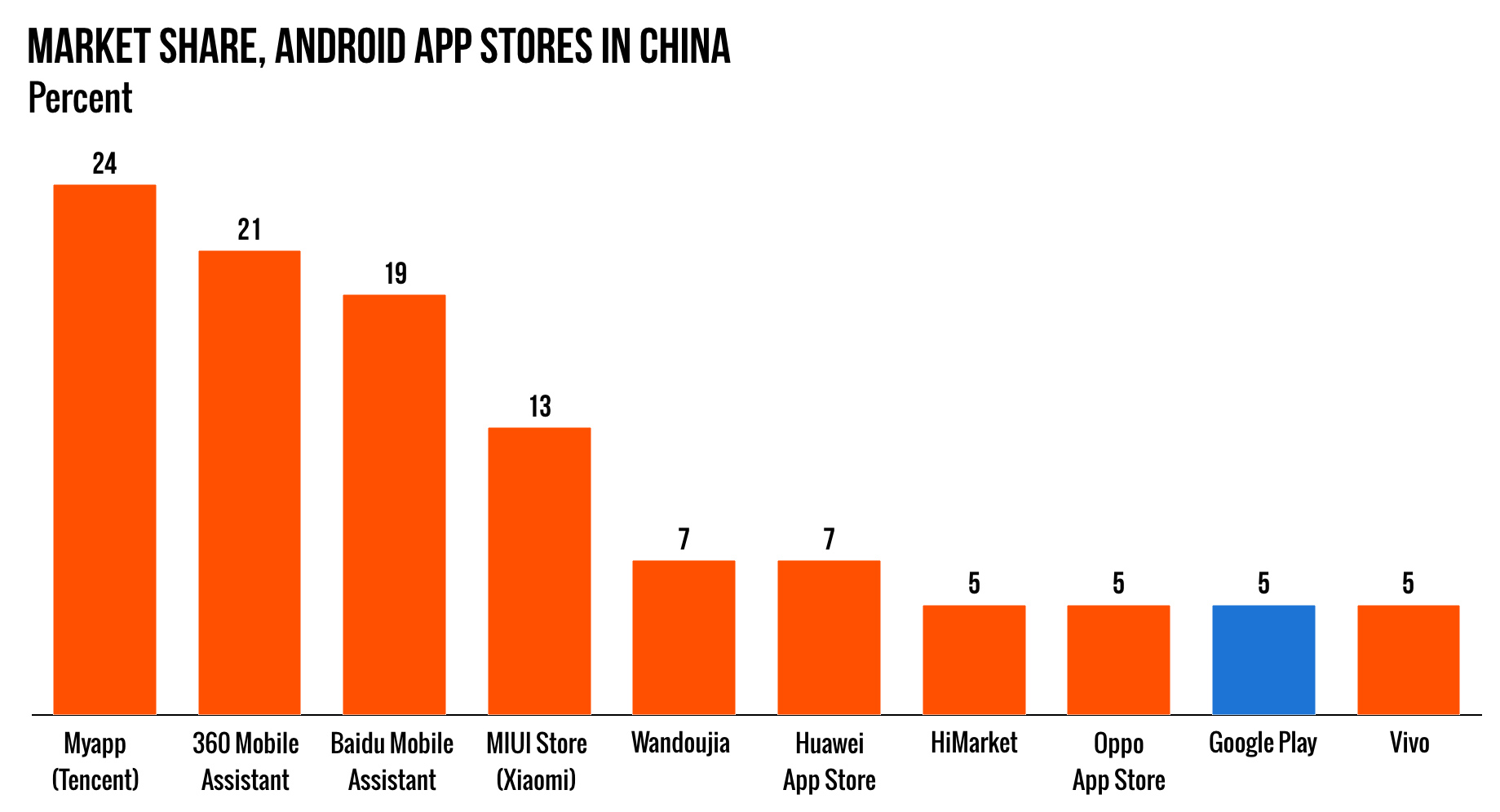
Since Google has every major Android manufacturer under contract, in most countries Google Playacts as the “default” app store and has a huge market share of Android-based devices versus otherapp stores. China is the main exception. With no Google Play Store in China, there is no “default” appstore, so it’s a messy free-for-all. Chinese customers end up with an OEM-provided app store andmaybe one from one of the major Chinese Internet companies, like Tencent, Baidu, or Qihoo 360.
Every OEM in China is basically shipping “forked Android” without Google Play, which would seeminglyrun afoul of the anti-fragmentation wording. Remember we’re working off of older MADA contracts from2011, but back then the contracts contained an interesting loophole that allowed Chinese app stores toexist. The contract deals with distributing Google applications “in the territories specifically authorizedby Google.” China is not one of those countries, hence the app store free-for-all.
Google notes that this list of territories “may be updated by Google from time to time.” So our nextquestion is “Then what?” What happens when Google Play moves into China? Does everyone’s MADAcontract kick in and Xiaomi, Huawei, and other top Chinese OEMs all immediately have to startshipping Google Play on everything? The transition will be something to keep a close eye on.
Yet another reboot of Google’s instant messaging strategy
Many of the world’s biggest tech companies consider instant messaging to be an important businessworthy of their money and development resources. Snapchat and Facebook’s WhatsApp areboth valued at $16 billion. And that’s nothing compared to China instant messaging app WeChat, whichis valued at a whopping $83.6 billion. Judging by the products it has so far produced, it seems Googledoes not agree with this assessment of the messaging market. The company’s only IM product isGoogle Hangouts, a neglected, barely developed product that has earned an awful reputation withAndroid users.
About six months ago, The Wall Street Journal reported that Google is planning a “new, smartermessaging app” that presumably would replace Hangouts. The new messaging app would integrate”chatbots” that would answer questions from “the Web and other sources.” Microsoft is working on asimilar concept inside Skype. At Build 2016, the company demoed the ability to do things like orderpizza from Domino’s via a chatbot with automatic escalation to a human.
A “visual search” camera app
Google Goggles is a little-known visual search app developed by Google. You snap a picture, it getsuploaded to Google’s servers, and Google tries to figure out what’s in the picture. It can identifyartwork, QR codes, and landmarks. The app can also solve Sudoku puzzles and do other things thatwould be difficult to search for with purely text.
The standalone app in the Play Store is pretty neglected, but a report from Slashgear says that Googleis planning to revamp its visual search offering by integrating it directly into the Google Camera, thedefault camera app on Nexus devices. The report says users would be able to snap a picture and tracearound the item they want more information on, and Google would return with results.



 Bruce's Blog