http://www.recode.net/2016/10/25/13401286/google-jamboard-whiteboard

This is Jamboard, Google’s new 4K digital whiteboard

It’ll go on sale next year to Google apps customers for “under $6,000.”

Google Jamboard
Google

Google’s newest gadget is for your office: Today, the company is announcing Jamboard, a new cloud-connected digital whiteboard that hooks into its “G Suite” of apps for corporate customers.

The Jamboard itself is a Google-designed, 55-inch 4K touchscreen display that runs Android and a new app for whiteboarding.

It includes a built-in camera and speakers and can recognize up to 16 simultaneous touch inputs. (It can also tell the difference between human fingers and its no-batteries-or-Bluetooth-pairing-necessary stylus and eraser accessories.) You can mount it to a wall or wheel it around on a custom stand. Google will start selling the device next year, starting at “under $6,000.”

Google Jamboard
A wall-mounted Jamboard
Google

But like most of Google’s suite of business apps, the real point is the software and its collaborative cloud service.

As you might expect, inside a “Jam” session, you can draw, type, import and scribble on images and Google Docs, search the web in a mini-browser, communicate with colleagues via Google Hangout and keep a digital record of your work in Google Drive. Teams using multiple Jamboards can work together on the same project in real time, as long as there’s internet access.

There’s also a full-featured tablet app for iOS and Android (so others can participate without a Jamboard) and a simpler version of the app for smartphones. Companies can test the concept just using these apps, though Google (obviously) thinks the huge touchscreen is a big part of the equation. It has been testing the software and devices with about 30 teams internally and with external partners including Netflix and Spotify.

The move comes as Google is trying to play a deeper role as a software-tools provider for organizations — ranging from its popular corporate version of Gmail to newer, cloud-based infrastructure services — and diversify its business from web advertising, which still represents 90 percent of its revenue.

Google Jamboard
Meetings on wheels
Google

Google is particularly proud that it designed the hardware and software in tandem.

That’s a concept that has historically been more associated with, say, Apple, or even increasingly Microsoft, one of its chief rivals in business services. Microsoft offers touchscreen “Surface Hub” displays, also marketed as tools for teamwork, in 55- and 84-inch models.

But Google is increasingly playing this game — see its recent Home speaker device or its high-end Pixel smartphones — and doing an impressive job. The Jamboard is certainly memorable, covered in a luxurious-feeling, matte, soft-touch plastic. (The team had considered fabric as a cover material, to fit in with conference rooms, someone who worked on the device told me. That would have been interesting.) And while it’ll be available in blue or gray options, the company will be pushing a bold, bright red version as its main color.

Google unveiled the device at a small press event yesterday in San Francisco, linked via real-time Jamboard session and Google Hangout to a team in the company’s New York office. The software generally seemed to work without any major lag or bugs, though some things drawn remotely showed up as a tad jerky on the receiving end. In a brief hands-on demo, the display itself looked fine, if a bit harsh on the eyes. And from my seat across the conference room, the screen’s glossy front coating reflected a little more ceiling light than I’d like.

Still, it seems like an interesting option for teams that seek to collaborate more visually in meetings — especially those split among multiple offices or with remote teammates.

Don’t miss: Google’s cloud and enterprise boss Diane Greene will speak next month at our newest Recode conference, Nov. 14-15 in San Francisco. Click here to learn more and to register.

http://hackerboards.com/pcduino-goes-quad-core-swaps-arduino-for-rpi-compatibility/

pcDuino goes quad-core, swaps Arduino for RPi compatibility

LinkSprite’s $25, 64 x 50mm “pcDuino4 Nano” SBC is a re-spin of FriendlyARM’s NanoPi M1, offering a quad-core H3, Raspberry Pi expansion, and 3x USB ports.

Can you be a pcDuino without the Duino? For its latest open source pcDuino board, LinkSprite has switched from Arduino compatibility to a 40-pin Raspberry Pi expansion interface, breaking the mold of the three pcDuino SBCs, and five models total, that made it into our June HackerBoard SBC survey. The new pcDuino4 Nano, which is on pre-sale for $25, follows the $40 pcDuino3 Nano, which fell directly in the middle of the pack of our reader rankings of community-backed SBCs, but was the most popular of the pcDuino models overall.

As noted in a recent CNXSoft post, the pcDuino4 Nano is almost identical to FriendlyARM’s now $13 NanoPi M1. In fact, FriendlyARM built the 4 Nano for LinkSprite, according to the story.


pcDuino4 Nano (left) and NanoPi M1
(click images to enlarge)
As you can see from the images above there are some minor differences in the design. The pcDuino4 Nano measures 64 x 50mm, compared to 69 × 48mm on the NanoPi M1, down significantly from 92 x 54mm on the pcDuino3 Nano. (Note that one instance in the pcDuino4 Nano wiki lists the dimensions as 64 x 56mm, but the same wiki, as well as the shopping page also lists 64 x 50mm.) Like the newer $16 version of the NanoPi M1, but not the base model, there’s 1GB of RAM, and LinkSprite also added a microphone.

LinkSprite compares the board not to the $35, 86 x 56mm Raspberry Pi 3, but rather to the $10, 69 × 48mm Orange Pi One. Like the similarly RPi-compatible Orange Pi One, the pcDuino4 Nano runs on a quad-core, Cortex-A7 Allwinner H3 clocked to 1.2GHz, thereby advancing from the pcDuino3 Nano’s dual-core -A7 Allwinner A20.


pcDuino4 Nano (left) and block diagram
(click images to enlarge)
The pcDuino4 Nano offers twice the RAM of the Orange Pi One, and it similarly foregoes the flash memory found on the 3 Nano, providing only a microSD slot. Other cost-cutting measures from moving to the NanoPi M1 design include swapping the 3 Nano’s GbE port for 10/100 Ethernet, and dispensing with the SATA interface.

The pcDuino4 Nano also adds a few features including one more USB 2.0 host port, for a total of three, along with the previous micro-USB OTG. It also adds CVBS (composite and stereo audio), plus a debug header. The Ubuntu MATE support is similar to that of the NanoPi M1, but unlike that board there’s no mention of Ubuntu Core or Android support.


pcDuino4 Nano sketch view (left) and rear view
(click images to enlarge)
The following specifications are listed for the pcDuino4 Nano SBC:

  • Processor — AllWinner H3 (4x ARM Cortex-A7 @ 1.2GHz); Mali 400MP2 GPU @ 600MHz
  • Memory/storage — 1GB DDR3 DRAM; microSD slot
  • Display — HDMI port; CVBS output
  • Networking — 10/100 Ethernet port
  • Other I/O:
    • 3x USB 2.0 host ports
    • Micro-USB OTG port
    • IR receiver
    • DVP camera interface
    • 3.5mm analog audio output
    • Serial debug 4-pin header
    • Raspberry Pi-compatible 40-pin expansion — GPIO, UART, SPI, I2C, PWM etc.
  • Other features — Power, reset buttons; 2x LEDs; onboard mic
  • Power input — 5V/2A via micro-USB; 5V via 4-pin serial header
  • Dimensions — 64 x 50mm
  • Weight — 91gm
  • Operating system — Ubuntu MATE, Debian with U-Boot

Further information

The pcDuino4 Nano is available for pre-order at $25 plus shipping from China. The board seems to have slipped past its intended Sep. 24 shipment target. More information may be found on LinkSprite’s pcDuino4 Nano shopping page and wiki.

http://indiatoday.intoday.in/technology/story/apple-watch-nike-edition-to-go-on-sale-from-october-28/1/794829.html

Apple Watch Nike+ edition to go on sale from October 28

Apple Watch Nike+ edition to go on sale from October 28

This one is for the fitness enthusiasts. the Apple Watch Nike+ edition, which is actually Apple Watch 2 developed in collaboration with Nike, will go on sale in India from October 28. It will be available in two dial sizes — 38mm and 42mm — and it will have a starting price of Rs 32,900.

Apple said that the Watch Nike+ also features Nike Sport Bands and unique watch faces that can be personalised with apps like Activity Rings, Heart Rate, Stopwatch and Weather.

“Running is one of the world’s most popular activities for staying in shape and being healthy, and with Apple Watch Nike+, runners will be even more motivated to achieve their performance goals,” said Jeff Williams, Apple’s chief operating officer. “The response so far has been incredible and we’re thrilled to get Apple Watch Nike+ onto customers’ wrists starting Friday.”

Apple said that the Watch Nike+, like other Watch Series 2 models, features built-in GPS to track pace, distance, and route even if a user doesn’t have iPhone with him or her. The Watch is also water resistant for up 50 meters.

The launch of Watch Nike+ comes even as IDC, a market research firm, warned of a market that is slowing down in a big way. In a report released on October 24, IDC said that smartwatch market declined by 51.9 per cent in the third quarter as various companies realign and rethink their strategies. Although with market share of over 41 per cent, Apple remained the leader.

“Apple maintained its position as the overall leader of the worldwide smartwatch market, yet it posted the second largest year-over-year decline among the leading vendors,” IDC noted in its report. “Its Series One and Series Two did little to stem that decline, although with lower price points and improved experiences, Apple could be heading for a sequential rebound in 4Q16.”

http://www.business-standard.com/article/news-ians/human-noise-can-adversely-affect-animal-s-use-of-scent-116102500756_1.html

Human noise can adversely affect animal’s use of scent

Human-made noise can have a detrimental impact on an animal’s use of information from scent, thereby putting them at greater risk of being attacked by predators, new research has found.

One obvious way in which human-made noise can cause animals problems is through the masking of valuable acoustic information.

“What our study shows for the first time is that there could also be disruption to the use of olfactory information; human-made noise could affect decision-making based on information gathered using a different sense,” said lead author of the study Amy Morris-Drake from the University of Bristol in England.

Using field-based experimental trials on dwarf mongooses in South Africa, the researchers combined sound recordings and fecal samples to demonstrate that road-noise playback negatively affected the mongooses’ ability to detect predator feces.

Even after detection, the additional noise led to less information gathering and less vigilance, making the mongooses more vulnerable to danger, according to the study published in the journal Current Biology.

“We’ve known for a long time that noise from urbanisation, traffic and airports can detrimentally affect humans by causing stress, sleep deprivation, cardiac problems and slower learning. What’s becoming increasingly clear is that a lot of other species — mammals, birds, fish, insects and amphibians — are also impacted in all sorts of ways by anthropogenic, or human-made, noise,” Andy Radford from the University of Bristol noted.

Closely monitoring the mongooses, the team found that their adaptive responses to predatory cues, such as increased inspection of the cue, vigilance scanning for danger and more time spent near the safety of the burrow, were all disrupted by road traffic noise.

http://www.themarysue.com/martian-notifier-watch/

Get the Normally $129, Top-Rated Martian Notifier Smartwatch for Just $30

c183827dd4f2967ff95c5722aed551759169132a_main_hero_image

It looks great, keeps tabs on your phone, and does everything you want a smartwatch to do. No wonder Consumer Reports ranked the Martian Notifier Smartwatch a Top 4 Best Smartwatch in 2014. We love it too…which is why we’re offering the Martian Notifier Smartwatch for 76% off at the Mary Sue Shop.

First things first, the Martian looks great enough to replace your everyday watch. And you’ll want to do just that, considering you can use it to take photos, set alarms, locate your phone, check the weather, and get notifications from hundreds of apps. You can even set up custom alerts, so you know what kind of notification is coming in without looking down.

Get the Martian Notifier Smartwatch for just $29.99, marked down from the usual $129 with free shipping included.

http://www.itweb.co.za/index.php?option=com_content&view=article&id=156974

ASUS announces Transformer 3 Pro T303

Powerful, convenient and expandable 2-in-1 is the world’s most versatile PC, with premium all-metal design, exquisite style and the ultimate take-anywhere performance.

Key points:
* Versatile: Exquisite all-metal 2-in-1 with new Cover Keyboard and exclusive ASUS Audio Pod, ASUS Universal Dock, ROG XG Station 2 & ASUS Pen accessories.
* Powerful: Unbelievable performance with 7th-gen Intel Core i7 CPU, 16GB RAM, 1TB PCIe x4 SSD, 3K display and superb Harmon Kardon audio system.
* Convenient: 8.35mm ultra-thin and ultra-light device weighs only 790g, supports new Windows 10 features including Cortana with Voice and Windows Hello.
* Expandable: USB-C with Thunderbolt 3, USB 3.0 & full-size HDMI ports enable unrivalled expansion possibilities with the exclusive accessory range.

ASUS has announced the Transformer 3 Pro T303, the world’s most versatile PC. The Transformer 3 Pro is a premium 12.6-inch Windows 2-in-1 with unbelievable performance, amazing convenience and unrivalled expandability. It features four exclusive and powerful accessories that allow users to add functionality and performance: the ROG XG Station 2 external graphics dock for 4K UHD gaming and virtual-reality (VR) applications; immersive 5.1-channel virtual surround-sound with the ASUS Audio Pod; enhanced connectivity with the ASUS Universal Dock; and intuitive creativity using the ASUS Pen with its 1024 pressure levels.

ASUS Transformer 3 Pro T303.

ASUS Transformer 3 Pro T303.

Exquisitely styled in solid magnesium-aluminium alloy, with an incredibly thin 8.35mm tablet that weighs only 790g, Transformer 3 Pro is the perfect choice for discerning creators and professionals — or anyone who needs the ultimate take-anywhere versatility and power.

Transformer 3 Pro is an incredibly powerful 2-in-1, featuring an up to a 7th-generation Intel Core i7 processor and 16GB of high-speed RAM, and an ultra-fast up to 1TB PCI Express (PCIe) x4 solid-state disk (SSD). Quiet and efficient cooling of the powerful processor is ensured by the revolutionary ThermoMaster Pro cooling system – a liquid-filled vapour-chamber cooling module that is just 0.5mm thin, plus a 3mm-thin cooling fan with ceramic bearings.

For on-the-go expansion and connectivity Transformer 3 Pro has not only a USB 3.0 Type-A port, full-size HDMI connector and a micro SD Card reader, but also the very latest USB 3.1 Gen 2 Type-C (USB-C) port with Thunderbolt 3 for 4K UHD display output, power delivery and up to 10Gbps data transfers via USB 3.1 or 40Gbps via Thunderbolt 3.

Transformer 3 Pro is the first model in the Transformer Series to feature the ultra-slim, magnetically-attached ASUS Transformer Cover Keyboard, which has a large Windows Precision Touchpad with support for Windows gestures. Transformer 3 Pro also has a stepless any-position kickstand that securely props the display at any angle up to an almost-horizontal 170°.

Transformer 3 Pro’s wide-viewing-angle, wide-colour-gamut display has a 3K (2880 by 1920) resolution, enhanced with ASUS TruVivid direct-bonding technology to reduce reflections and ASUS Tru2Life Video technology for clearer, sharper videos. For immersive entertainment, Transformer 3 Pro has a powerful Harmon Kardon stereo audio system, incorporating smart-amplifier technology for minimum distortion and maximum volume.

With full support for new Windows 10 features including Cortana with Voice and Windows Hello face-recognition login, Transformer 3 Pro sets a new standard for 2-in-1s.

The world’s most versatile PC

ASUS Transformer 3 Pro, the latest addition to the innovative ASUS Transformer Series, is a high-performance detachable 12.6-inch 2-in-1 crafted from solid magnesium-aluminium alloy. This premium-grade metal allows an incredibly thin and light design, without sacrificing strength or rigidity. It is also a remarkably tough material that resists everyday scuffs and scratches, and its beauty is enhanced by a finely sandblasted finish with brilliant diamond-cut accents on the lid.

To allow users to match their style, Transformer 3 Pro introduces a completely new approach to colour, with eight unique colour combinations to choose from. There are two gorgeous device colours – sophisticated Icicle Gold and high-tech Titanium Grey – plus a choice of Stone, Taupe, Amber and Charcoal keyboard colours, allowing users to mix and match to get the perfect theme for their lifestyle.

The two tablet colour options paired with the four keyboard colour options: from left to right: Icicle Gold with Stone keyboard, Amber keyboard, Titanium Grey with Taupe keyboard and Charcoal keyboard

Four exclusive optional accessories allow users to take Transformer 3 Pro to the next level of mobile computing.

ASUS Audio Pod is a Bluetooth wireless or wired speaker system with four powerful speakers that deliver 5.1-channel virtual surround-sound, making it the perfect companion for watching movies or listening to music on the go.

ASUS Universal Dock is a small and convenient port-expansion device that attaches to Transformer 3 Pro via its USB-C port. Extra ports include a USB-C, USB 3.0 Type-A, full-size HDMI, VGA, RJ45 LAN, and a 3-in-1 SD Card reader.

ASUS Pen is a high-precision active stylus with 1024 levels of pressure sensitivity to detect every nuance of movement. It allows users to point, write or draw accurately and offers a natural handwriting experience. ASUS Pen is compatible with wide range of software, from Microsoft OneNote for serious note-taking, to professional-grade tools like SketchBook for digital artists, illustrators and designers.

ROG XG Station 2 is an external graphics dock that connects via Thunderbolt 3 and can accept up to an NVIDIA GeForce GTX 1080 desktop graphics card. With four USB 3.0 ports and two USB-C ports, ROG XG Station 2 gives Transformer 3 Pro the graphics power to run the most graphically-demanding 4K UHD games or immersive virtual-reality (VR) applications.

Transformer 3 Pro is the perfect 2-in-1 for discerning, style-conscious creative and professional users who demand no-compromise performance, on-the-go convenience and unrivalled expandability.

Powerful: The ultimate take-anywhere performance 

Even though ASUS Transformer 3 Pro is incredibly thin, it is packed with powerful components that help maximise productivity and enable effortless creativity. The 7th-generation up to Intel Core i7 processor and 16GB of fast 2133MHz LPDDR3 RAM make light work of the toughest tasks, and the up to 1TB PCIe x4 SSD delivers lightning-quick app loads and near-instant boot times.

Achieving this level of performance in such a thin device posed many engineering challenges, including that of cooling the powerful processor. Transformer 3 Pro introduces the revolutionary ThermoMaster Pro cooling system, incorporating the world’s thinnest (0.5mm) vapour chamber. This sealed, liquid-filled component provides 3D heat-dissipation and is engineered using nano-etching technology to create the internal porous-metal structures. A 3mm-thin fan with durable, low-noise ceramic bearings expels the warm air, ensuring that Transformer 3 Pro remains quiet and cool – up to 10°C cooler than rival devices – even under the heaviest computing loads.

Despite its powerful specification, the power-efficient design of Transformer 3 Pro delivers all-day freedom. And when a recharge is needed, fast-charge technology allows the lithium-polymer battery to be topped up to 60% capacity in just 50 minutes.

The gorgeous 12.6-inch touchscreen has a crystal-clear 3K (2880 by 1920) resolution, and a pixel density of 275ppi for super-fine detail. The display has a wide colour gamut of 121% sRGB for accurate, natural-looking colours, and the wide 178° viewing angle minimizes colour and contrast degradation for off-centre viewing. Several exclusive technologies are included that enhance the visual experience. ASUS TruVivid direct-bonding technology reduces the number of glass layers, increasing brightness and reducing reflections for better outdoor viewing. ASUS Tru2Life Video enhances each pixel in every video frame to give sharper, clearer and more realistic-looking videos, and ASUS Splendid ensures vivid, accurate colours for any kind of visual content, as well as offering an Eye Care mode to reduce potentially harmful blue-light emissions.

For superb on-the-go entertainment, Transformer 3 Pro is fitted with an ASUS SonicMaster Premium audio system, developed in conjunction with audio experts Harman Kardon, with powerful front-facing stereo speakers driven by smart amplifiers. These amplifiers use intelligent software algorithms to boost volume levels by 350% – compared to speakers of similar size and power driven by standard amplifiers – while minimising distortion.

Convenient: Ultra-thin, ultra-light and perfect for entertainment 
Designed for convenient and effortless portability, the ultra-thin and ultra-light ASUS Transformer 3 Pro has a tablet that is just 8.35mm thin, and weighs only 790g.

The ultra-slim ASUS Transformer Cover Keyboard attaches magnetically to allow instant mode-changing between laptop and tablet, and is gently backlit for perfect visibility in any environment. The generous 1.4mm key travel is longer than many slim mobile keyboards, giving a more comfortable laptop-like feel. The large glass-covered touchpad is extremely smooth to use and supports Windows Precision Touchpad features including multi-touch gestures for easy navigation and control.

At the rear of Transformer 3 Pro is an integrated full-width metal kickstand, with a stepless any-position 155° hinge that securely props up the display at any angle up to an almost-horizontal 170°.

The kickstand hinge has 155° of movement, allowing the tablet to be tilted up to an almost-horizontal 170°

Expandable: Next-gen connectivity with USB-C and Thunderbolt 3
ASUS Transformer 3 Pro features a full range of high-performance I/O expansion ports on the tablet, including USB 3.0 Type-A, a full-size HDMI port for connecting an external display and a micro SD Card reader. There is also a USB Type-C (USB-C) port with Thunderbolt 3 support, which not only allows USB 3.1 Gen 2 data transfers of up to 10Gbps – twice as fast as USB 3.0 – but also enables data speeds of up 40Gbps via Thunderbolt 3. In addition, the USB-C port supports 4K UHD display output and power delivery. These next-generation interfaces ensure compatibility with both existing and future peripherals.

A great Windows 10 experience: Windows Hello and Cortana with Voice
Transformer 3 Pro has a 13MP rear camera, in addition to a front camera with infrared capability that supports Windows Hello biometric login. The front camera can recognise the user’s face in seconds and for instant and secure login. Cortana with Voice is the personal digital assistant that accepts voice commands. With Transformer 3 Pro’s array microphone, background noise is reduced so that voices are captured clearly from any direction, giving accurate voice recognition and recording.

Availability and pricing

ASUS Transformer 3 Pro T303 will be available from February 2017 in South Africa from leading online stores. Please contact your local ASUS representative for further information.

Specifications (1)

ASUS Transformer 3 Pro T303

(1) Specifications, content and product availability are all subject to change without notice and may differ from country to country. Actual performance may vary depending on applications, usage, environment and other factors. Full specifications are available at http://www.asus.com

https://techcrunch.com/2016/10/25/apple-could-be-developing-its-car-os-in-canada/

Apple could be developing its car OS in Canada

More details about Apple’s software team for its not-so-secret car project are emerging.According to a new report from Bloomberg, Apple has hired quite a few engineers in theOttawa suburb of Kanata. The company also opened an office over there and could bedeveloping its car operating system from there.

The reason why Kanata is so hot right now is because BlackBerry’s QNX office also happensto be there. QNX is an operating system for car and runs many infotainment system inmajor car brands, such as Volkswagen, Audi, BMW, GM, Ford and nearly everyone else.

Back in July, another report already indicated that QNX CEO Dan Dodge left the company tojoin Apple. Since then, around two dozen employees reportedly joined him, along with non-QNX employees.

According to Bloomberg, the team is working on an operating system for car — and Icertainly hope Apple calls it carOS. But it’s unclear if the team is focusing on theinfotainment aspect or the software layer that is going to run the entire car.

Apple is now reportedly working on autonomous driving technology and not a full-fledgedcar. The idea is that Apple could partner with existing car manufacturers to integrate Apple’stechnologies.

In addition to this strategy shift, Apple has yet to decide if the car project is a viable project.If Apple’s car team can’t build a promising demo before the end of 2017, then the companycould cancel the project.

As you can see, there are a lot of rumors going different ways about Project Titan. Applecould be hiring but also firing, Apple could be opening a new office but also reducing thescope of the project… If the car project is real, there’s one thing for sure. Apple still doesn’treally know what it wants to do.

http://www.gizmodo.com.au/2016/10/why-you-should-upgrade-your-raspberry-pi/

Why You Should Upgrade Your Raspberry Pi

Why You Should Upgrade Your Raspberry Pi

The hard-working developers behind Raspbian OS, the custom-made Linux distro tweaked for the Pi, have announced a major update called Pixel (short for Pi Improved Xwindows Environment, Lightweight, if you’re wondering). It’s now the default OS offered for download by the Raspberry Pi Foundation, and here’s why you should give it a try.


1) The interface looks fantastic

Why You Should Upgrade Your Raspberry Pi

If you’re a seasoned Pi Raspbian user, you’ll notice the Pixel’s new lick of paint straight away as soon as you boot up. A more aesthetically pleasing splash screen has replaced the technical text strings of yore. Get into the desktop interface and the refreshed look becomes even more apparent, with updated icons and better-looking window bars.

In fact “making things look nicer” is the primary goal of Pixel, which will be reassuring for beginners and those with a phobia of pixelated iconography. The menus have been tidied up to make them look a little less cluttered, and there are now easier-to-understand system icons for undervoltage (a lightning bolt) and overtemperature (a thermometer).


2) It’s easier to use

Why You Should Upgrade Your Raspberry Pi

Want to quickly turn off wi-fi and Bluetooth and save yourself some power? It’s now easier to do thanks to the menu switches in the top right corner. Another small tweak is the extension of window grab handles just outside the boundaries of the actual title bars, making it easier to snag them using the mouse cursor on higher-resolution displays.

The login screen (if you have one enabled) has been streamlined and redesigned too, with your current choice of desktop wallpaper (see below) shown behind the dialog box. What’s more, improvements have been made to a number of the built-in applications on Raspbian, including Scratch (visual programming) and Note-RED (the IoT manager).


3) You get more apps preloaded

Why You Should Upgrade Your Raspberry Pi

If you want to get up and running with your Pi as quickly as possible, you’ll be pleased to know that Pixel comes preloaded with more applications than its predecessor. Programs such as RealVNC for your remote desktopping needs and a new Sense HAT emulator tool for the corresponding add-on board that adds extra features to your mini computer.

The most welcome addition is a Pi-optimised version of Chromium (the open source browser underlying Google Chrome). It’s built to play video content (including YouTube) more smoothly on the Pi’s limited hardware and comes with an ad-blocking extension already installed. Using the web on Pixel should be a much more pleasant experience.


4. There are some stunning desktop wallpapers

Why You Should Upgrade Your Raspberry Pi

Continuing the theme of visual improvements are the new official backdrops arriving with the Pixel update. OK, maybe desktop wallpapers aren’t the most important part of an operating system, but they certainly don’t do any harm to its look and feel. If you head to the pixel-wallpaper folder on your Pi you’ll find 16 brand new images ready for use.

The images have been generously supplied by Greg Annandale, one of the developers at the Pi Foundation. From the Pi menu go to Preferences then Appearance Settings and click on the folder icon next to the current wallpaper to set a new one. You can alter the size of the system font and the characteristics of the menu bar from the same dialog box.

http://www.digitalartsonline.co.uk/news/creative-hardware/this-amazing-app-turns-your-ipad-pro-into-cintiq/

This amazing app turns your iPad Pro into a Cintiq

Duet Display Pro could be your new favourite creative app. Created for the iPad Pro, it lets you use your tablet as an additional screen to your Mac or Windows PC – and draw using the Apple Pencil in the likes of Photoshop, Illustrator and Painter.

Duet Display has been out since the beginning of 2015, but that ‘standard’ version merely lets you use an iPad as an additional (touch)screen for your PC or Mac. That’s perhaps useful for the travelling creator who wants to add an additional screen to their laptop – but it’s with the new Pro version that it comes into its own. Duet Display costs £7.99/US$9.99 from the iTunes App Store. Upgrading to the Pro version is an $20-a-year in-app subscription (that’s around £16.50 currently, blame Brexit).

To use Duet Display Pro, you install apps on both your iPad from the iTunes App Store, and the free companion app for Mac or Windows from duetdisplay.com. Launch the iPad app, connect the USB-to-Lightning cable between the two, and your iPad becomes an additional screen on your desk.

Pull your design or art application onto this screen – whether Photoshop, Illustrator, SketchBook Pro or Manga Studio – and you can draw on it using the Apple Pencil. There’s full support for pressure and tilt, and drawing this way is rather lovely. Getting your apps to fit into this second screen properly was sometimes fiddly – but once it was set, everything became super-easy again. I’ve been testing Duet Display Pro for a few weeks now – including the beta version – and I’ve yet to see it work anything less than reliably.

Control over this additional screen is via an icon that sits in your Mac’s Menu Bar or the system tray in Windows. This lets change the resolution, frame rate and display quality of what’s on your iPad. Most of these are to allow you dial-down the quality to save the drain on your laptop battery, so you may never touch them. The one you’ll want to try multiple versions of is the resolution, between Retina and High Resolution. Both give you the full 2,732 x 2,048 resolution of your 12.9-inch iPad Pro (or the 2,048 x 1,536 res of the 9.7-inch model), but the Retina mode means Photoshop get a nicer looking interface that also larger. This take up more of your iPad Pro’s screen – which makes buttons easier to hit but reduces the size for your artwork, graphics or designs. Which works best is a personal decision.

iPad Pro vs Cintiq 13HD

So how does an iPad Pro with Duet Display Pro stack up against Wacom’s Cintiq 13HD tablet display (below)– or its new MobileStudioPro?

The Cintiq is easier to use. The buttons and control wheel make using Photoshop and Illustrator easier – as you don’t have to touch your keyboard for simple modifiers or to bring up brush parameters. Photoshop understands the Cintiq more – which could be down to Wacom’s drivers – you never seem to need manually tell a brush to respect pressure or tilt, as we often did with iPad Pro/Duet Display Pro.

There’s also an inherent difference in their stylii. The Wacom Pen is bulkier and has multiple buttons, while the Pencil is light and simple. Saying which is better is like trying to decide between a Rotring pen and a Faber-Castell Pitt Monochrome Graphite pencil – only you know what’s right for you.

If you already own an iPad Pro, choosing an iPad with Duet Display Pro over the Cintiq 13HD is a no-brainer – unless you have £600 to blow just for that more easy control. If not, the choice is trickier as an equivalent iPad Pro with enough storage to be worthwhile (eg 128GB) costs at least a couple of hundred pounds more. It all depends on how useful having a large tablet is to you.

iPad Pro vs MobileStudioPro

Another comparison for the iPad Pro with Duet Display Pro would be Wacom’s new MobileStudio Pro – an upgrade to its Cintiq Companion. This is a full Windows 10 tablet that turns into a Cintiq if you plug it into a Mac or PC. It’s a lot more expensive than the iPad Pro – Wacom’s pricing starts at £1,399 – but you get something capable of running Photoshop, Illustrator et al in their own rights.

So in short, Duet Display is a must-have app for designers and illustrators who own an iPad Pro. Go buy it.

https://www.raspberrypi.org/blog/meter-maid-monitor-parking-protection-pi/

METER MAID MONITOR: PARKING PROTECTION WITH PI

Parking can be a challenge in big cities like San Francisco. Spots are scarce,regulations are confusing, and the cost is often too darn high. At the TechCrunchDisrupt hackathon recently, John Naulty reached for a Raspberry Pi to help solvesome of his parking problems.

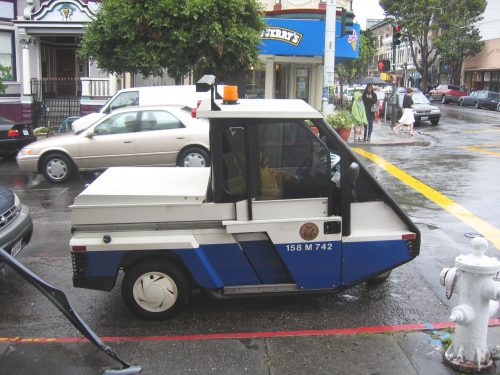
The dreaded parking enforcement Interceptors! Source: Wikipedia

John explained that the parking spots near his home only allow two hour parking.But he had figured out that you only get caught exceeding that if the parkingenforcement officers see your car in the same spot for more than two hours. If hecould somehow know when a meter maid’s Interceptor drives by, he would have atwo hour heads-up before he had to move his vehicle.

Here’s how the Raspberry Pi comes into play:

“I used a Raspberry Pi with the Camera Module and OpenCV as amotion detector,” Naulty explains, rattling off the long list of tech thatwent into creating Meter Maid Monitor. “The camera monitors trafficand takes photos. The pictures are uploaded to AWS, where an EC2instance running the TensorFlow supervised learning platform doesthe image recognition. I’ve trained it to recognise meter maid cars.Finally, if there’s more than a 75 percent chance of the car being ameter maid, it sends me a text message using Twilio, so I can movemy car before I get a ticket”

If this all feels a bit nefarious and subversive to you, hopefully you can at the veryleast appreciate John’s clever use of technology. Either way, if you want to see hiscode for the Raspberry Pi and for the AWS instance, head on over to his GitHubrepo for this project. If you have any other smart ideas for using Raspberry Pi tomake city parking more bearable, let’s hear ’em!