https://www.macrumors.com/2018/01/26/everything-new-in-watchos-4-3/

Everything New in watchOS 4.3: iPhone Music Controls, Portrait Orientation Nightstand Mode and More

Apple yesterday seeded the first beta of watchOS 4.3 to developers, and there are some great new features that many Apple Watch owners have been requesting for quite some time.

We’ve outlined all of the changes you’ll find in the watchOS 4.3 update in the video and the post below.

Subscribe to the MacRumors YouTube channel for more videos.
First and foremost, watchOS 4.3 once again allows Apple Watch owners to access their Apple Music Library for iPhone, a feature that was removed in watchOS 4.

With watchOS 4.3, there’s a new “On iPhone” section in the Music app that lets you access your playlists, albums, songs, and artists. Prior to this update, you could access your music library, but only when playing music on the watch itself.

When playing music on the iPhone, you were only able to use the Now Playing feature to skip tracks — there was no library access for choosing songs to play on the iPhone from the Apple Watch. Apple Watch owners have been complaining about the removal of iPhone music controls on Apple Watch since watchOS 4 debuted, so this should be a welcome change for many people.

Along with music controls, watchOS 4.3 adds your daily Activity information to the Siri watch face, so you can see your current progress at a glance without needing to open up the Activity app, and it introduces a new charging animation when the watch is placed on a charging puck.

The final new feature in watchOS 4.3 is Nightstand Mode while the Apple Watch is in portrait orientation. Since Nightstand Mode was first introduced, using it has required putting the Apple Watch in landscape orientation on its side. That’s no longer necessary — you can now use Nightstand mode in any orientation.

Apple doesn’t make watchOS betas available to its public beta testers because there’s no way to restore an Apple Watch to an older operating system, so the watchOS 4.3 update will be limited to developers until its public launch.

We’ll likely see watchOS 4.3 in the spring alongside iOS 11.3macOS 10.13.4, and tvOS 11.3.

http://www.kurzweilai.net/the-doomsday-clock-is-now-two-minutes-before-midnight

The Doomsday Clock is now two minutes before midnight
Scientists move clock ahead 30 seconds, closest to midnight since 1953
January 25, 2018

(credit: Bulletin of the Atomic Scientists)

Citing growing nuclear risks and unchecked climate dangers, the Doomsday Clock — the symbolic point of annihilation — is now two minutes to midnight, the closest the Clock has been since 1953 at the height of the Cold War, according to a statement today (Jan. 25) by the Bulletin of the Atomic Scientists.

“In 2017, world leaders failed to respond effectively to the looming threats of nuclear war and climate change, making the world security situation more dangerous than it was a year ago — and as dangerous as it has been since World War II,” according to the Atomic Scientists’ Science and Security Board in consultation with the Board of Sponsors, which includes 15 Nobel Laureates.

“This is a dangerous time, but the danger is of our own making. Humankind has invented the implements of apocalypse; so can it invent the methods of controlling and eventually eliminating them. This year, leaders and citizens of the world can move the Doomsday Clock and the world away from the metaphorical midnight of global catastrophe by taking common-sense action.” — Lawrence Krauss, director of the Origins Project at Arizona State University, Foundation Professor at School of Earth and Space Exploration and Physics Department, Arizona State University, and chair, Bulletin of the Atomic Scientists’ Board of Sponsors.

The increased risks driving the decision to move the clock include:

Nuclear. Hyperbolic rhetoric and provocative actions from North Korea and the U.S. have increased the possibility of nuclear war by accident or miscalculation. These include U.S.-Russian military entanglements, South China Sea tensions, escalating rhetoric between Pakistan and India, uncertainty about continued U.S. support for the Iran nuclear deal.

Decline of U.S. leadership and a related demise of diplomacy under the Trump Administration. “In 2017, the United States backed away from its longstanding leadership role in the world, reducing its commitment to seek common ground and undermining the overall effort toward solving pressing global governance challenges. Neither allies nor adversaries have been able to reliably predict U.S. actions or understand when U.S. pronouncements are real and when they are mere rhetoric. International diplomacy has been reduced to name-calling, giving it a surrealistic sense of unreality that makes the world security situation ever more threatening.”

Climate change. “The nations of the world will have to significantly decrease their greenhouse gas emissions to keep climate risks manageable, and so far, the global response has fallen far short of meeting this challenge.”

How to #RewindtheDoomsdayClock

According to Bulletin of the Atomic Scientists:

* U.S. President Donald Trump should refrain from provocative rhetoric regarding North Korea, recognizing the impossibility of predicting North Korean reactions. The U.S. and North Korean governments should open multiple channels of communication.

* The world community should pursue, as a short-term goal, the cessation of North Korea’s nuclear weapon and ballistic missile tests. North Korea is the only country to violate the norm against nuclear testing in 20 years.

* The Trump administration should abide by the terms of the Joint Comprehensive Plan of Action for Iran’s nuclear program unless credible evidence emerges that Iran is not complying with the agreement or Iran agrees to an alternative approach that meets U.S. national security needs.

* The United States and Russia should discuss and adopt measures to prevent peacetime military incidents along the borders of NATO.

* U.S. and Russian leaders should return to the negotiating table to resolve differences over the INF treaty, to seek further reductions in nuclear arms, to discuss a lowering of the alert status of the nuclear arsenals of both countries, to limit nuclear modernization programs that threaten to create a new nuclear arms race, and to ensure that new tactical or low-yield nuclear weapons are not built, and existing tactical weapons are never used on the battlefield.

* U.S. citizens should demand, in all legal ways, climate action from their government. Climate change is a real and serious threat to humanity.

* Governments around the world should redouble their efforts to reduce greenhouse gas emissions so they go well beyond the initial, inadequate pledges under the Paris Agreement.

* The international community should establish new protocols to discourage and penalize the misuse of information technology to undermine public trust in political institutions, in the media, in science, and in the existence of objective reality itself.

Worldwide deployments of nuclear weapons, 2017

“As of mid-2017, there are nearly 15,000 nuclear weapons in the world, located at some 107 sites in 14 countries. Roughly, 9400 of these weapons are in military arsenals; the remaining weapons are retired and awaiting dismantlement. Nearly 4000 are operationally available, and some 1800 are on high alert and ready for use on short notice.

“By far, the largest concentrations of nuclear weapons reside in Russia and the United States, which possess 93 percent of the total global inventory. In addition to the seven other countries with nuclear weapon stockpiles (Britain, France, China, Israel, India, Pakistan, and North Korea), five nonnuclear NATO allies (Belgium, Germany, Italy, the Netherlands, and Turkey) host about 150 US nuclear bombs at six air bases.”

— Hans M. Kristensen & Robert S. Norris, Worldwide deployments of nuclear weapons, Bulletin of the Atomic Scientists 2017. Pages 289-297 | Published online: 31 Aug 2017.

Topics: Survival/Defense

http://science.sciencemag.org/content/359/6374/398.full

Investigating the afterlife

Science  26 Jan 2018:
Vol. 359, Issue 6374, pp. 398
DOI: 10.1126/science.aar5147

Awareness of one’s mortality is universal for human beings. Its conceptualization often starts at a very young age, as preschoolers observe and note the differences between alive and dead organisms. Between the ages of 7 and 10, children come to understand that death is permanent and irreversible, which often leads to anxiety or a fear of death. Despite a growing ability to rationalize, this fear persists in adults.

Various cultural inventions aim to remedy this disturbing emotional reaction. Each transcendental explanation of what happens when we die is inevitably followed by an additional mythology that provides a cognitive reinforcement, resulting in a strong, coherent set of beliefs.

In his new book, Heavens on Earth, Michael Shermer aims to deconstruct systems of irrational beliefs. In particular, he provides analysis of three concepts: The first is a belief in immortality or in an afterlife. Sometimes this belief relates not to an individual but to the preservation of a species. The second is a belief in a utopia where a better version of one’s self lives peacefully among peers. The third is a belief that one belongs to a group that has special insight into the nature of life after death. As Shermer shows, prognosticators of both religious and secular utopias can fall victim to this way of thinking.

It is not difficult to imagine the evolutionary reasons behind these beliefs: A fear of death is a rationale for a belief in immortality; a desire for a well-functioning society provides foundations for utopias; a craving for meaning pushes people to perceive themselves as particularly important. Cognitive shortcuts that simplify complexity, such as confirmation bias (a tendency to search for information that is consistent with preexisting beliefs) or patternicity (a tendency to search for patterns in both meaningful information and meaningless noise), help to establish and reinforce this mode of thinking.

Throughout the book, Shermer investigates a multitude of examples, from religious heavens and spiritual traditions that search for universal consciousness and reincarnation to science-driven quests to create humans who will—in one form or another—live forever. He challenges each, in turn, using techniques from his skeptic’s toolbox, reminding us, for example, that according to scientific methodology, a preponderance of anecdotes is not evidence for a preferred belief.

A skeptic, Shermer shows, must also be sensitive to the conceptual structure of the language used in argumentation. Techno-optimist theories based in science are a particularly rich area for this type of consideration. Shermer analyzes both trans-humanists, who focus on preserving the physical body, and singularitarians, who, inspired by the rapid proliferation of information and computing technologies, believe that the self is simply a pattern of information that we will eventually be able to move from the biological brain to an artificial one.

Conceptual inconsistencies within these frameworks are frequent. For instance, if we want to combat aging, what do we define “aging” to mean? More fundamentally, how do we define self-identity? Shall I insist that it is inseparable from my body? If I upload my mind to a computer, how shall I conceive of my original self versus the copy?

Shermer also touches on the ways that strong beliefs can be used in various, not always commendable, manners. True, strong ideologies can motivate visionaries like Ray Kurzweil, Peter Thiel, or Elon Musk. But beliefs can also be used to encourage people to commit atrocities, as the Nazis did with the idea of racial supremacy in pre-World War II Germany and ISIS does today, promising its martyrs a paradisiacal life after their suicidal sacrifice.

Even if we can rationally reject each irrational argument in favor of an afterlife, Shermer acknowledges that belief will persist and that this makes it real, in a way. “Heavens above may or may not be real, but heavens on earth are, at least in the minds of those who believe in them,” he writes. “In that sense, the empyrean realm of gods and heavens that resides in the brains of believers is as real as anything in the terrestrial kingdom.”

We all seek to live a meaningful and purpose-driven life. But how do we do so without invoking an afterlife? “Through recognition of our uniqueness, through our gratitude for having the chance to live, through the love of others and others’ love for us, and through engagement with the world with courage and integrity,” writes Shermer. We can find “heavens on Earth,” he argues, right here in the wonders of our own universe.

https://www.macrumors.com/2018/01/24/ios-11-3-tvos-11-3-airplay-2/

iOS 11.3 and tvOS 11.3 Introduce Support for AirPlay 2

The new developer betas of iOS 11.3 and tvOS 11.3 introduce AirPlay 2 features, allowing for multi-room music playback on Apple TVs using your iPhone.

With iOS 11.3 installed on an iOS device and tvOS 11.3 installed on one or more fourth or fifth-generation Apple TVs, you can use AirPlay 2 to stream music to multiple devices at the same time.


For example, with two Apple TVs running tvOS 11.3 set up in different rooms in the house, you can use the iPhone to play the same song on both, successfully using the multi-room audio feature of AirPlay 2.

Installing tvOS 11.3 prompts you to add your Apple TV to your HomeKit setup, and you’ll be asked to choose a room for it during the setup process. After that’s done, the Apple TV is displayed as an available device in the Home app. You can’t do much with Apple TV in the Home app, but you can play and pause music.


Announced as part of iOS 11 back in June when the operating system was first introduced, AirPlay 2 introduces features like multi-room audio playback from iOS devices and improved buffering.

AirPlay 2 functionality is limited to devices running the current iOS 11.3 and tvOS 11.3 developer betas, so it basically only works with the Apple TV right now. AirPlay 2 has not yet officially been released by Apple, but in the future, third-party speakers and Apple’s own HomePod will support the feature. When AirPlay 2 compatible devices are widely available, you will be able to use AirPlay 2 to control all of the different speakers and devices located throughout your home, for a full multi-room audio experience.

HomePod, which will be available starting on February 9, will not ship with multi-room audio support. It’s possible multi-room HomePod playback will be available once iOS 11.3 launches to the public, however, as iOS 11.3 is not set to be released until the spring.

Apple hasn’t provided specific details on when the HomePod will be updated with multi-room support beyond stating that it will come in a later update, and AirPlay 2 was missing from the detailed rundown of iOS 11.3 features that Apple shared this morning ahead of the beta’s release, so Apple’s plans aren’t quite clear.

At the current time, AirPlay 2 on iOS 11.3 and tvOS 11.3 is rather buggy and the implementation is clearly incomplete, but Apple will likely make significant improvements over the iOS 11.3 beta testing period.

https://www.neowin.net/news/microsoft-is-now-selling-the-commercial-surface-laptop-with-windows-10-pro

Microsoft is now selling the Commercial Surface Laptop with Windows 10 Pro

At an event in May, Microsoft announced Windows 10 S, a version of the OS aimed at the educational market that only allows users to run apps that come from the Store. The flagship device for the new SKU of Windows 10 was, and still is, the Surface Laptop. The device came with an offer for a free upgrade switch to Windows 10 Pro, an offer that has since been extended to March.

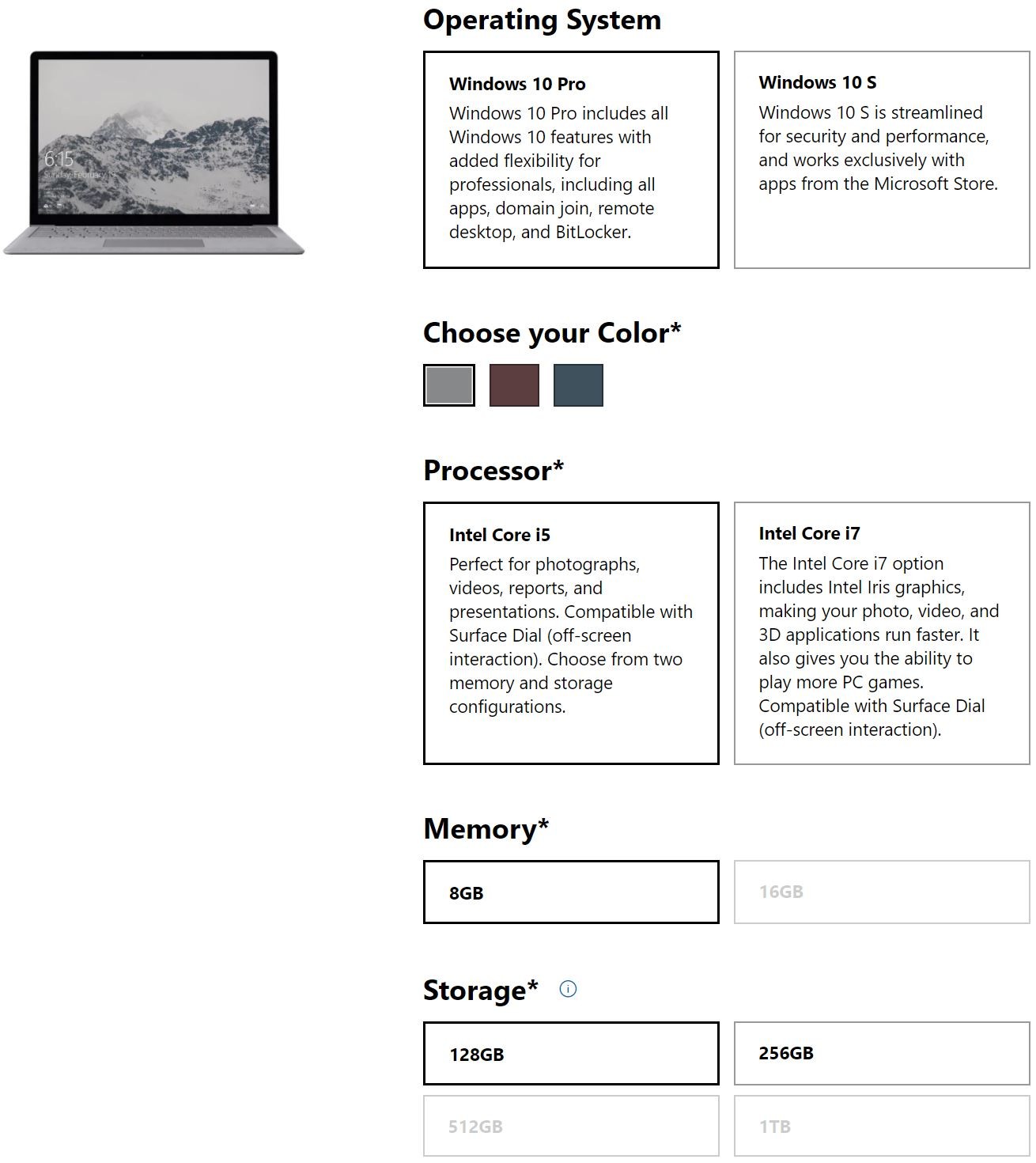
Microsoft updated its Store listing for the Commercial Surface Laptop today, where you can actually buy one that ships with Windows 10 Pro now. While anyone should be able to buy the Commercial model, don’t expect this new variant to be available as a consumer model, as this change likely reflects the needs of organizations that need a large number of devices to run Pro, but without the hassle of having to upgrade each one.

What’s also interesting is that there are more color options for Windows 10 Pro than for 10 S. Up until today, the Commercial Surface Laptop only came in Platinum, but now Burgundy and Cobalt Blue are available. However, you can only get these colors if you get it shipped with Windows 10 Pro.

Microsoft is charging a premium for Windows 10 Pro though. The base model is a configuration that comes with a Core i5, 8GB RAM, and 128GB SSD (not available in a consumer SKU) costs $1,099 with Windows 10 S, or $1,199 with Windows 10 Pro. The rest of the models are marked up by either $49 or $50, which is how much a switch from Windows 10 S to Pro should cost.

The decision between Windows 10 S and Pro purely comes down to the needs of the user. The two SKUs really aren’t that different, with the most notable change being that users can’t run legacy Win32 apps on 10 S. Other Pro features, like Hyper-V, still work.

The Burgundy and Cobalt Blue flavors of the Laptop are currently listed as out of stock, likely because the listings are brand new and Microsoft hasn’t actually started selling them. If you want to check out the Commercial Surface Laptop, you can find it here.

https://techcrunch.com/2018/01/25/apple-could-be-redesigning-the-ibooks-app-soon/

Apple could be redesigning the iBooks app

As AppleInsider first spotted, the first beta of iOS 11.3 includes a subtle change. iBooks is now called Books. And Mark Gurman thinks it could be the sign that there will be bigger changes with Apple’s ebook reading app.

According to Bloomberg, Apple is working on a new design for the iBooks app on the iPhone and iPad. It will feature a simpler interface with a new section called ‘Reading Now’. Instead of having to scroll through your library to find the book you’re currently reading, this section will highlight your current book.

Audio books could also get a dedicated tab. And this is probably the biggest and most telling change. Apple has been selling audio books in the iTunes Store for years. But it doesn’t really make sense that you have to open the Music app to listen to audio books.

That’s why Apple could move audio books to the iBooks Store. Talking about the store, Bloomberg also says that Apple is working on a redesign to make it look like the new App Store design.

Books could be the app name on your home screen. But maybe Apple is going to call it Apple Books so that it follows the same naming convention as Apple Music and Apple TV.

Bloomberg thinks this is all about getting back into a fight with Amazon regarding ebooks. But I think Apple’s reasoning is much simpler here.

First, iBooks needs a redesign. Second, Apple is slowly unbundling iTunes so that iTunes can fade into the abyss. So the company could be removing audio books from the iTunes Store. Third, it sounds like a good opportunity to rename the service to Apple Books.


https://www.theverge.com/2018/1/24/16927922/bo-play-beoplay-m3-wireless-speaker-airplay-cast-review

B&O Play Beoplay M3 review

B&O Play Beoplay M3

Late last year, B&O Play announced the Beoplay M3, an addition to its home wireless speaker lineup that’s more approachable in both size and price compared to the Beoplay M5. In fact, the $299.95 M3 is the least expensive home speaker in B&O Play’s portfolio, and appears to be specifically targeted to the person looking at a Sonos system for their home. I was intrigued: could this be the long-awaited Sonos alternative?

My go-to recommendation for a wireless home speaker over the past couple of years has been Sonos’ excellent Play:1, and later, its replacement, the new Sonos One. The Sonos products combine an accessible price with great sound quality, rock solid wireless performance, and compatibility with virtually any streaming music service you might use. They also grant you entry into the Sonos platform, which easily handles expansion across multiple rooms and larger speakers. There have been other options in this space, but none have quite been able to match Sonos in terms of usability and quality.

The Beoplay M3 might be the strongest contender yet. It has a number of good things going for it, including easy setup, loud output, and stylish design. It’s also compatible with Apple AirPlay, Google Cast, and Bluetooth connections, so if there’s something you want to play through it, you probably can. But, unfortunately, nothing about the M3 justifies its significant cost premium over the Sonos, and in a number of important ways, the Sonos provides the better experience.

B&O Play products, whether they are speakers or headphones, tend to have good audio quality that’s pleasing to almost anyone that might listen to them. The M3 is no exception: it’s a loud little speaker that punches above its size class. Much like the similarly-sized Sonos One, the M3 has one 0.75-inch tweeter and one 3.75-inch woofer, each driven by their own 40-watt Class D amplifier. The M3 can easily fill a room with sound, yet is small enough to hide away on a kitchen counter, in a corner of your living room, or even on your nightstand.

The other defining characteristic of B&O Play products is that you’re likely to pay a price premium for their design and aesthetics. This is often something I feel is worth ponying up for — the H9i headphones are a gorgeous piece of kit that aren’t matched by lesser headphones. But the M3’s design is a little too plain to warrant its premium, and in the case of my black review unit, it’s downright boring. An all-black Sonos One has a sleek stealthy vibe that the M3 doesn’t pull off. But if you’re looking for something dark to hide in a bookshelf, it can do the trick.

Unlike, the M5, the M3 is a directional speaker, and doesn’t radiate sound in all directions — it just points forward. But it’s not so directional that moving around the room causes the sound to dramatically change, you can basically plop it on a shelf and hear quality music from anywhere you sit.

At medium volumes, the M3 has a warm, rich sound that belies its fully digital system and might even convince you that you’re listening to an older analog sound system. Unsurprisingly, the M3 doesn’t provide chest-thumping bass (as opposed to the larger Beoplay M5, which has no problem putting out a ton of bass), but it does reproduce low-end sounds that you aren’t likely to hear on a less expensive speaker.

At full volume, the M3 can almost be uncomfortable to listen to, especially if you’re in a small room. It does not distort or break up no matter how hard you crank it. It does, however, have an audible hiss that’s really hard to ignore once you hear it.

And at low volumes the sound can be overwhelmed by the bass. This makes the M3 less than ideal for podcasts or other vocal-dominant audio sources. It’s clear that the M3 performs its best in the middle of its volume range, from about 30 percent up to 70 percent, but many people might find even that to be too loud for prolonged listening or when you just want something on in the background.

For comparison, the Sonos One, and its predecessor, the Play:1, do not have these issues — they’re easy to listen to at low volumes and when the knob is cranked up to 11.

The M3 is primarily a wireless speaker, but you can plug a wired audio source into the 3.5mm input hidden on the speaker’s underside. For wirelessly controlling the speaker, you can use Apple AirPlay, Google Cast, or Bluetooth, allowing you to basically play any kind of audio from your mobile device on the M3. The only thing lacking is Spotify Connect, which means that it’s difficult to use a Windows PC to send Spotify audio to the M3 without directly pairing it over Bluetooth. (Spotify’s mobile apps support the Google Cast protocol, so it works just fine on an iOS or Android phone or tablet.)

You can use the Beoplay mobile app to set up the speaker on your Wi-Fi network and configure it into a multiroom setup with other Beoplay speakers, but it’s not possible to pair two M3 speakers in a stereo configuration like you can do with Sonos speakers. Beoplay’s multiroom options appear to be quite limited, but as I only had one M3 to test, I was unable to put them through their paces.

The app also lets you configure the speaker’s tuning based on its placement (free standing, in a corner, or against a wall), but I didn’t notice much of a difference between the settings. There is also Beoplay’s ToneTouch feature, which eschews a traditional equalizer control for a four-zone system that lets you bias the speaker towards “Warm,” “Excited,” “Relaxed,” or “Bright” sound profiles. The differences between the profiles are subtle, as are the presets for Party, Podcast, Lounge, and Clear. I’d suspect most people buying the M3 will never bother to mess with these settings and they will be no worse off if they don’t.

The big, obvious thing that the M3 is lacking is any sort of integrated voice control. This isn’t a speaker you can ask to play a specific song, album, artist, or playlist, nor can you tell it to raise or lower the volume with your voice. I was also unable to get a Google Home to play music through the M3, even though it is a Cast-enabled device. All of your interactions are through your mobile phone or a small volume rocker on the back of the speaker that appears to be purposefully hidden away.

B&O Play Beoplay M3 next to Sonos Play:1

That puts the M3 at a significant disadvantage compared to the Sonos One, which has built-in microphones and can hear voice commands for playing music, adjusting volume, or accessing Amazon’s Alexa voice assistant (with Google Assistant promised to come in the near future).

Despite its pleasing sound signature, ample volume, and attractive design, it’s tough to recommend the Beoplay M3 over the Sonos One, which costs $100 less and has better multiroom support (including stereo pairing options), better audio quality no matter what volume you play it at, and a built-in voice assistant. That means the M3 is much like other B&O Play products in another important respect: you’re paying a hefty price premium for its design. Which, in this case, isn’t worth it.

Photography by Dan Seifert / The Verge

6.5VERGE SCORE

GOOD STUFF

  • Compact design
  • Loud output without distortion
  • Compatible with AirPlay, Google Cast, Bluetooth, and wired sources

BAD STUFF

  • Doesn’t sound great at extreme high or low volumes
  • No voice control options at all
  • Expensive price tag