Apple Watch launching this fall with larger display, says analyst
Apple plans to add a “more trendy” form factor design to the Apple Watch Series 4, says a usually reliable analyst.
Apple Watch Series 3 LTE (Image: Sarah Tew/CNET)
Apple is planning an update to the Apple Watch for this fall that will include a roughly 15 percent larger display and improved battery life, according to Ming-Chi Kuo of KGI Securities.
The usually reliable analyst said in a note to investors Apple will also add enhanced health monitoring to the new Apple Watch — presumably set to be labeled as Apple Watch Series 4.
The analyst believes a combination of a ‘more trendy form factor design’, the addition of new sensors beyond heart rate monitoring, and lowering of prices of older models will drive Apple Watch sales to new records
Apple will increase Apple Watch sales by 30 percent in 2018, with 22 to 24 million unit sold, Kuo predicts. The analyst didn’t detail a specific launch timeline for the new wearable.
Apple Education Event went quite good taking into account the new additions that the company announced along with a new platform – ClassKit. Apart from the announcement of the 9.7-inch iPad for students as well as the general public, Apple also showcased several apps. Now it is revealed that Apple is bringing the Classroom app to the Mac and a ClassKit API. So let’s dive in to see some more details in the scenario as well as the availability of ClassKit.
ClassKit API Will Be Available In iOS 11.4, Classroom For Mac on the Way!
Apple announced the new Schoolwork app, new versions of its iWork apps as well as the Apple Teacher platform for teachers. ClassKit is a new API from Apple which will integrate apps. The framework will basically allow educators to integrate with the Schoolwork app.
The ClassKit platform will be available in iOS 11.4:
The ClassKit framework, coming in iOS 11.4, works with a powerful new iPad app called Schoolwork that helps teachers and students keep track of assignments and progress.
With ClassKit, you can help teachers easily discover specific learning activities in your app, take students directly to the right activity with a single tap, and securely and privately share progress data to help teachers personalize instruction.
Apart from this, Apple is also porting its Classroom app to the Mac. Since Macs play an important role in the education system, it would be viable for teachers to make use of the Classroom app.
The new Apple Teacher program is a professional learning program for teachers which will allow them to take advantage of the new applications and implement them. It’s good to see that Apple is working on improving the educators as well as students. Through the implied methods and utilities, productivity for all parties will be enhanced.
Logitech’s new rugged case for the iPad has its own smart keyboard connector
Logitech’s Rugged Combo 2 keyboard case for the iPad is not likely to be something you’ll want to buy. It’s just too big for most. It’s very, very rugged, surrounding the device in a huge plastic block that feels like it could protect the glass inside from nearly anything. (Logitech says it’s good for up to a four-foot drop, but I bet it could handle more.) You won’t really be able to buy it anyway; it’s designed for the education market.
But I am here to tell you that it is fascinating. The spill-proof keyboard doesn’t connect via Bluetooth, but instead via a custom smart connector Logitech developed, which passes through to the Lightning port inside the case. The keyboard is therefore removable (it attaches by a strong magnet) and can be replaced with a simple cover.
The thing stands up via a kickstand on the back. That means, when the keyboard is attached, it basically looks like a big, blocky Surface Pro.
Apple says teachers asked for a non-Bluetooth keyboard option for classrooms, so they wouldn’t have to muck around with pairing them to iPads. That makes sense! It makes so much sense that you sort of wish the iPad itself had a smart keyboard connector.
The case itself is very difficult to take off (we couldn’t manage to do it), which is by design: if kids never take it out of the case, they’ll be less likely to break their iPads. It also has a pass-through Lightning connector. Perhaps the most pragmatic touch is a little clear window underneath the Surface-esque kickstand. That’s there because schools usually put stickers on the back of the iPad to identify them.
Schools will be able to buy the Rugged Combo 2 case this summer.
Apple Announces ‘Everyone Can Create’ Curriculum, Schoolwork App, Classroom for Mac
Apple today announced a new free curriculum called ‘Everyone Can Create’, a new app called Schoolwork, and Classroom for Mac.
“Creativity sparks a deeper level of engagement in students, and we’re excited to help teachers bring out that creativity in the classroom,” said Philip Schiller, Apple’s senior vice president of Worldwide Marketing. “When you combine the power of iPad, the creativity of Apple Pencil, over a million iPad apps in the App Store, the rich curriculum in Everyone Can Code and Everyone Can Create, and unique Classroom and Schoolwork apps that support students and help schools manage technology in the classroom, we believe we can amplify learning and creativity in a way that only Apple can.”
New Curriculum
Everyone Can Create is a range of free learning resources and teaching guides that help teachers easily weave drawing, music, filmmaking or photography into any lesson, topic or assignment. The curriculum gives students different ways to express themselves and helps them to discover and develop new skills.
Developed in collaboration with educators and creative professionals, Everyone Can Create includes teacher and student guides, lessons, ideas and examples to help teachers bring creativity and new communication skills into their existing subjects like English, math, science and history. For example, students can use the built-in camera in iPad to learn about fractals or they can use Apple Pencil and apps like Tayasui Sketches to learn about symmetry.
Beginning later this spring, Apple Stores will begin teaching Everyone Can Create as part of their regular Today at Apple sessions for educators. Apple’s 501 stores in 21 countries have already taught nearly 5,000 hands-on Teacher Tuesday sessions on topics including coding and app design, movie and music creation, and presentations or spreadsheets.
Schoolwork
Schoolwork is a new app that helps teachers create assignments, view student progress and bring the power of apps to the classroom in exciting new ways. Schoolwork features Handouts, an easy way to create and send assignments with almost any type of content, from web links to PDFs and documents.
With Schoolwork, teachers can take advantage of the power and creativity of apps available on iPad. They can easily assign a specific activity within an app and direct their students directly to the specific point within the app. Popular education apps like Nearpod, Tynker and Kahoot are already integrating support for Schoolwork.
There is a rich ecosystem of education apps available for iPad today. Developers can now easily update their apps to take advantage of Schoolwork by utilizing ClassKit, a new education framework, to make it easy to assign activities and view student progress.
Schoolwork and apps that take advantage of it give teachers new insight into how their students are performing, helping them tailor their teaching to the needs and potential of individual students. With Schoolwork, teachers have a snapshot of each student’s overall class performance and can check on students’ app activities and progress on their assignments.
Classroom for Mac
Classroom, a powerful teaching assistant that helps teachers manage student iPads and guide students through lessons, keep them on track and share work, is now coming to the Mac.
With Classroom, teachers can easily launch apps, books and webpages on all student devices at once or send and receive documents. Classroom lets teachers view student screens during class to help students stay focused, assign shared iPads to specific students for class and even reset a student’s password. The Mac version of the app will be available in beta starting in June.
200GB of Free iCloud Storage
iCloud safely stores students’ documents and creative projects, keeping them up to date, secure and accessible from any device. And starting today, any teacher or student with a Managed Apple ID has access to 200GB of free iCloud storage.
Google launches more realistic text-to-speech service powered by DeepMind’s AI
OK Google, sing supercalifragilisticexpialidocious
Google is already using DeepMind’s tech to power the voice of Google Assistant. Photo by Dieter Bohn / The Verge
Google is launching a new AI voice synthesizer as part of its suite of machine learning cloud tools. The service, named Cloud Text-to-Speech, will be available for any developer or business that needs voice synthesis on tap, whether that’s for an app, website, or virtual assistant. But what’s particularly interesting about this news is that Cloud Text-to-Speech is powered by WaveNet, software created by Google’s UK-based AI subsidiary DeepMind.
This is significant for two reasons. First, ever since Google bought DeepMind in 2014, it’s been exploring ways to turn the company’s AI talent into tangible products. So far, this has meant using DeepMind’s algorithms to reduce electricity costs in Google’s data centers by 40 percent and DeepMind’s forays into health care. But, directly integrating WaveNet into its cloud service is arguably more significant, especially as Google tries to win cloud business away from Amazon and Microsoft, presenting its AI skills as its differentiating factor.
Second, DeepMind’s AI voice synthesis tech is some of the most advanced and realistic in the business. Most voice synthesizers (including Apple’s Siri) use what’s called concatenative synthesis, in which a program stores individual syllables — sounds such as “ba,” “sht,” and “oo” — and pieces them together on the fly to form words and sentences. This method has gotten pretty good over the years, but it still sounds stilted.
A GIF showing how DeepMind’s WaveNet model has improved over the years. Image: DeepMind
WaveNet, by comparison, uses machine learning to generate audio from scratch. It actually analyzes the waveforms from a huge database of human speech and re-creates them at a rate of 24,000 samples per second. The end result includes voices with subtleties like lip smacks and accents. When Google first unveiled WaveNet in 2016, it was far too computationally intensive to work outside of research environments, but it’s since been slimmed down significantly, showing a clear pipeline from research to product.
WaveNet was first integrated into Google Assistant last October (although only in Japanese and English) and is now available for select voices in Cloud Text-To-Speech. Google says the new service offers 32 different voices capable of speaking 12 languages, and users are able to customize factors like pitch and speed. So, be prepared for a wave of new, realistic computer voices to argue with and boss around. You can check out how WaveNet sounds for yourself below.
Here’s an industry-leading synthesized voice:
And here’s the same sentence from WaveNet:
Here’s another rival’s voice synthesizer, this time speaking Japanese:
Bitcoin 101: Cryptocurrency Classes Are Cropping Up at Area Colleges
Cryptocurrency has become a fundamental part of some finance course at DePaul University.
BY ALLY MAROTTI, CHICAGO TRIBUNE / MARCH 14, 20180
Lamont Black, standing at left, an assistant professor at DePaul University’s Driehaus College of Business, incorporates cryptocurrency into his teaching. (Nuccio DiNuzzo/Chicago Tribune/TNS)TNS
(TNS) — CHICAGO — At DePaul University, cryptocurrency has become a fundamental part of some finance courses.
Until recently, bitcoin came up only at the end of assistant professor Lamont Black’s undergraduate and graduate finance classes. It was the last day of class, “the fun day,” Black said, when they discussed the future of money and the possibilities of bitcoin and other cryptocurrencies. But things have changed.
Digital currency is now part of the classes’ discussions surrounding the definition of money, a core concept in courses that cover money, banking and capital markets. “My students are starting the class thinking about it now,” Black said.
Just as bitcoin has infiltrated conversations, headlines and financial exchanges, lessons on the digital currency and its underlying technology are springing up in university classrooms around Illinois. Some professors are altering lesson plans that before just grazed the subject, while some schools are adding entire bitcoin and blockchain classes to their course lists.
The price of bitcoin spiked at more than $19,000 late last year, sending many people on quests for fortune and a better understanding of the potential gold strike. The CBOE Futures Exchange in early December became the first traditional exchange to offer bitcoin futures trading, and contracts for the virtual currency debuted on the Chicago Mercantile Exchange shortly after.
Those milestones added legitimacy to bitcoin, and public interest has lingered even as its price has come down — it was trading at about $9,300 Thursday. Though many experts remain trepidatious about bitcoin’s long-term prospects, it’s becoming clear that knowledge of cryptocurrency and blockchain, the technology underlying digital currencies, could be vital for students’ future careers.
“It’s not so much about being ahead; it’s making sure that you’re not going to be behind,” said Sarit Markovich, an associate professor at Northwestern University’s Kellogg School of Management.
Blockchain technology can be applied to many fields, and many parties — from lone coders to financial institutions such as Northern Trust — are finding new ways to use it.
Blockchain is a ledger of cryptocurrency transactions. It’s decentralized and public, allowing people to keep track of the transactions, which are added to the blockchain in chronological order. The software is mostly used now to verify transactions, though it’s possible to code and insert other documents into the blockchain.
Markovich began discussing bitcoin and blockchain in a class on innovation in financial markets she developed five years ago. With a doctorate in economics and a degree in computer sciences, Markovich is enchanted by financial technology. But back then, the students didn’t share the fascination.
“It was hard for me to fill up the course,” she said. “Students were interested in typical traditional banking. They were like, ‘We don’t want to hear about that. … Tell us about mergers and acquisitions.’ ”
The switch flipped last year, and more than half the class wanted to know more about financial technology. She has students that have crafted independent studies around blockchain and cryptocurrency, and alumni have reached out.
Recently, Markovich got approval to build a coarse focused entirely on blockchain and cryptocurrency. The class would be for students in the Master of Business Administration program, and she hopes to offer it next school year.
Illinois Institute of Technology is set to offer its first class on blockchain this summer. The University of Illinois at Chicago doesn’t offer any full-fledged classes on cryptocurrency yet, but professor Gib Bassett, head of the finance department, is planning a panel discussion on bitcoin in his Chicago Exchanges MBA course later this month.
It’ll be the first time the course, which he has taught for a decade, will delve into bitcoin, and it was the students that sparked the change, Bassett said.
“They want to hear about bitcoin. Their parents have told them it’s a tulip bubble,” he said, referring to the tulip bulb market in 1600s Holland that bloomed dramatically, then crashed. “It’s crazy, it’s ridiculous, and their friends who invested three years ago are millionaires. … There’s clearly a generational component to this.”
For Johny Roumanidakis, a student in Black’s class at DePaul’s Driehaus College of Business, the technology driving bitcoin was a much more interesting final paper topic than the CME futures contracts his group first considered writing about.
Roumanidakis, 24, is set to graduate soon with a master’s in finance and plans to go work for his family’s Wheeling-based manufacturing business. Understanding blockchain and bitcoin isn’t a necessity quite yet, he said, but it was worth a look.
“We just wanted to see if we could wrap our heads around the technology and what drives the value behind it,” he said recently, just before class started. “It seems so controversial, and not many people understand it.”
A row over, two of Roumanidakis’ classmates were also getting their feet wet in a formal cryptocurrency education.
Dan Gordon, a fourth-year student in math and computer science, and Nick Ricciardella, a fifth-year student in accounting and finance, run two startups that deal with crowdfunding. They want to incorporate blockchain technology into their work, and the class is a good jumping off point, Ricciardella said.
Venezuela’s cryptocurrency is one of the worst investments ever
Students are captivated by the opportunity blockchain presents for involvement, said Andrew Miller, an assistant professor of electrical and computer engineering at University of Illinois at Urbana-Champaign.
Miller is preparing to teach a class on smart contracts, or computer programs that run on top of cryptocurrency. Miller has taught classes on the topic before, but interest is surging. Miller was uncertain his class would fit into students’ schedules, as it starts midsemester, but it filled up in hours. He increased capacity to 64 students, and it filled up again.
Participation in the traditional finance industry is barred by exams and certifications and typically can only be accessed through a financial institution, Miller said. Blockchain offers a lower barrier to entry. The community is active and strong, and computer science and engineering students are drawn to the opportunity to take part in it.
In addition to our standalone articles covering the latest Apple news and rumors at MacRumors, this Quick Takes column provides a bite-sized recap of other headlines about Apple and its competitors on weekdays.
Highlights
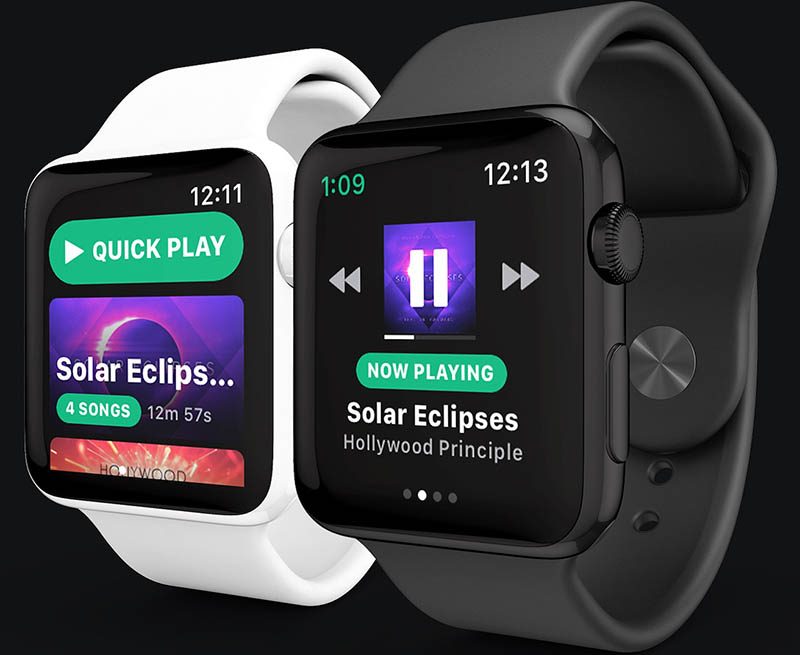
1. Spotify for Apple Watch to debut at WWDC? An anonymous and unverified tipster has informed MacRumors that Spotify will unveil an official Apple Watch app at WWDC2018 in June, based on personal involvement with the project.
Third-party Spotify app Snowy, which was never released, as its developer Andrew Chang was hired by Spotify to help build their official Apple Watch app
The app will supposedly be a lead example of Apple’s tentatively named StreamKit framework that will enable cellular Apple Watch models to receive push notifications from third-party apps like Facebook and Twitter, completely independent from a paired iPhone, on watchOS 5.
2. Are corporations that use Wikipedia giving back? Wikimedia’s revenue chief Lisa Gruwell expresses some concerns about seemingly one-sided relationships with companies that utilize its information.
“I don’t mean to sound like the Lorax here,” said Gruwell. “If you overuse something and you don’t give back to it, you can harm it. In the case of Alexa and Siri, our content gets intermediated. Wikipedia works because people can contribute to it, people can edit it. Also, once a year, when we ask people can donate. When they get their information not from us — but Wikipedia content through something like Siri or something like Alexa — that opportunity to either contribute back as an editor is broken, and that opportunity to contribute, to donate is also broken.”
Gruwell said Wikimedia’s relationship with Google is by far the best, both in terms of how much they contribute to the organization—more than $1 million in the 2017 fiscal year—and how the companies work together.
By comparison, Apple, Facebook, and Microsoft all contributed around $50,000 through their employee donation matching programs, while Amazon wasn’t named on Wikimedia’s list of donors in 2017 whatsoever.
An illustration of the size difference between traditional LEDs and Micro-LEDs via CNET
3. MicroLED is the first new screen tech in a decade. Can it beat OLED?CNET‘s Geoffrey Morrison provides a detailed explanation of the advantages and technology behind microLED displays. Apple is reportedly developing its own microLED displays, but we’re likely at least a few years away from seeing them in an Apple Watch or iPhone.
Tracking Parkinson’s symptoms with phone app could improve treatment
Researchers say the use of HopkinsPD and mPower by patients with Parkinson’s disease could help improve their own treatment and the way doctors overall handle patients with the disease.
Researchers monitored 129 individuals with Parkinson’s disease who remotely completed a series of tasks on a smartphone application to track the disease’s severity over time. Photo courtesy of University of Rochester Medical Center
March 26 (UPI) — Smartphone software and technology can accurately track the severity of the symptoms of Parkinson’s disease, leading to better drugs and treatment, according to a study.
Because Parkinson’s symptoms fluctuate widely on a daily basis, it makes it difficult to track the progression of the disease and adjust treatment, researchers said.
Data collected by the app, called HopkinsPD on Android and mPower on iPhone, allowed physicians to get an ongoing look at the patient’s condition instead of their visits once every several months.
“This study demonstrates that we can create both an objective measure of the progression of Parkinson’s and one that provides a richer picture of the daily lived experience of the disease,” co-author Dr. Ray Dorsey, a neurologist at the University of Rochester Medical Center, said in a press release.
HopkinsPD, which is available for smartphones that run the Android operating system, was originally developed by Dr. Max Little, an associate professor of Mathematics at Aston University in Britain. The iPhone version of the app, mPower, was later developed and released in 2015 by Little, Dorsey, and Sage Bionetworks.
For the study, published Monday in the Journal of American Medical Association’s Neurology, researchers monitored 129 individuals who remotely completed a series of tasks on HopkinsPD.
The tasks measured voice, finger tapping, gait, balance and reaction time. In all, the researchers analyzed 6,148 smartphone activity assessments from the participants.
The smartphone data was analyzed using a machine-learning algorithm to generate a mobile Parkinson disease score on scale of 1-100 with the highest number the greatest severity.
The researchers also conducted in-person visits with 58 individuals with Parkinson’s disease and controls in the clinic at URMC. They were asked to complete tasks on the app and were also seen by a neurologist and scored using a standard clinical evaluation tool for the disease.
The measurements collected by the app corresponded with what was observed by the physicians in the clinic.
After clinical trials, researchers hope the app could provide physicians and patients with a new way to monitor the disease.
“The ability to remotely monitor patients on a much more frequent basis, more accurately track the symptoms and progression of the disease, and monitor the impact of exercise, sleep, and medications and their side effects holds the potential to transform how we treat Parkinson’s disease,” said Dr. Christopher Tarolli, a neurologist at URMC and co-author of the study.
The Bip is the layman’s Apple Watch. At just $99 (around £68, AU$99), the Bip offers plenty of reason to invest, but none greater than its excellent battery life.
FOR
Amazing value
Stylish design
Excellent companion app
AGAINST
Auto-pause feature doesn’t work
Finicky UI
Light on supported workouts
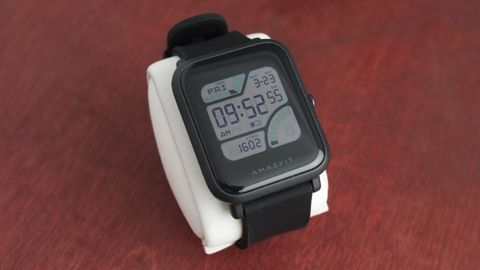
A good fitness tracker doesn’t need to look like the Apple Watch 3 in order to succeed, but it sure helps. The Amazfit Bip is a head-turning wearable that, even once you learn that it isn’t an Apple Watch, is still worth your attention.
For $99, the Amazfit Bip is a competent fitness tracker that is said to last longer than 30 days on a single charge. If you’re after a simple wearable that can push notifications from your smartphone, wake you up with a dedicated alarm, and track your workouts with built-in GPS, and more, the Bip makes a strong case for itself.
It’s not the most robust offering, and while it certainly can’t compete with the rich, interactive experience provided by watchOS 4 or Wear OS, you’ll likely be impressed with just how much $100 can get you.
Price and release date
The Amazfit Bip is out now in the US for $99 (£68, around AU$99) and is readily available on the company’s website, as well as well-traveled web destinations like Amazon.
As Amazfit is a brand within Huami, which supplies wearables under the Xiaomi umbrella, distribution across the globe is a bit murky. Despite the confusion, we’ve seen the Bip available on Amazon in both the UK and AU for a comparable price.
Design
We’ve already touched on the highlights of the Bip’s design. It looks like an Apple Watch. But upon closer inspection, a closer parallel might be something more like the Pebble Time.
Built with a matte-textured plastic chassis, the Bip transitions nicely into a slightly curved slate of Corning Gorilla Glass on top of its colored, pixelated display.
Moving around the tracker’s interface is done on the touchscreen, but waking it with the side button is mandatory. This design choice might seem like an annoyance, though it’s defensible when you realize how easy it can be to accidentally swipe the screen when you’re working out.
The inevitable comparison image, with Apple’s wearable on the left (just kidding)
Speaking more on the glossy button on its side, clicking it triggers an animation to wipe across the screen, indicating that you’ve woken it. The built-in settings allow you to designate a task that launches when you press and hold the button. Things like outdoor running, cycling, treadmill, or walking are the only options available now, but the list could grow in the future.
Once the Bip is unlocked, you have free access to slide your finger around, each direction venturing into different features. Sliding down reveals your connection status, battery level, and lets you toggle a “do not disturb” mode that disables notifications of any kind. Swiping up shows you various notifications that have come through your phone, like text messages or alerts for Twitter.
Nothing happens when you slide from the right side, but moving left reveals one of seven tiles, which can be rearranged in the Mi Fit companion app. Here, you’ll find the Status section, giving you a deep dive on steps taken, heart rate, distance traveled, etc. Some of the built-in watch faces (like the one prominently pictured in this review) reveal this info without any interaction whatsoever, so your use may vary for this view.
Following Status, there are pages dedicated to Activity, Weather, Alarm, Timer, Compass and Settings. We’ll drill into the Activity section later on, but each of the others are pretty predictable, though accessible, in their execution.
Depending on the wearable, judging performance differs quite a bit. If it’s an Apple Watch or a Wear OS smartwatch, we analyze its multitasking abilities to ensure that it delivers the rich experience to justify their high prices. But for something like the $99 Bip, expectations are a bit lower by comparison.
Even so, Amazfit isn’t shy about talking up this fitness tracker’s greatest asset, the battery life. Let’s get it out of the way: it delivers, and then some. In a market wherein the Samsung Gear Fit 2 can only last around three days (a still-impressive number) with a few GPS-reliant activities under its belt, the Bip is on a whole other level. Advertised to last past the 30-day mark under normal use with its tiny 190mAh battery, and up to 45 days with minimal notifications.
A look at the metrics gathered by Mi Fit and the elegant way that it displays them. While not always simple to find what you’re looking for, it’s all there if you look hard enough.
During our testing, which is near the end of its second week, we’ve only been able to knock it down to 36% battery remaining. This is after an extensive series of activities that utilized the built-in GPS and heart rate sensor several times per day, and being a non-stop siphon for our smartphone notifications.
Speaking of notifications, don’t expect rich, actionable notifications here. Unlike watchOS or Wear OS, you can’t do anything with texts, Twitter alerts or phone calls beyond reading the contents should you receive them. The Bip simply acts to remind you that you need to pick up your phone, then handle the rest there.
Moving onto the companion app, Mi Fit, that’s available for iOS and Android, it’s surprisingly good. It’s operated by Xiaomi and setting up the Bip is simple, though syncing with the app can take a little too long – about a minute at times, depending on when you last synced up with it. If the wearable were piping metrics to the app constantly, the battery would probably not be so amazing, so that’s a hit we’re willing to take here.
Otherwise, the app offers a robust look at what you’ve accomplished on the Bip, something that this wearable can’t do well on its own.
Sleep tracking and the overall daily activity views are among my favorite. As you can see, GPS signal is consistently wobbly, though it works well enough.
Fitness
The Amazfit Bip is built for those who want a wearable that can handle a lot, whether it consists of trudging through the elements with you on a tough run, or just staying alive for days on end without needing to be recharged. Thankfully, it excels at both of those things, though it isn’t the absolute best option if you’re looking for the most amount of activity support.
At a similar price point, affordable Wear OS watches equipped with Google Fit support more activities, as do options like the Fitbit Charge 2 and Samsung Gear Fit 2. From an activity tracking perspective, the Bip is sorely lacking in swim tracking capabilities despite its IP68 waterproof rating – something that the Samsung Gear FIt 2 Pro handles just about the best of any smart tracker that we’ve tested thus far.
The Amazfit Bip’s list of abilities could expand with future updates, but even as is for $99, it offers a decent amount of options. If you enjoy walking, biking or running outdoors, it comes with built-in GPS to map your progress, as well as accelerometer, barometer and compass, to track your pace and altitude. Otherwise, the only other trackable option is the treadmill.
We’ve tracked numerous outdoor workouts with the Bip, and in our experience, finding a GPS signal takes a bit of time – about 15-20 seconds based on the density of your location. The NYC skyscrapers could have elongated the search, whereas scanning in a rural area might have quickened things up a bit.
After each workout, we checked our progress on the Mi Fit app, which is one of the better tracking apps in terms of how far your can drill down into your metrics. While your GPS-tracked routes are way too difficult to find, it’s dizzying how many bits are tracked, and fun to see how Xiaomi spins them. When it comes to sleep tracking, which the Bip does well, I enjoy knowing that I get more deep sleep than 88% of others in my city, according to data gathered from anonymous users who use the app.
When it comes to picking out the right fitness tracker for your needs, it’s certainly a challenge. There are so many competing models to select between, but there’s one very positive change happening, as the Bip further makes obvious: high-end features like GPS and waterproofing are coming to cheaper devices.
The Bip certainly looks the part, and so long as your needs aren’t too steep from a fitness perspective, it should make you quite happy with accurate heart-rate sensing and sleep tracking.
Who’s it for?
The Amazfit Bip is for someone who wants a fitness tracker that looks like an Apple Watch, but doesn’t want to pay Apple prices. Digging beyond surface level observations, the Bip is an excellent match with those who appreciate amazing battery life and a ton of features loaded into a small, affordable package.
Should you buy it?
There are more appealing fitness trackers out there if you’re looking for a media and notification-savvy option. The Samsung Gear Fit 2 Pro, for example, offers a curved AMOLED display with support for offline Spotify streaming. Sure, the battery life pales in comparison, but if you have the money, bigger and better features lie just beyond the Bip’s asking price.
That being said, the Bip is nevertheless an impressive offering from a relatively unknown company. It’s smart, comfortable, capable, and best of all, it’s a cheap way to get into effective fitness tracking.
With the Greenland shark finally caught on video for the very first time, scientists and engineers are discussing the limitations of current marine monitoring technology. One significant advance comes from the CSAIL team at Massachusetts Institute of Technology (MIT): SoFi, the robotic fish.
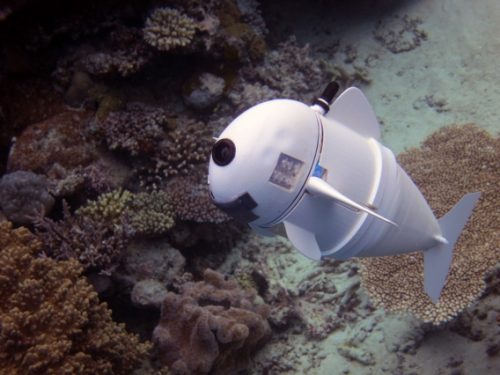
The untethered SoFi robot
Last week, the Computer Science and Artificial Intelligence Laboratory (CSAIL) team at MIT unveiled SoFi, “a soft robotic fish that can independently swim alongside real fish in the ocean.”
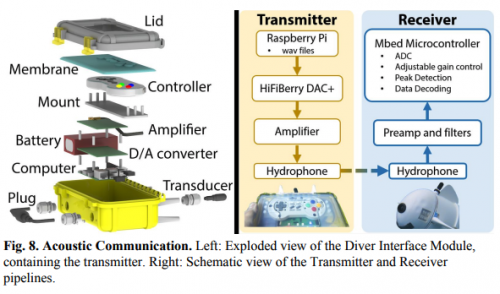
Directed by a Super Nintendo controller and acoustic signals, SoFi can dive untethered to a maximum of 18 feet for a total of 40 minutes. A Raspberry Pireceives input from the controller and amplifies the ultrasound signals for SoFi via a HiFiBerry. The controller, Raspberry Pi, and HiFiBerry are sealed within a waterproof, cast-moulded silicone membrane filled with non-conductive mineral oil, allowing for underwater equalisation.
The ultrasound signals, received by a modem within SoFi’s head, control everything from direction, tail oscillation, pitch, and depth to the onboard camera.
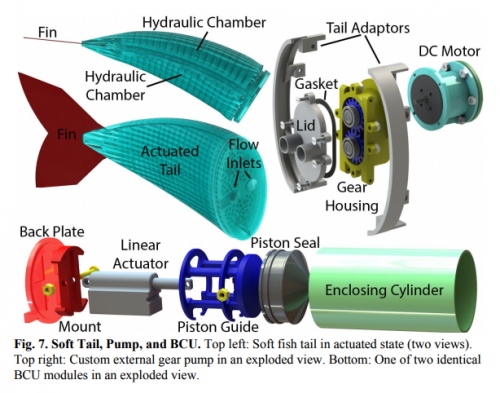
As explained on MIT’s news blog, “to make the robot swim, the motor pumps water into two balloon-like chambers in the fish’s tail that operate like a set of pistons in an engine. As one chamber expands, it bends and flexes to one side; when the actuators push water to the other channel, that one bends and flexes in the other direction.”
Ocean exploration
While we’ve seen many autonomous underwater vehicles (AUVs) using onboard Raspberry Pis, SoFi’s ability to roam untethered with a wireless waterproof controller is an exciting achievement.
“To our knowledge, this is the first robotic fish that can swim untethered in three dimensions for extended periods of time. We are excited about the possibility of being able to use a system like this to get closer to marine life than humans can get on their own.” – CSAIL PhD candidate Robert Katzschmann
As the MIT news post notes, SoFi’s simple, lightweight setup of a single camera, a motor, and a smartphone lithium polymer battery set it apart it from existing bulky AUVs that require large motors or support from boats.
For more in-depth information on SoFi and the onboard tech that controls it, find the CSAIL team’s paper here.


/cdn.vox-cdn.com/uploads/chorus_image/image/59171861/dbohn_170515_1686_0003.0.0.jpg)

 Third-party Spotify app Snowy, which was never released, as its developer Andrew Chang was hired by Spotify to help build their official Apple Watch app
 An illustration of the size difference between traditional LEDs and Micro-LEDs via CNET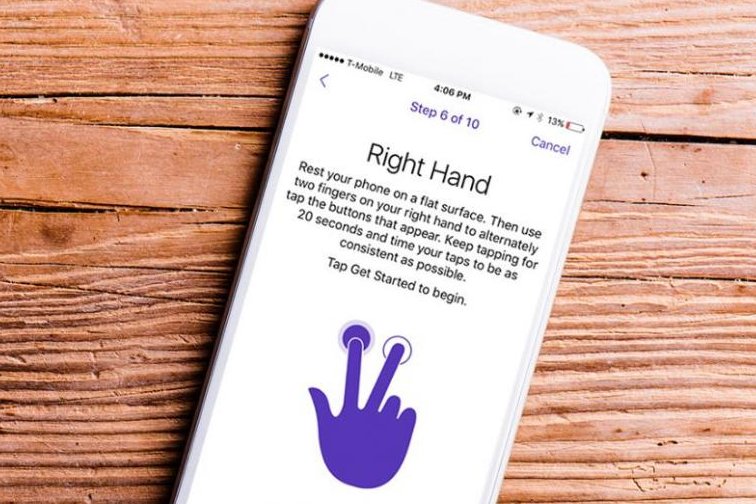

 Bruce's Blog
Logitech’s Rugged Combo 2 keyboard case for the iPad is not likely to be something you’ll want to buy. It’s just too big for most. It’s very, very rugged, surrounding the device in a huge plastic block that feels like it could protect the glass inside from nearly anything. (Logitech says it’s good for up to a four-foot drop, but I bet it could handle more.) You won’t really be able to buy it anyway; it’s designed for the education market.
But I am here to tell you that it is fascinating. The spill-proof keyboard doesn’t connect via Bluetooth, but instead via a custom smart connector Logitech developed, which passes through to the Lightning port inside the case. The keyboard is therefore removable (it attaches by a strong magnet) and can be replaced with a simple cover.
The thing stands up via a kickstand on the back. That means, when the keyboard is attached, it basically looks like a big, blocky Surface Pro.
Apple says teachers asked for a non-Bluetooth keyboard option for classrooms, so they wouldn’t have to muck around with pairing them to iPads. That makes sense! It makes so much sense that you sort of wish the iPad itself had a smart keyboard connector.
The case itself is very difficult to take off (we couldn’t manage to do it), which is by design: if kids never take it out of the case, they’ll be less likely to break their iPads. It also has a pass-through Lightning connector. Perhaps the most pragmatic touch is a little clear window underneath the Surface-esque kickstand. That’s there because schools usually put stickers on the back of the iPad to identify them.
Schools will be able to buy the Rugged Combo 2 case this summer.