The Raspberry Pi 4’s Most Interesting Quirks

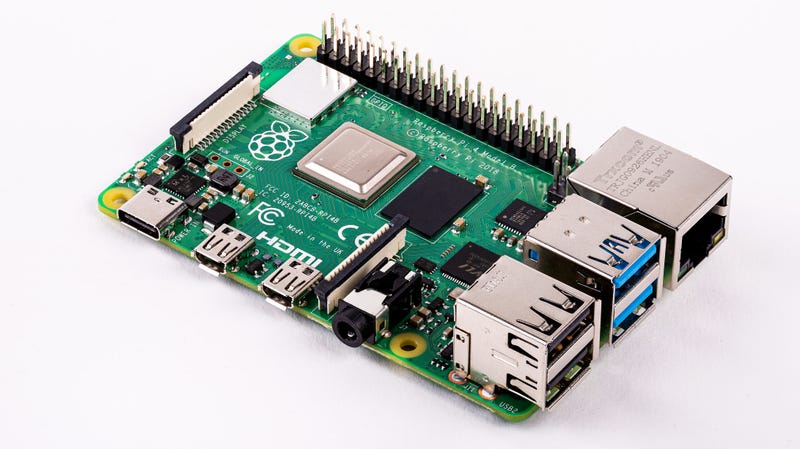
The Raspberry Pi 4 Model B is finally here, a $35 device that packs a lot of useful technology on a single circuit board you can hold in your hand. It might even be your next budget computer, assuming you can stomach some of the trade-offs enthusiasts have identified in their early testing.
This tiny tool that powers plenty of people’s clever hacking projects—including dorm room parties—gets a lot of great upgrades for its fourth-generation release. On paper, the specs are impressive: a 1.5 GHz, quad-core, ARM Cortex-A72 processor; up to 4GB of memory (bumping the price to $55); Gigabit Ethernet; wireless-ac; and the ability to push 60 frames per second to a 4K display (or 30 frames per second to two connected 4K displays).
It runs hot
If you’ve played with a Raspberry Pi previously—especially if you’ve been trying to crank as much performance out of it as possible—you’ve probably encountered some overheating issues. The Raspberry Pi 4 is no different; in fact, it’s hotter. As Gareth Halfacree writes for Medium:
“…after just a few minutes, the entire board feels warm to the touch. Start loading it heavily and that warmth becomes uncomfortable; while it’s still entirely possible to use the board without extra cooling, those looking to put one in a case will find active cooling is required to avoid thermal throttling.”
He’s taken some lovely thermal shots of the Raspberry Pi 4 and its 2018 predecessor, the Raspberry Pi 3 Model B+, which we’ve published below. Watch where you put your fingers.
It sucks more power
This one’s a no-brainer. The Raspberry Pi 4 switched to USB-C for power—a necessity, since it now draws around 3.5 watts when it’s idle and up to 7.6 watts or so when it’s under duress. The Raspberry Pi 3 Model B+, by comparison, draws around 1.9 watts when idle and up to around 5 watts when you’re taxing it.
The good news? Even if its running at its top speeds 24 hours a day, every single day of the year, the Raspberry Pi 4 should only cost you around $3 extra to operate.
It can handle a 4K display, but…
One of the more eye-opening features of the Raspberry Pi 4 is its dual-HDMI configuration that, as mentioned, supports 60 frames per second on a 4K display or 30 frames per second on two 4K displays.
It blows my mind to think that a tiny single-board computer can process 16.5 million pixels like that, but don’t let this spec fool you. The Raspberry Pi 4 might be able to handle a 4K display, but that doesn’t mean that it can run 4K video very well—or even 1080p video. From Avram Piltch over at Tom’s Hardware:
“While surfing the web, looking at still images and just enjoying all the extra screen real estate of 4K is great, video playback is the Raspberry Pi 4’s Achille’s heel, at least as of this writing. Whether we were attempting to stream a 4K video or use a downloaded file, we never got a smooth, workable 4K experience, either in Raspbian Buster or LibreElec, an OS that runs the Kodi media player. Several H.264 encoded videos, including Tears of Steel, did not play at all or showed as a jumble of colors. Even the sample jelly fish videos that the folks at Kodi recommended for my testing appeared as still pictures with no movement. Clearly, there’s a lot of optimization that still needs to be done both on the OS and software side to make the Raspberry Pi 4 capable of playing 4K video.
Unfortunately, even streaming 1080p YouTube videos is a challenge at this point. Running at 1080p resolution, full screen video trailer for Stranger Things showed obvious jerkiness. However, the playback was smooth when I watched the same clip in a smaller window. The same problem occurred, even when I dropped the stream’s resolution down to 480p.
Playing offline 1080p videos works well, provided your screen is at 1920 x 1080 or lower resolution. A downloaded trailer of Avenger’s Endgame was perfectly smooth when I watched it using the VLC player.”
 Bruce's Blog