JavaScript remains the most used programming language among developers, but Python is the most studied – and Go the one that most coders want to switch to.
HTML/CSS came a close second with 61% saying they had used it in the past 12 months, followed by SQL at 56% and Java at 50%. Although Python was only fifth on the list, used by just under half of developers (49%), it shows significant potential growth: 9% of respondents said they intended to adopt it or migrate to it.
Python was also ranked as the most studied language: 27% of respondents have started or continued to learn Python in the past 12 months. Data analysis, web development, and machine learning were listed as its top three uses by developers.
But according to JetBrains, Go is considered the most promising programming language. Currently used by just 18% of developers (up from 8% in last year’s survey), almost as many again – 13% – identified it as a language they would like to adopt or migrate to.
In the survey, 40% of coders said that JavaScript was their primary programming language, followed by Java and Python. But Java was ranked the leading ‘solo’ language: 44% of its users said they use only Java or use Java first, compared to second-placed JavaScript, the sole choice of 17%.
JetBrains noted that there is a group of ‘secondary’ languages – used mainly as an additional language – which include HTML, SQL, and Shell scripting: “A lot of software developers have some practice with these secondary languages, but very few work with them as their major language.” JetBrains surveyed 6,993 developers: 69% were employed full time, 15% were students and 12% were self employed or freelance.
A team of researchers affiliated with several institutions in Spain and the U.S. has announced that they have discovered a new property of light—self-torque. In their paper published in the journal Science, the group describes how they happened to spot the new property and possible uses for it.
Scientists have long known about such properties of light as wavelength. More recently, researchers have found that light can also be twisted, a property called angular momentum. Beams with highly structured angular momentum are said to have orbital angular momentum (OAM), and are called vortex beams. They appear as a helix surrounding a common center, and when they strike a flat surface, they appear as doughnut-shaped. In this new effort, the researchers were working with OAM beams when they found the light behaving in a way that had never been seen before.
The experiments involved firing two lasers at a cloud of argon gas—doing so forced the beams to overlap, and they joined and were emitted as a single beam from the other side of the argon cloud. The result was a type of vortex beam. The researchers then wondered what would happen if the lasers had different orbital angular momentum and if they were slightly out of sync. This resulted in a beam that looked like a corkscrew with a gradually changing twist. And when the beam struck a flat surface, it looked like a crescent moon. The researchers noted that looked at another way, a single photon at the front of the beam was orbiting around its center more slowly than a photon at the back of the beam. The researchers promptly dubbed the new property self-torque—and not only is it a newly discovered property of light, it is also one that has never even been predicted.
Play
00:00
06:04
Settings
PIPEnter fullscreen
Play
A new property of light beams, the self-torque of light, which is associated to a temporal variation of the orbital angular momentum. Extreme-ultraviolet ultrafast pulses with self-torque are generated through high harmonic generation. Credit: JILA (USA) Rebecca Jacobson, Servicio de Produccion e Innovacion Digital – Universidad de Salamanca (Spain)
The researchers suggest that it should be possible to use their technique to modulate the orbital angular momentum of light in ways very similar to modulating frequencies in communications equipment. This could lead to the development of novel devices that make use of manipulating extremely tiny materials.
More information: Laura Rego et al. Generation of extreme-ultraviolet beams with time-varying orbital angular momentum, Science (2019). DOI: 10.1126/science.aaw9486
The NanoPi M4 is a single-board computer with a Rockchip RK3399 hexa-core processor and at least 2GB of RAM. It launched last year for $65 and up, but recently FriendlyELEC cut the starting price to $50.
Why the change?
I can think of two reasons. One, it’s been out for almost a year and the manufacturing costs may have fallen in that time. Two, the new price makes the NanoPi M4 a lot more competitive with the new Raspberry Pi 4 that launched this week.
While the Raspberry Pi 4 Model B has a starting price of $35, you only get 1GB of RAM at that price. A 2GB version will set you back $45, while a 4GB model is $55.
The NanoPi M4, meanwhile, now sells for $50 if you want 2GB of RAM or $75 for 4GB.
FriendlyElec’s little computer also features optional support for eMMC modules, and it sports a hexa-core processor (2 x Arm Cortex-A72 + 4 x Cortex-A53) rather than a quad-core Arm Cortex-A72 chip like the latest Raspberry Pi.
On the other hand, one of the advantages of Raspberry Pi hardware is the large user base leads to a larger support and software ecosystem for those products which tends to make Raspberry Pi devices a good choice for beginners, so it’s nice to see the foundation’s little computers starting to catch up with the competitions in terms of features and raw horsepower.
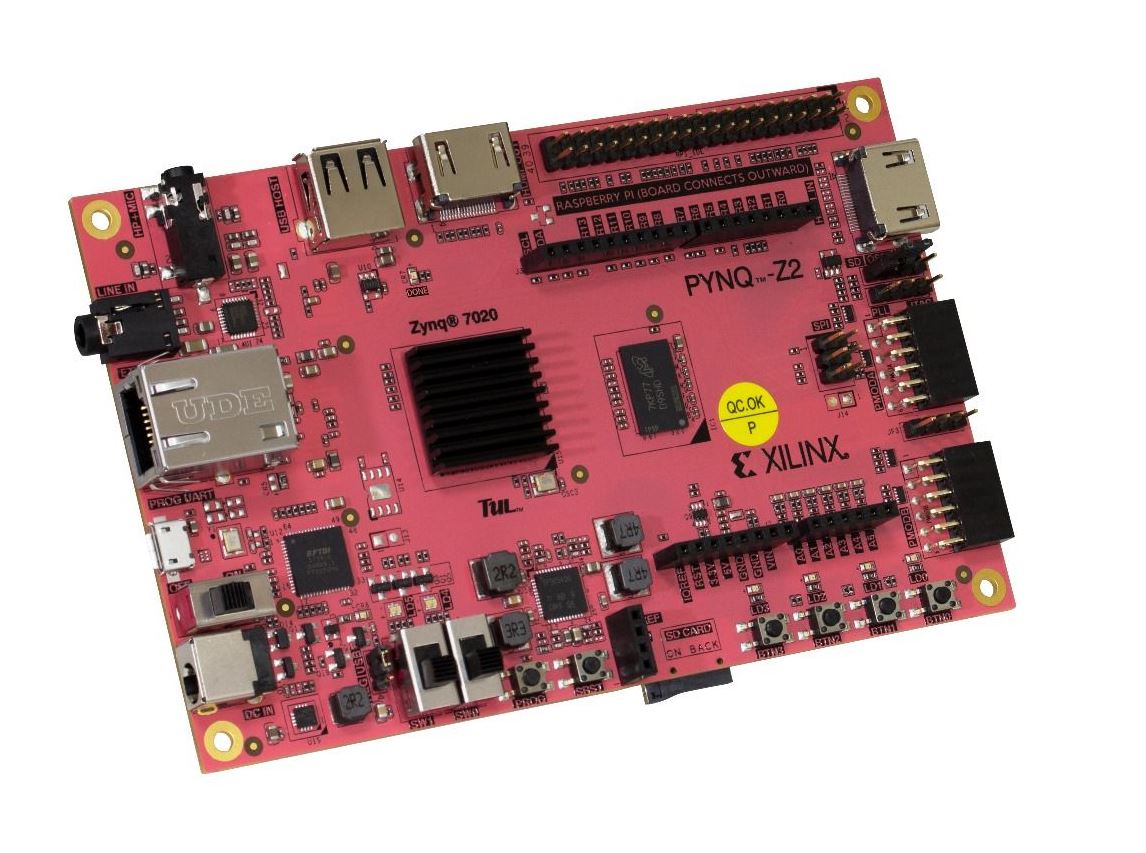
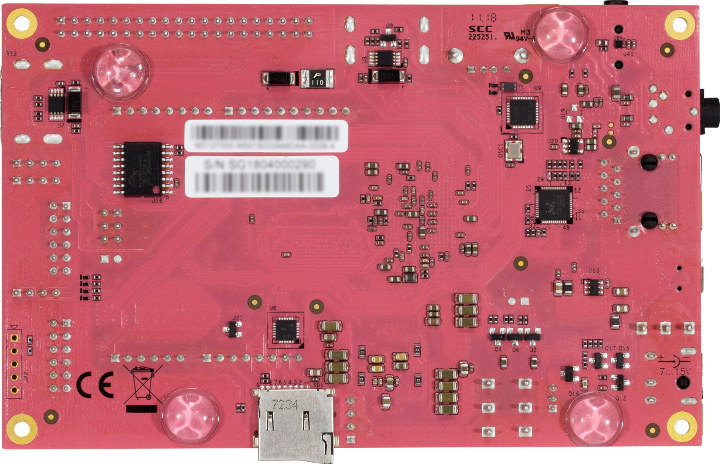
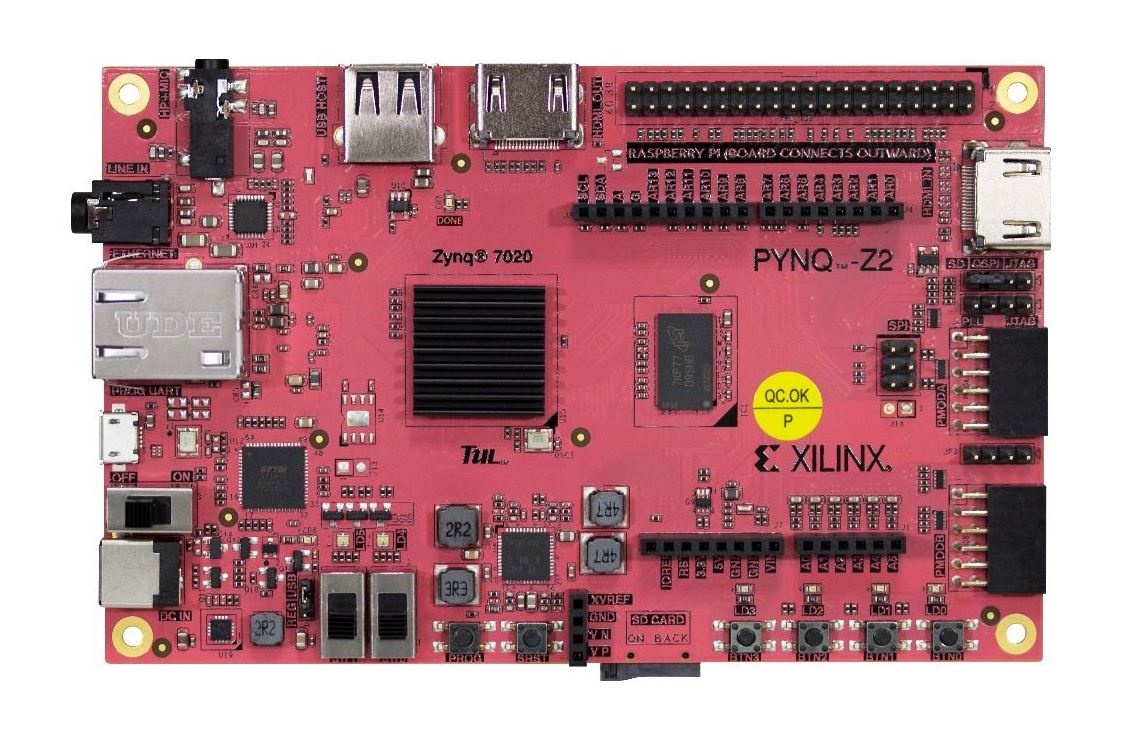
TUL PYNQ-Z2: An Arduino and Raspberry Pi compatible Xilinx Zynq C7Z020-based PYNQ development board
The TUL PYNQ-Z2 costs US$119 worldwide or US$114 if you live in the US. (Image source: TUL)
The TUL PYNQ-Z2 is a single-board computer (SBC) designed for development with the open-source Python Productivity for Zynq (PYNQ) framework. The board has Arduino and Raspberry Pi headers along with a host of other ports and connectors. The TUL PYNQ-Z2 ships worldwide from Seeedstudio for US$119 or for US$114 from Newegg if you live in the US.
The TUL PYNQ-Z2 looks a bit different compared to most modern single-board computers (SBCs). We are not just talking about its attractive red colour of its board either. Firstly, it measures 140 x 87 mm, making it rather large by SBC standards. The additional footprint has allowed TUL to integrate Arduino and Raspberry Pi compatible headers, along with an Analog Devices ADAU1761 24-bit audio codec that incorporates two 3.5 mm jacks.
TUL has designed the PYNQ-Z2 for Python Productivity for Zynq (PYNQ) development, an open-source framework published by Xilinx. The framework incorporates Python language and libraries to create embedded systems with Xilinx Zynq SoCs. PYNQ has an extensive website explaining the framework and its uses, which you can find here.
PYNQ currently supports four boards including the PYNQ-Z2, with the latter distinguishing itself with its Raspberry Pi header and 24-bit audio codec. TUL has equipped the board with a Xilinx Zynq-7020 XC7Z020-1CLG400C SoC, which integrates two ARM Cortex-A9 cores running at 650 MHz, 512 MB of DDR3 RAM and 16 MB of QSPI flash storage. The board includes a microSD card slot should you need more space though.
There is also HDMI in and HDMI out, Gigabit Ethernet and two USB ports, one of which is a micro USB that supports up to 5 V power. The PYNQ-Z2 can run on a 7 V to 15 V power supply too. The TUL PYNQ-Z2 ships worldwide from Seeedstudio for US$119 or for US$5 cheaper from Newegg if you live in the US.
From back office tasks to spreadsheets, businesses are saving time and money by employing RPA
Image Credit: Pixabay
The fear that robots will one day take our jobs is a common one despite the fact that robots are already working alongside humans in a number of industries. However, not in the way that you might think. Robotic process automation (RPA) employs robots or rather AI workers to help businesses automate a wide variety of tasks and workloads.
To learn more about how businesses are currently using RPA to automate their workloads, TechRadar Pro spoke with UiPath’s chief evangelist Guy Kirkwood.
How does UiPath help businesses be more productive?
Through its Robotic Process Automation (RPA) platform, UiPath provides organizations with software robots that can be used to automate repetitive, mundane tasks; the sort of stuff that workers dislike doing in the first place. With support from these robots, employees can focus on more strategic, fulfilling work – unleashing significant productivity gains, as well as greater opportunity for innovation. For example, one of UiPath’s Japanese clients, Sumitomo Mitsui Banking Corporation (SMBC), has saved more than one million-man hours by implementing RPA.
Image credit: UiPath
The company was founded in Romania and later moved its headquarters to New York. What prompted this move and has it paid off?
UiPath moved its headquarters to New York City in 2017. New York is a known hub of enterprise software companies, and the firm was eager to become part of its vibrant business and tech community. Not only that, but several of its early customers are based in New York, including financial institutions, banks and insurance companies.
The proximity to these customers enables more intimate face-to-face interactions and helps UiPath establish deeper relationships with existing and prospective customers and partners. This intimacy is not restricted to NYC, UiPath now has operations in 34 countries as it realized that local knowledge and relationships are invaluable to effective growth. The result? UiPath’s revenues are very evenly split between the Americas at 37 percent, Europe at 34 percent and Asia at 29 percent; this even spread is extremely unusual in the business that is essentially only four years old.
Lastly, New York attracts top-tier tech (specifically developer) talent due to its large population and nearby schools. Since its move, UiPath has been continually amazed by the tech talent NYC has to offer. So much so that since moving into a new building on Park Avenue in the summer of 2018, headcount has doubled, and the company had to make additional space in Brooklyn.
How are businesses using RPA to automate mundane tasks and can you give us some examples of the kinds of processes that are being automated?
Businesses are deploying RPA to efficiently manage large-scale processing in ways that are customizable throughout each individual business. RPA is currently being used across almost all industries and functions, including IT, finance and accounting, human resources and customer service. RPA can be leveraged for an array of tasks – whether it is auto-populating forms or spreadsheets, organizing incoming information or processing transactions.
What’s “new” about RPA is that benefits are generated for employees and businesses alike. For example, State Auto, a super-regional insurance holding company headquartered in Columbus, Ohio, uses RPA for back-office tasks. Auditors at State Auto go through thousands of policies to determine recommendations for changing rates. Policies that don’t need to be audited still have to be documented, which requires performing routine data-entry with two separate and unconnected systems, selecting codes and making drop-down selections. With robots in place, this activity happens rapidly and error-free, releasing individuals from time-consuming, and mind-numbing, tasks. The use of UiPath’s RPA solution at State Auto has netted a productivity benefit of over 65,000 hours of labour saved. These hours were not reflected in job cuts, but instead as a pure value-add that has allowed for unprecedented growth.
RPA is also improving job satisfaction, driving productivity and enhancing customer service. One CEO of a UiPath customer in Ireland said: “since we put in automation, the mood music of our organization has changed. We have happier employees and we now measure our service in terms of compliments rather than complaints.” This has nothing to do with technology; what we’re seeing is a fundamental culture change.
Are IT departments standing in the way of implementing RPA?
IT departments are helping with the implementation of RPA, as CIOs own the necessary infrastructure for the deployment of robots. For RPA implementations to be successful, it’s critical that IT and business units collaborate, align on goals and work closely together.
RPA was initially seen as a way of avoiding the wait for IT to provide the connections at a system-to-system level (through APIs) that had traditionally been the preserve of the IT teams. By operating through the user interface (UI), RPA could provide the same or better benefits much more quickly and much cheaper. It was therefore considered a potential threat to the CIO and was pejoratively described variously as a “dirty fix” or “sticking plaster solution.” That situation has now, thankfully, been superseded by the realization that RPA is just as applicable in the IT department for password resets, ITSM and BPM/ERP integrations, as it is for their colleagues in business operations.
Image credit: Shutterstock
How can organizations strike the right balance between IT and business?
As with any business operating or department working with any other, the answer is partnership. IT has to be comfortable that the business has the sufficient (and robust) compliance and governance processes and tools in place to protect the company’s data. In turn, the business itself must be comfortable knowing that IT supports the move to a more automated future where robots and humans work together.
UiPath’s technology partners have recognized this: Oracle for instance, is using RPA, not APIs, to connect to the plethora of differing systems that link into their platform: it is cheaper, faster and more robust given the continually changing application landscape. Think about it, if both systems have a UI, RPA can act as the bridge.
How does UiPath plan to move into more front-office and customer facing areas?
With the proven success of RPA in the back office, due in large part to the fantastic work that Blue Prism, the inventors of RPA and erstwhile competitors of UiPath, has demonstrated since 2002, there is increasing demand to leverage RPA more in the front office. Already, RPA is used in the front office to shorten transaction times in call centers and help employees tackle large volumes of incoming requests.
RPA can also help enhance customer communication by controlling a contact schedule, triggering reminders when it is time for employees to follow up with customers or manage a complaint. Beyond that, RPA can also send automated messages to customers to allow for faster replies.
This is why UiPath has seen the balance between unattended robots (which work on the activities that no one wants to do) and attended robots (which help humans to do – and improve – the work that they want to do) is changing. In 2018, the percentage ratio was 64:36 in favor of unattended; today it stands at 46:54 in favor of the attended robots.
Image credit: Shutterstock
What advice would you give to businesses looking to adopt RPA for the first time?
That’s easy: use the fantastic resource created by analyst firm Everest Group! The Smart RPA Playbook is the step-by-step guide that helps organizations of all sizes, and in all industries, to scale RPA from initial pilot to what they term as Pinnacle; where automation is in every part of the enterprise. This 200-page instruction book can be downloaded from the UiPath website at no charge.
Learn the coding language used by Google engineers
In case it wasn’t clear from the Google pedigree, Google Go has a ton of support in the coding world. Already, this new programming language is the fourth most active on Github, and developers who work with Go are the third-highest paid globally in the Stack Overflow developer survey for 2019. Globally, the average Go coder can expect to bring home $109,483 per year or $136,000 per year in the US. Search popularity on Google Go has been constant this past year, and you can only expect it to ramp up as more companies integrate it into their systems.
This 50-hour course package is designed to get even non-programmers working with Go in no time, but it doesn’t skimp on the details. By the end of the later lessons, you’ll be able to work confidently as a full stack developer in any production environment.
Select Language
Afrikaans
Albanian
Amharic
Arabic
Armenian
Azerbaijani
Basque
Belarusian
Bengali
Bosnian
Bulgarian
Catalan
Cebuano
Chichewa
Chinese (Simplified)
Chinese (Traditional)
Corsican
Croatian
Czech
Danish
Dutch
Esperanto
Estonian
Filipino
Finnish
French
Frisian
Galician
Georgian
German
Greek
Gujarati
Haitian Creole
Hausa
Hawaiian
Hebrew
Hindi
Hmong
Hungarian
Icelandic
Igbo
Indonesian
Irish
Italian
Japanese
Javanese
Kannada
Kazakh
Khmer
Korean
Kurdish (Kurmanji)
Kyrgyz
Lao
Latin
Latvian
Lithuanian
Luxembourgish
Macedonian
Malagasy
Malay
Malayalam
Maltese
Maori
Marathi
Mongolian
Myanmar (Burmese)
Nepali
Norwegian
Pashto
Persian
Polish
Portuguese
Punjabi
Romanian
Russian
Samoan
Scots Gaelic
Serbian
Sesotho
Shona
Sindhi
Sinhala
Slovak
Slovenian
Somali
Spanish
Sundanese
Swahili
Swedish
Tajik
Tamil
Telugu
Thai
Turkish
Ukrainian
Urdu
Uzbek
Vietnamese
Welsh
Xhosa
Yiddish
Yoruba
Zulu
The Super Plant Pizza is available nationwide (Photos: Pizza Pizza)
Canadian pizza chain, Pizza Pizza, has welcomed a vegan pepperoni and chorizo crumbles to all its traditional restaurants across the country.
The eatery, which already offers dairy-free cheese, has introduced the meat alternatives in partnership with Yves Veggie Cuisine and Field Roast Grain Meat Co.
Pizza Pizza’s ‘Super Plant Pizza’ features both plant-based meats, vegan ‘cheeze’, and is available on any crust, including the brand’s new Cauliflower Crust.
‘An exciting moment’
“The pizza landscape in Canada is continuously evolving and we have always been an innovation leader at the forefront,” said Paul Goddard, CEO of Pizza Pizza.
“The launch of the Super Plant Pizza with our plant-based protein options is an exciting moment in our brand history and one that we are very proud of. We will continue to create flexible options to suit all dietary preferences as we look to the future.”
Responding to customers’ ‘ever-changing needs’
Alyssa Huggins, Vice President, Marketing, Pizza Pizza, said: “Most people personalize their pizza and consumers want options; that’s something we’ve continually offered consumers, putting quality and great taste at the forefront of introducing new options.
“With the launch of the Super Plant Pizza and the plant-based protein options we are responding to our customers’ ever-changing needs, namely the flexitarian movement, but also growth in consumers identifying as vegan or vegetarian.”
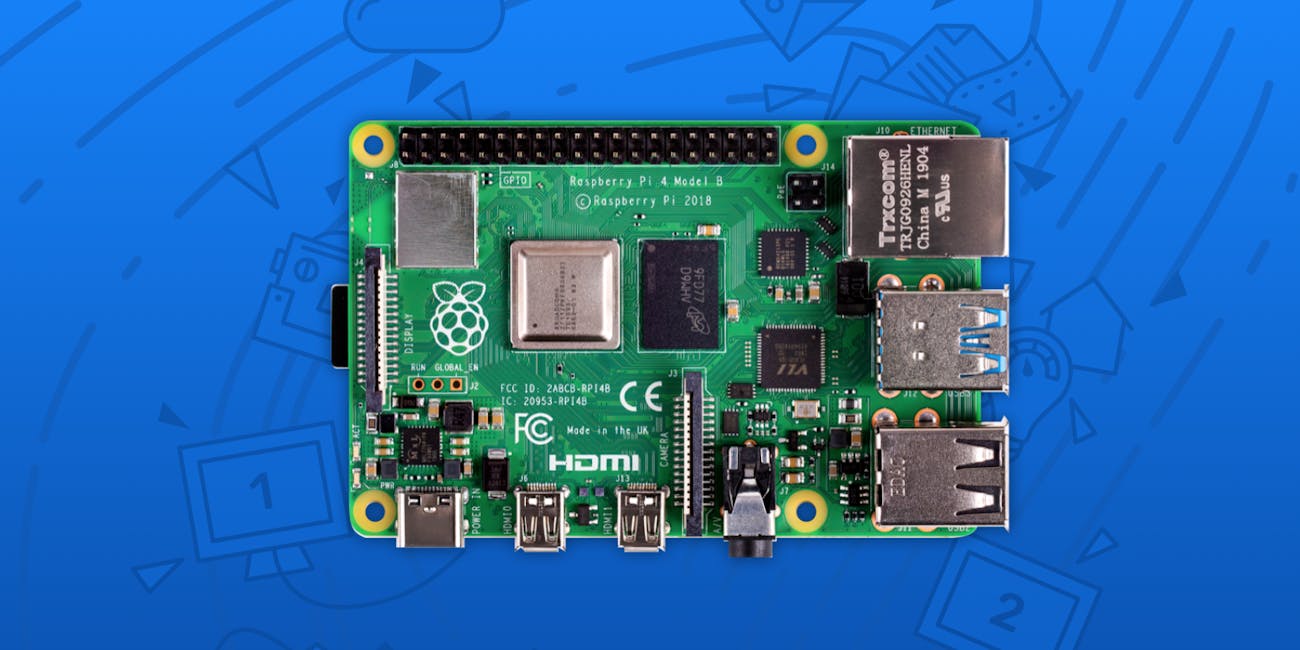
The Raspberry Pi is back, and it’s attracting a whole slew of new hobbyist ideas. The credit card-sized computer, which first launched in 2012, received a major upgrade earlier this week when the fourth-generation model hit stores. The new version boasts faster speeds and better connectivity, but with an ultra-low $35 price tag.
Earlier versions have been a hit among tinkerers. Their small size means they can fit in all sorts of homemade designs, from anything to magic mirrors to even as small as a plant watering system. Their popularity also means there’s a thriving community of open source developers, sharing their code for how to make a robot bartender or a miniaturized braille laptop.
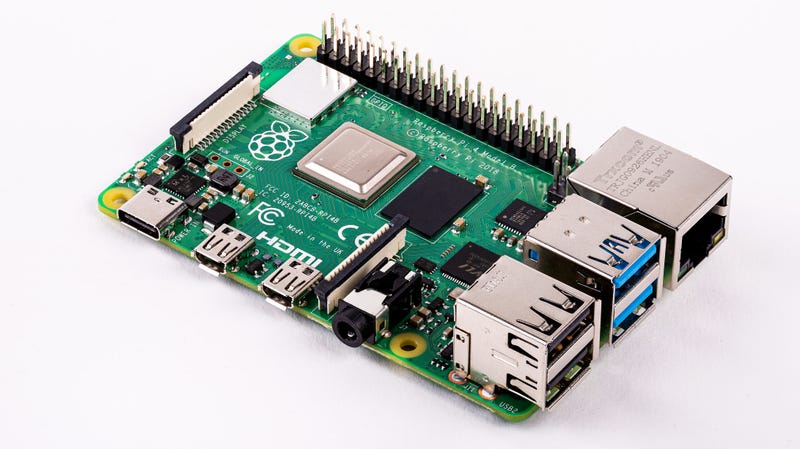
Broadcom BCM2711 quad core Cortex-A72 system-on-a-chip at 1.5GHz.
1GB, 2GB or 4GB of RAM
Bluetooth 5.0, 802.11ac Wifi and Gigabit Ethernet
Two USB3 ports, Two USB2 ports, and two micro-HDMI ports that support two 4K displays.
A USB-C connector for power.
Here’s what people want to do with the new version.
9. Even Better Video Game Emulation
Earlier models have been a hit with video game emulation fans, using setups like RetroPie. These programs mimic older machines like the SNES, running older titles the way they originally played.
The speed boosts in the new model have led to speculation about supporting even newer consoles. A Reddit user called “phire,” one of the developers of Nintendo GameCube and Wii emulator “Dolphin,” confirmed that they have ordered one to see how well it performs.
Could you run Wii games on the Pi 4?
The 1.5ghz Cortex A72 is a massive improvement over the A53 and brings it into the range where lightweight Wii games might reach “playable” speeds if you tweak certain settings. And the GPU has gotten a massive upgrade, though it’s a complete unknown at this point.
How well it performs in reality remains to be seen.
8. A Face-Recognizing Home Companion
The extra performance could enable new applications in artificial intelligence. In his article for Tom’s Hardware, writer Avram Piltch tested Google’s TensorFlow machine learning system and OpenCV computer vision system. He found that the Pi 4 could detect objects around 70 percent faster than the Pi 3B+, but at a still relatively slow speed of 1.7 frames per second. However, Piltch noted that the addition of USB 3 means developers can add in extras like Google Coral’s TPU USB accelerator to boost these numbers, something that was not possible with the Pi 3B+.
Imagine building a home companion robot that recognizes every member of your household by face or one that helps a farmer sort cucumbers by type. Some of these workloads are possible on earlier Raspberry Pi computers, but the Pi 4 B should make them fast and accurate enough to use on a regular basis. We can’t wait to see what developers and what makers do with Pi 4 and A.I.
Instead of unlocking a phone like on the iPhone X and later, face scanning could enable an Amazon Alexa of the future.
The iPhone X’s Face ID face scanner in action.
The Ultimate Media Server
One of the biggest boosts in the new models is the separation of the Ethernet from the USB bus. That, paired with faster Ethernet speeds and USB 3 support, means it should serve files faster than ever.
“Gigabit Ethernet, USB 3.0 – It looks like raspberry will be finally good choice for NAS [network attached storage],” wrote a Reddit user called “infiniteoffset.”
Stick one in an airing cupboard and run your home movies for everyone to enjoy.
Smarter Robots
Face recognition is cool, but the beefier processor in the new Pi 4 should enable motorized robots to crunch numbers faster.
“Once again I’m primarily looking at this from the perspective of an embedded systems/robotics applications – not just ‘a small desktop’,” wrote a Reddit user called “sayfog.” “The USB3 is the single biggest upgrade to what we’re interested in, the next problem is for us applications which need the USB3 need more processing power (RTABMAP) to back them up than the Pi can provide it.”
A Super-Small Home PC
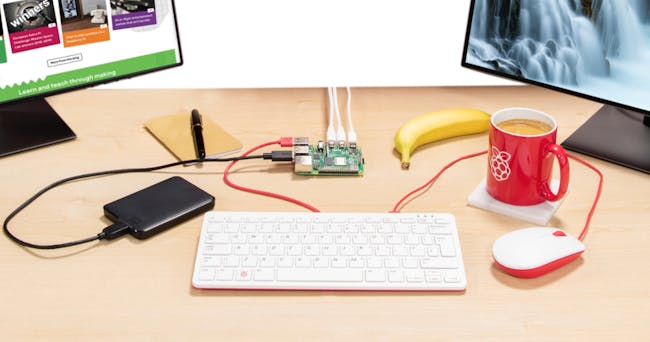
The Pi 4 powering a simple home setup.
The Raspberry Pi’s developers tout its ability to output 4K to two screens at once. Hooked up to a keyboard and mouse, with a small SD card attached, the Pi 4 could represent a relatively cheap way of getting basic tasks done.
“I have ordered the 4GB with that purpose,” wrote a Reddit user called “CloudNetworkingIO.”
A New Smart TV
Loading up a Raspberry Pi with a TV-designed app like Kodi could transform a TV into something like a Roku or Amazon Fire Stick. This could come with the benefit of easier tweaking, enabling users to add on all sorts of extras.
“Might be a good way to upgrade my tv at the cottage to a smart tv,” wrote a Reddit user called “MtnyCptn.”
The Ultimate Ad Blocker
The older versions of the Raspberry Pi could run Pi-Hole, a program that takes ads and ferries them to a dead end for all the users on a network. The addition of even faster Ethernet has got users excited about this possibility.
“I’m tempted to grab a few and try running Pi-Hole for my whole organization (~1200 users) and see how that goes,” wrote a HackerNews user called “PakG1.”
Self-Driving Boat
Tired of driving your boat yourself? Why not get a machine to do it!
“Every year we upgrade our autonomous sailboat controller to the latest Raspberry Pi,” wrote a HackerNews user called “tsaoyu.” “This year we face a situation to choose from Jetson Nano and RPi 4. Even the decision is hard to made, now is an exciting moment for robot makers.”
While autonomous ships aren’t expected to set sail until 2025, a miniature version could come ashore surprisingly soon.
Vivo has announced its first AR glasses at MWC Shanghai. The prototype product is simply called the Vivo AR Glass and is a relatively lightweight headset with two transparent displays and 6DoF tracking. It connects with a cable to Vivo’s as-yet unnamed 5G smartphone, which is also being demonstrated this week.
Vivo says the AR Glass has five use cases right now: gaming, office work, “5G theatre,” facial recognition, and object recognition. A promotional video posted by the company shows users playing games at the dinner table, getting told an acquaintance’s name, and sitting on their sofa surrounded by virtual jellyfish.
The Vivo AR Glass doesn’t have any pricing or release information yet, but the 5G phone is set for release in the third quarter of this year. Vivo is framing the announcement as part of a shift to a new brand strategy where it’ll offer products like smartwatches, AR glasses, and headphones to sit alongside its 5G smartphones
The Raspberry Pi 4 Model B is finally here, a $35 device that packs a lot of useful technology on a single circuit board you can hold in your hand. It might even be your next budget computer, assuming you can stomach some of the trade-offs enthusiasts have identified in their early testing.
This tiny tool that powers plenty of people’s clever hacking projects—including dorm room parties—gets a lot of great upgrades for its fourth-generation release. On paper, the specs are impressive: a 1.5 GHz, quad-core, ARM Cortex-A72 processor; up to 4GB of memory (bumping the price to $55); Gigabit Ethernet; wireless-ac; and the ability to push 60 frames per second to a 4K display (or 30 frames per second to two connected 4K displays).
It runs hot
If you’ve played with a Raspberry Pi previously—especially if you’ve been trying to crank as much performance out of it as possible—you’ve probably encountered some overheating issues. The Raspberry Pi 4 is no different; in fact, it’s hotter. As Gareth Halfacree writes for Medium:
“…after just a few minutes, the entire board feels warm to the touch. Start loading it heavily and that warmth becomes uncomfortable; while it’s still entirely possible to use the board without extra cooling, those looking to put one in a case will find active cooling is required to avoid thermal throttling.”
He’s taken some lovely thermal shots of the Raspberry Pi 4 and its 2018 predecessor, the Raspberry Pi 3 Model B+, which we’ve published below. Watch where you put your fingers.
This one’s a no-brainer. The Raspberry Pi 4 switched to USB-C for power—a necessity, since it now draws around 3.5 watts when it’s idle and up to 7.6 watts or so when it’s under duress. The Raspberry Pi 3 Model B+, by comparison, draws around 1.9 watts when idle and up to around 5 watts when you’re taxing it.
The good news? Even if its running at its top speeds 24 hours a day, every single day of the year, the Raspberry Pi 4 should only cost you around $3 extra to operate.
It can handle a 4K display, but…
One of the more eye-opening features of the Raspberry Pi 4 is its dual-HDMI configuration that, as mentioned, supports 60 frames per second on a 4K display or 30 frames per second on two 4K displays.
It blows my mind to think that a tiny single-board computer can process 16.5 million pixels like that, but don’t let this spec fool you. The Raspberry Pi 4 might be able to handle a 4K display, but that doesn’t mean that it can run 4K video very well—or even 1080p video. From Avram Piltch over at Tom’s Hardware:
“While surfing the web, looking at still images and just enjoying all the extra screen real estate of 4K is great, video playback is the Raspberry Pi 4’s Achille’s heel, at least as of this writing. Whether we were attempting to stream a 4K video or use a downloaded file, we never got a smooth, workable 4K experience, either in Raspbian Buster or LibreElec, an OS that runs the Kodi media player. Several H.264 encoded videos, including Tears of Steel, did not play at all or showed as a jumble of colors. Even the sample jelly fish videos that the folks at Kodi recommended for my testing appeared as still pictures with no movement. Clearly, there’s a lot of optimization that still needs to be done both on the OS and software side to make the Raspberry Pi 4 capable of playing 4K video.
Unfortunately, even streaming 1080p YouTube videos is a challenge at this point. Running at 1080p resolution, full screen video trailer for Stranger Things showed obvious jerkiness. However, the playback was smooth when I watched the same clip in a smaller window. The same problem occurred, even when I dropped the stream’s resolution down to 480p.
Playing offline 1080p videos works well, provided your screen is at 1920 x 1080 or lower resolution. A downloaded trailer of Avenger’s Endgame was perfectly smooth when I watched it using the VLC player.”





 Translate



/cdn.vox-cdn.com/uploads/chorus_image/image/64131877/Vivo_MWC_Shanghai_Vivo_AR_Glass_2.0.jpg)
/cdn.vox-cdn.com/uploads/chorus_asset/file/16678253/vivo_stupid_ar.gif)

 Bruce's Blog