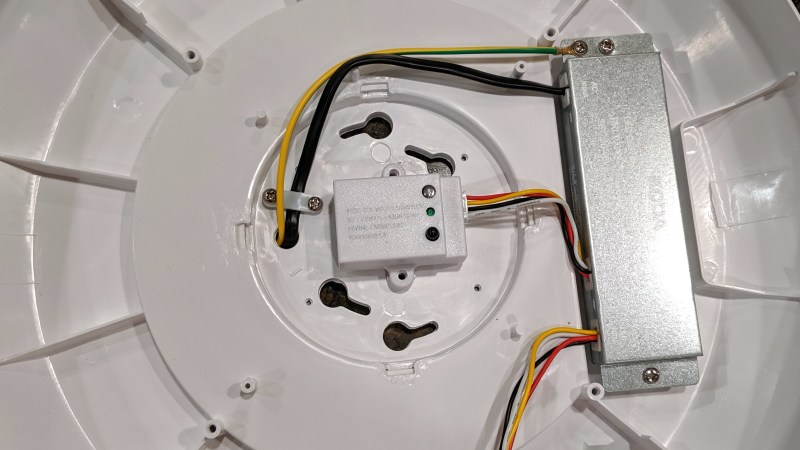
[hclxing] eagerly picked up an LED ceiling light for its ability to be turned on and off remotely, but it turns out that the lamp has quite a few other features. These include adjustable brightness, color temperature, automatic turnoff, light sensing, motion sensing, and more. Before installing, [hclxing] decided to tear it down to see what was involved in bringing all those features to bear, but after opening the lamp there wasn’t much to see. Surprisingly, besides a PCB laden with LEDs, there were exactly two components inside the unit: an AC power adapter and a small white controller unit. That’s it.
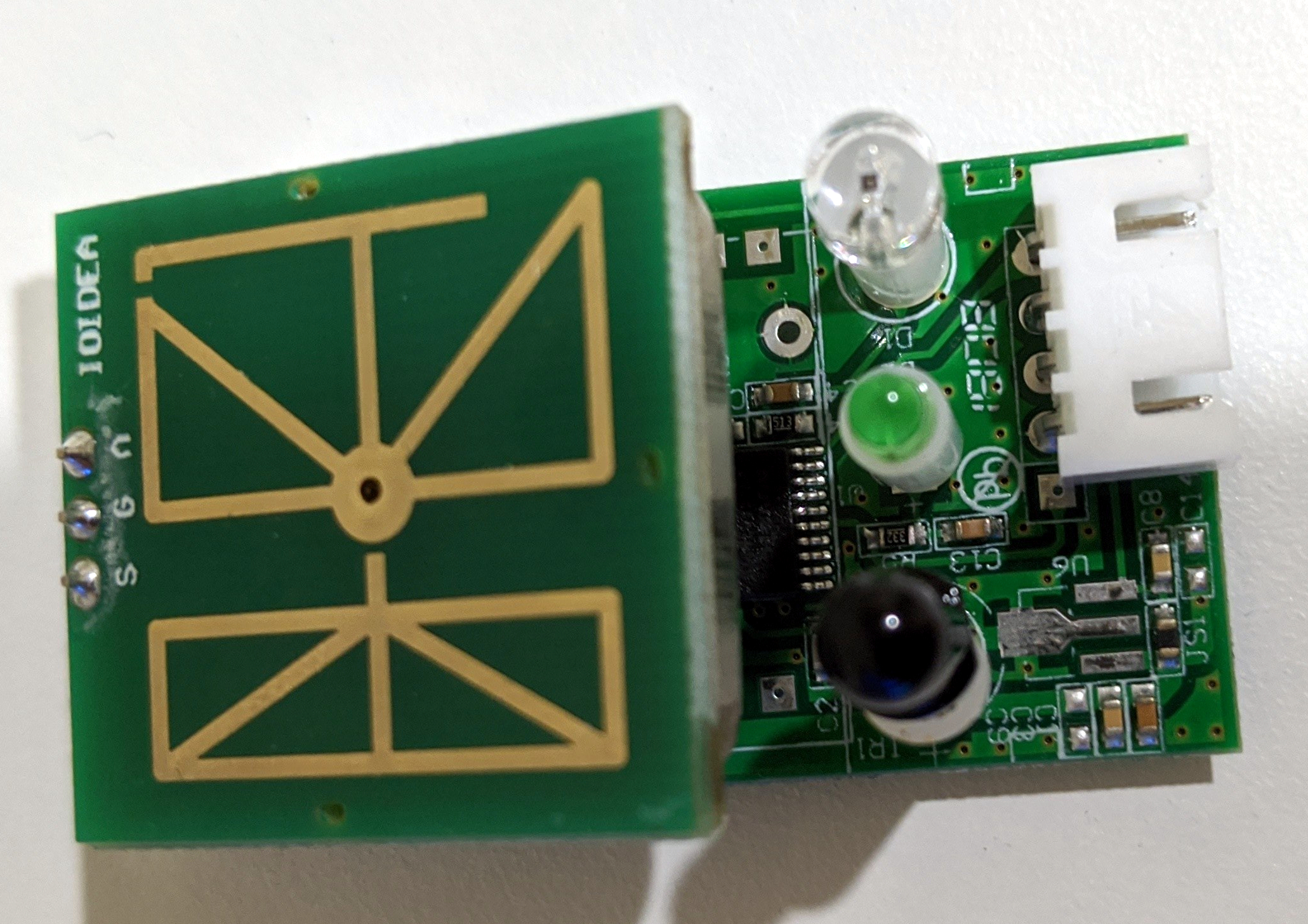
Microwave-based motion sensor board on top, controller board for LED ceiling light underneath.
The power adapter is straightforward in that it accepts 100-240 Volts AC and turns it into 30-40 Volts DC for the LEDs, and it appears to provide 5 V for the controller as well. But [hclxing] noticed that the small white controller unit — the only other component besides the LEDs — had an FCC ID on it. A quick bit of online sleuthing revealed that ID is attached to a microwave sensor module. Most of us would probably expect to see a PIR sensor, but this light is motion sensing with microwaves. We have seen such units tested in the past, which links to a video [hclxing] also references.
The microwave motion sensor board is shown here, and underneath it is a dense PCB that controls all other functions. Once [hclxing] identified the wires and their signals, it was off to Costco to buy more because the device looks eminently hackable. We’re sure [hclxing] can do it, given their past history with reverse-engineering WyzeSense hardware.
Everyone’s using video calls to stay in touch with friends, family and colleagues as they remain locked down due to the coronavirus.
There are tons of apps to choose from, and it seems like we use different ones depending on the situation.
Here are some of the best video calling apps.
Apply fun filters or use your Memoji to talk.
As the coronavirus continues to keep us indoors, the best way to stay in touch with family and friends right now is through a video call. And everyone seems to be doing it. Last Friday, I had a birthday party on Zoom, a work happy hour on Slack and a family video call over Facebook Portal.
It’s not just me. The top free apps in Apple’s App Store right now include Zoom, TikTok, Houseparty, Google Classroom, Google Hangouts, Squad and others, a sign that many are looking for new ways to connect while locked down. But you may not know which app to use. Often, the best choice is to just pick whatever everyone else is using in the moment.
It seems like there’s now an app for every different situation. Maybe you use Zoom to chat with colleagues and FaceTime for friends and family. It all depends on your situation.
These are some of the best apps for video calls, and the features they include.
Best video call app for iPhone
You can use pretty much any video chat app on an iPhone, but if you’re purely staying in touch with other Mac, iPhone and iPad users, it’s easiest to just stick with Apple’s FaceTime. It supports up to 32 users at once, has been really reliable for me over the past few weeks and adds fun things like 3D face masks to spice up the chat.
It’s also probably the easiest to use, since it’s built right into all of Apple’s gadgets. For that reason, I think it’s best for staying in touch with seniors, such as grandparents and parents who just want something really simple and safe.
I like how it automatically detects who is speaking and makes their video the largest. Plus, it’s encrypted, which means the calls are totally private. Apple says it doesn’t gather any data about your FaceTime calls. But it’s still a bummer if you just want to add one person who’s on an Android device or Windows PC. You can’t do it.
Best video call apps for Android
Google Duo video chat with 8 people.
Google
Google Duo isn’t usually mentioned as a top video chat app, but I like it for a few reasons when I’m making calls to Android users from an Android phone. First, you can see the caller before you pick up (if they have the feature active) which is a neat touch. It’s also, like FaceTime, built right into the dialer of some phones, like Google Pixels and the latest Samsung phones, so you can just dial a number and hit the video chat button. Google just bumped the maximum up to 12 people on a call, which isn’t as many as FaceTime, but it works on Apple devices, web browsers and Android, so it’s easier to get people using different gadgets together.
Best video call apps for iPhone and Android
Jaap Arriens | NurPhoto | Getty Images
OK, maybe you’re trying to call an Android phone from an iPhone, or vice versa. You could use Google Duo, but there’s an alternative that I like even better: WhatsApp, which is owned by Facebook. Google Duo doesn’t have a regular text chat option, but WhatsApp is awesome for massive group chats andit supports video calls with up to 16 people or voice calls with up to 32 people at the same time. It’s owned by Facebook but, unlike Facebook Messenger, it supports end-to-end encryption for keeping your video calls private. Plus, it works with the Facebook Portal, which is one of my favorite video calling systems.
Best video call apps for business users
A Zoom call.
CNBC
A few video call apps come to mind for business users who need to make conference calls. It really comes down to what your company lets you use and what your IT department pays for. Some of the most popular ones include Cisco Webex, Zoom, Slack, Microsoft’s Skype, Google Hangouts or Microsoft Teams.
It’s a personal opinion, but I’ve had the most fun with Zoom, since it lets me customize my backgrounds so I can hide the messy room behind me and put something fun, like the CNBC newsroom, behind me. Like the other apps, it lets you screen share, so you can show colleagues what you’re working on, or host a Powerpoint presentation.
Zoom is free for up to 100 people for 40 minutes. I like that time limit for free calls. It forces people to end the call instead of dragging on forever. Plus, it seems like most people already have it installed, thanks to its recent surge in popularity.
But Zoom’s rise has also come with some downsides. In recent weeks, the company has faced criticism for its privacy policy, which said it sent some data to Facebook, even if you don’t have a Facebook account. Zoom later updated its mobile apps to remove the data sharing with Facebook.
Best video call apps for hanging out with friends
The Houseparty app icon is seen displayed on phone screen in this illustration photo.
Jakub Porzycki | NurPhoto via Getty Images
There are three apps you might not have heard of: Houseparty, Squad and Discord. They’re totally different, but you should know about them.
Houseparty lets you video chat with up to 12 people across iPhone, Android, Mac and Chrome web browsers. But it’s more than just video chat. You can share your screen, or play games like Heads Up ($0.99), which requires you to guess the word on a card above your head. I haven’t seen this myself, but some folks have suggested other accounts were hacked after using Houseparty. The company is denying that and offering $1 million to anyone who can prove it.
Squad is similar to Houseparty. It lets you chat, make video calls and share your screen. But you can also shop with friends in any app, or easily watch TikTok and YouTube videos at the same time. It’s free and supports up to nine people at a time.
The new online PC game sales business designed by Discord offers a select menu of games curated by human staffers, as well as a subscription service. Other gaming sites offer thousands of games with algorithms making recommendations to users.
Discord
Discord is popular app primarily used by video game players to talk about the games. It lets you chat with a bunch of other people and host video calls with up to 10 folks. If you’re into gaming, you can team up friends and play the same game with video chat.
To give more people a chance to play with natural language understanding, Google AI Hub has introduced Semantic Reactor, an experimental Google Sheets Add-on, to use in service bots and the like.
The Semantic Reactor is promoted as a tool that “allows the user to sort lines of text in a sheet using a variety of machine-learning models”. It is said to be useful for experimenting with chatbot responses, and testing word associations for games among other things. Moreover, Google sees a variety of applications for the approach, ranging from semantic search tasks for forums to building digital personal assistants.
To get going, users will have to add phrases fitting the use case at hand to a Google Sheet, and will then be able to select a model and ranking method for further processing. The candidate list can then be queried from the outside and provide the enquirer with a ranking of all phrases and weights or scores for them.
The ranking methods provided for now are Input/Response and Semantic Similarity. While the former rates the line most appropriate as a conversational response higher, Semantic Similarity puts text with a similar meaning to the input on the top of the list. When writing a conversational bot for example, Input/Response might be suitable since it is hard to predict what people might ask and the number of potential responses is quite high.
Meanwhile Semantic Similarity would be a good choice for bots for use cases with a very narrow focus where questions are easy to anticipate. An example could be a product-related customer support bot. When writing such a thing, Google states that users will have to compile a list of questions and answers, and once a question is asked, the Reactor will find the one in the list that is most similar and answer with the sentence paired to that.
Models used within the Semantic Reactor include a minified and a basic version of the universal sentence encoder, as well as one trained on pairs of questions and answers in a variety of languages, that can be tested against each other for experimentational purposes.
An example application making use of the Semantic Reactor can be found on GitHub. However, since the tool is still only an experiment, those interested in building something similar themselves will have to apply at the AI Hub to get approved and receive installation instructions.
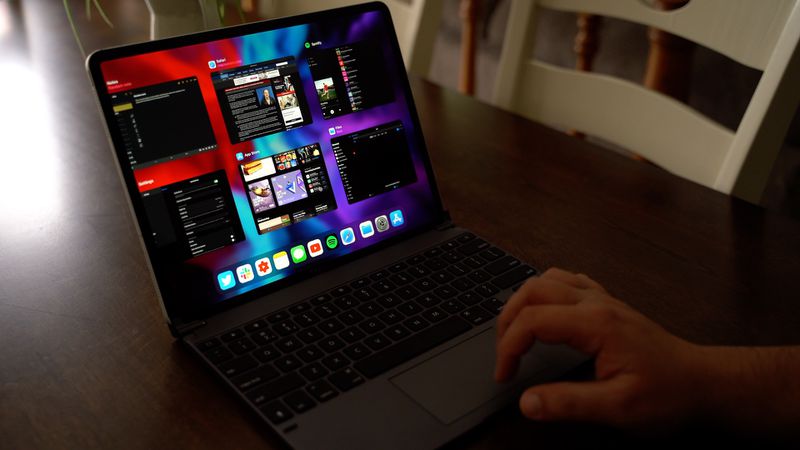
Well ahead of when Apple introduced trackpad support in iOS 13.4, Brydge announced an iPad Pro keyboard with a built-in multi-touch trackpad. We have one of Brydge’s new Pro+ keyboards on hand, and thought we’d check it out to see how it works with Apple’s new 2020 iPad Pro models.
The Brydge Pro+ keyboard is similar in design to past Brydge keyboards, attaching to the iPad Pro using a set of hinges that allow the iPad Pro’s angle to be adjusted to best suit each person’s needs. It’s made entirely from aluminum and matches the iPad Pro well, and at the bottom, there’s a new trackpad.
Brydge keyboards always offer a great typing experience, and this year’s Pro+ is no exception. In fact, we thought it was even better than last year’s version because there’s no need to press as hard for a key to register.
There are dedicated iPad controls on the keyboard, including a Siri button and options for accessing the Home screen, locking the iPad, adjusting brightness, controlling media playback, and more. As with other Brydge keyboards, this one connects via Bluetooth and lasts for quite awhile before needing to be recharged.
When it comes to the trackpad, it’s clear that it was designed before the release of iOS 13.4 because compared to official trackpad support with the Magic Trackpad 2, it’s a bit lacking. Scrolling is smooth and works well through a standard two finger gesture, but we did run into a bug with continuous scrolling at the top or bottom of a page.
While you can use any two finger gesture with the trackpad on the Brydge Pro+, it doesn’t really work with three finger gestures. You can add some three finger button presses with Accessibility functionality, but it’s not as convenient as the three finger gesture support on the Magic Trackpad 2.
We did a full overview of how the Magic Trackpad 2 works with the iPad Pro in a prior video, and this is what we can expect to see when Apple’s own Magic Keyboard comes out in May.
In the future, Brydge may be able to work with Apple to add more functionality to its keyboard, as Apple has worked with Logitech on some custom keyboards with trackpad support. Even without the full functionality of the Apple-designed trackpad, the Brydge Pro+ has a lot to offer.
Apple’s Magic Keyboard is priced starting at $300 for the 11-inch model, while the Brydge Pro+ is priced starting at $199, so it’s certainly a more affordable option. For those interested, more on the Brydge Pro+ can be found on Brydge’s website.
D-Wave, the Canadian quantum computing company, today announced that it is giving anyone who is working on responses to the COVID-19 free access to its Leap 2 quantum computing cloud service. The offer isn’t only valid to those focusing on new drugs but open to any research or team working on any aspect of how to solve the current crisis, be that logistics, modeling the spread of the virus or working on novel diagnostics.
One thing that makes the D-Wave program unique is that the company also managed to pull in a number of partners that are already working with it on other projects. These include Volkswagen, DENSO, Jülich Supercomputing Centre, MDR, Menten AI, Sigma-i Tohoku University, Ludwig Maximilian University and OTI Lumionics. These partners will provide engineering expertise to teams that are using Leap 2 for developing solutions to the Covid-19 crisis.
As D-Wave CEO Alan Baratz told me, this project started taking shape about a week and a half ago. In our conversation, he stressed that teams working with Leap 2 will get a commercial license, so there is no need to open source their solutions and won’t have a one-minute per month limit, which are typically the standard restrictions for using D-Wave’s cloud service.
“When we launched leap 2 on February 26th with our hybrid solver service, we launched a quantum computing capability that is now able to solve fairly large problems — large scale problems — problems at the scale of solving real-world production problems,” Baratz told me. “And so we said: look, if nothing else, this could be another tool that could be useful to those working on trying to come up with solutions to the pandemic. And so we should make it available.”
He acknowledged that there is no guarantee that the teams that will get access to its systems will come up with any workable solutions. “But what we do know is that we would be remiss if we didn’t make this tool available,” he said.
Leap is currently available in the U.S., Canada, Japan and 32 countries in Europe. That’s also where D-Wave’s partners are active and where researchers will be able to make free use of its systems.
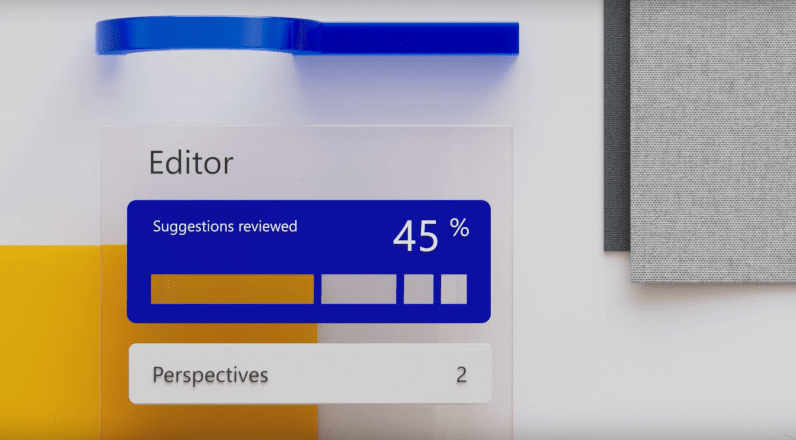
Today, Microsoft announced it was rebranding Office 365 as Microsoft 365 as it sought to expand its feature set beyond work life. Among the most interesting of those new features is Microsoft Editor, the company’s challenger to Grammarly.
While Microsoft has had spelling and grammar correction in Word and other Office apps for as long as I can remember, Microsoft Editor doubles down on the feature by offering up AI-powered writing suggestions that go well beyond the usual fare. Moreover, it is available outside of Office apps, as an extension for both Chrome and the new Edge.
The new Editor expands on basic spellcheck in several ways:
Provides suggestions to improve sentence clarity
Suggests alternate vocabulary
Reminds you when to use formal language
Supports over 20 languages
A similarity checker helps catch plagiarism or lets you quickly provide citations if you’re the one writing
Suggest alternative punctuation
Suggest gender-neutral and inclusive terms to reduce inherent bias in writing
Provide information on how long it takes to read or speak your document
For example, the app might suggest ‘police officer’ instead of ‘policeman,’ or suggest you spell out an acronym upon the first mention. The app can even rewrite entire sentences,
The new Editor goes head to head with Grammarly, which provides similar contextual suggestions, although with a few different strengths of its own – we’ll have to test the two tools side-by-side to see how they compare.
Microsoft Editor begins rolling out today and will be globally available “by the end of April.” It’s still not available in the Chrome Web Store at the time of writing, but we assume it’s only a matter of time.
Sometimes, a driver is distracted and fails to spot a red light, blowing right through it.
It could be that a driver isn’t necessarily distracted, and might instead simply be in an unfamiliar locale, and fails to spy where the traffic signal has been placed.
Another possibility is that the red light is somehow obscured, perhaps there’s heavy rain coming down or snow that’s falling, any of which might make things harder for the driver to see a traffic signal.
Scarily, there are those drivers that are intoxicated and thus they might or might not detect a red-light, and even if they do see it, their mental state might disrupt them from taking the proper action and coming to a stop.
Some drivers like to play a game of chicken with red lights, whereby upon seeing a red light up ahead, the driver keeps in-motion, though they should really be slowing down, but they believe in their own minds that they can comfortably end-up at the light once it turns green and won’t need to come to a stop (this is a daily judgment call, by many).
In some cases, they judge wrong, and end-up either partially into the intersection or decide to just go for it and drive through the red light entirely.
Then there are the outright scofflaws.
These drivers don’t care that the light is red.
They are willing to rush through a red light as though it were a green light.
Why?
One popular excuse is that there wasn’t any other cross-traffic (that they could see), and thus why come to a stop, they exhort, and anyway it wastes energy to come to a stop and then get underway again (those that are so-called crying tears over such wasted energy are unlikely to be prolonged savers of energy in any other respects of their existence, by the way).
You can potentially add to the list of intentions for not stopping knowingly at a red light the aspect of the driver believing fervently that they won’t get caught.
In other words, it’s one thing to run a red light, breaking the law, and get caught doing so, while there’s the other side of things when you are pretty sure that you won’t be caught doing this illegal act.
Sadly, some people are guided by their perceived probability of being caught driving illegally, more so than whether their driving actions generate ill-advised risks that could demonstrably harm or kill themselves or others (including their passengers, nearby pedestrians, and drivers plus passengers in other cars).
You might be the safest driver out there, and yet you know that at any time, at any place where there’s a traffic signal, other drivers might be misjudging or purposely flouting a red light, and could readily smash into your car.
There’s not too much that you can do, other than endlessly be on-the-watch for the actions of other drivers, hoping that you’ll be lucky enough and quick enough to spot a red-light hoodlum and avoid their adverse driving antics.
Oddly enough, there aren’t as many red-light deadly outcomes per year as you might otherwise naturally assume.
That’s about 2 to 3 people per day, on average, so think of this as a loved one or someone that you know, any of which could be caught up in a red-light fatality.
I am loathed to say it, but the odds of getting killed via a red-light thug is relatively low (my hesitation is that I don’t want those idiots that are running red lights to somehow interpret the stat as though somehow it is okay for them to do their terrifying and dastardly acts of red-light destruction).
All in all, for the number of miles that we collectively drive, and for the number of traffic signals that you might encounter on a daily driving trip, there aren’t as many red-light running wipe-outs as could occur.
Once again, be careful in interpreting that aspect.
I’m betting that we all see or experience a red-light dangerous act with a rather common frequency.
By luck of the draw or maybe due to other circumstances, those red-light crazies aren’t being continually turned into killer roadway incidents.
Yet, they are happening, nonetheless.
According to a survey of American drivers, reportedly one-third or about 30% or so have stated that they blew through a red light in the last 30 days.
Yikes!
In fact, apparently, about 40% of all drivers were also of the belief that if they did run a red-light, they figured it was unlikely they would get caught.
That last statistic makes sense since the odds of getting caught running a red light involves the chances of a police car being at the same intersection at the same moment that you run the red light, along with the cop realizing that you’ve done so, which can be tricky to readily spot at times.
If you ever wondered why some cities decide to use red-light cameras to try and catch the red-light evildoers, perhaps the aspect that nearly a half of all drivers believe they won’t get caught showcases that if someone realizes a camera might catch them, it would deter those malcontents that are contemplating such an action (though realize that oftentimes these miscreants don’t even notice the camera anyway, and thus, it becomes an after-the-fact lesson rather than a preventative cure per se).
Estimates are that over the course of a year, you might end-up sitting at red-lights for about 60 hours of your lifetime annually (that’s adding up all the times in a year that you stop at a red light).
The typical traffic signal has about a two-minute or so cycle time, meaning that it goes through the cycle of green, yellow, and red in about a two minute time period (this varies quite a bit in terms of some locations might have cycles of 90 seconds, or maybe three minutes, four minutes, etc.).
A rule-of-thumb is that the yellow light is usually around 3 to 6 seconds in length (again, this varies)
Thus, in theory, the green light and red light split the rest of the two minutes or so cycle time.
Sometimes, the green light gets the greater proportion, while in certain intersections or particular times of the day, the red light gets the larger proportion of the cycle time.
Why all this discussion about the nature of red lights?
The latest news reports claim that Tesla is readying an Autopilot update that will include a red-light auto-stopping feature.
Sparking the excitement was a video posted that purportedly shows the red-light feature in use while a driver was driving his Tesla.
On the one hand, it would certainly seem like a great advantage to have a car that automatically comes to a stop when there’s a red-light.
But real-life is not always so easily swayed or overcome.
There are a lot of gotchas and this coming update, if indeed it is on the verge of being released, could be a bad deal.
There are lots of ways that this can go wrong, horrifically so.
Not only could this harm people, but it also has the potential for creating a backlash against Tesla cars and could potentially have a backlash over-spill toward all efforts underway to craft and field AI-based true self-driving cars.
Here’s today’s question: “Will the advent of a Tesla Autopilot update that includes a red-light auto-stopping feature have potentially adverse consequences and what might those be precipitated by?”
True self-driving cars are ones that the AI drives the car entirely on its own and there isn’t any human assistance during the driving task.
These driverless vehicles are considered a Level 4 and Level 5, while a car that requires a human driver to co-share the driving effort is usually considered at a Level 2 or Level 3. The cars that co-share the driving task are described as being semi-autonomous, and typically contain a variety of automated add-on’s that are referred to as ADAS (Advanced Driver-Assistance Systems).
There is not yet a true self-driving car at Level 5, which we don’t yet even know if this will be possible to achieve, and nor how long it will take to get there.
Meanwhile, the Level 4 efforts are gradually trying to get some traction by undergoing very narrow and selective public roadway trials, though there is controversy over whether this testing should be allowed per se (we are all life-or-death guinea pigs in an experiment taking place on our highways and byways, some point out).
Since semi-autonomous cars require a human driver, the adoption of those types of cars won’t be markedly different than driving conventional vehicles, so there’s not much new per se to cover about them on this topic (though, as you’ll see in a moment, the points next made are generally applicable).
For semi-autonomous cars, it is important that the public is forewarned about a disturbing aspect that’s been arising lately, namely that in spite of those human drivers that keep posting videos of themselves falling asleep at the wheel of a Level 2 or Level 3 car, we all need to avoid being misled into believing that the driver can take away their attention from the driving task while driving a semi-autonomous car.
You are the responsible party for the driving actions of the vehicle, regardless of how much automation might be tossed into a Level 2 or Level 3.
Self-Driving Cars And Auto-Stopping
For Level 4 and Level 5 true self-driving vehicles, there won’t be a human driver involved in the driving task.
All occupants will be passengers.
The AI is doing the driving.
Existing Tesla’s are not Level 4 and nor are they Level 5.
Well, if you have a true self-driving car (Level 4 and Level 5), one that is being driven solely by the AI, there is no need for a human driver and indeed no interaction between the AI and a human driver.
The twist that’s going to mess everyone up is that the AI might seem to be able to drive the Level 2 car, meanwhile, it cannot, and thus the human driver still must be attentive and act as though they are driving the car.
Consider how this applies to red lights.
You are driving a car and there is a red light up ahead.
The smiley face version of such a scenario is that the car detects the red light, and furthermore, upon the detection, brings the car to a stop, sufficiently in time to come to a stop smoothly and properly.
The human driver didn’t have to take any action.
Score one point.
Imagine though that the car fails to detect the red light.
Presumably, the human driver is paying rapt attention and will realize that the red-light detection has gone awry, for whatever reason, and thus the human driver has to now bring the car to a stop for the red-light.
Will though human drivers have this required rapt attention.
If you relied upon the red-light auto-stopping feature and it successfully worked say ten times in a row, what impulse or reaction might you have as a human driver on subsequent red lights?
Of course, you’d begin to assume that the red-light auto-stopper will always save your bacon.
You can bet that they’ll believe so resolutely in the auto-stopper that they will readily take their eyes off the road and their hands off the wheel and their feet off the pedals.
Maybe this will be sufficient for say 90% of the time, or for those that are staunch believers, let’s say it is even 99% of the time – you have to ask, what about the 10% or the 1% of the time that the auto-stopper didn’t work right.
Time to score a minus point, likely make it several minus points.
I’m sure some will retort that there’s no reason to believe that the auto-stopper won’t work all of the time.
Really?
Suppose the red-light itself is obscured in some manner and not readily detected by the car?
Or, there is a red-light, but the system of the car fails to realize that it is the red-light of a traffic signal.
Keep in mind that when driving on a busy road that is in a downtown area, there are a lot of other competing red lights that have nothing to do with the traffic signals.
You might wonder, well, if that’s the case, why would a fully true self-driving car be any better, since it would presumably have the same chances of fouling up (and, for a Level 2 car, at least the human driver is there as a means to step-in)?
First, this is exactly why the progress toward achieving public roadway ready Level 4 and Level 5 self-driving cars is slow going and a slug-fest (by-and-large, there is a human safety driver sitting in the driver’s seat currently, purposely monitoring the car and presumably ready to take over, and in theory alert at all times, unlike a conventional human driver).
The true self-driving car needs to be right, all of the time.
That’s a high bar.
Secondly, many are anticipating that for true self-driving cars, they will be driving in designated areas, called an Operational Design Domain (ODD), which basically means the scope of where the self-driving car is able to drive.
Thus, you might have a Level 4 self-driving car that is set up to drive in a downtown area, during daylight, and not in inclement weather.
If those conditions aren’t met, the self-driving car won’t try driving, since it would be doing so outside of its allowed bounds.
In addition, many of the self-driving car developers are aiming to have detailed pre-mapped indications of where all the traffic signals are in the designated locale, which increases the chances of the system detecting the traffic signal and reduces the risk of mistaking something else as a traffic signal.
This means that the roadway infrastructure such as traffic signals, bridges, railroad crossings, and other aspects will be equipped with an electronic device allowing those roadway elements to broadcast their status. Self-driving cars will be similarly equipped with V2I features to pick up the signals and therefore use that information accordingly.
Thus, in the future, a traffic signal will likely emit an electronic signal saying it is red, or green, or yellow, and the self-driving car won’t necessarily need to visually detect the traffic signal (or, do both, double-checking the V2I with a visual look-see).
All of that is going to bolster the advent of self-driving cars.
That’s not where things are today.
So, let’s get back to the Level 2 cars.
A Level 2 car that gets equipped with a red-light auto-stopping feature is asking for trouble.
And, in case you doubt that assertion, here’s something you can bet your bottom dollar on.
When an incident happens of a Level 2 car that fails to stop for a red-light, and someone gets harmed or killed, the maker of the Level 2 car is going to say that it was unfortunate, but that in-the-end, the human driver was at fault.
Some really vigorous fans of a Level 2 car might say, hey, if a driver of a Level 2 wants to take a chance and use the red-light auto-stopper, and they get killed, it’s on them.
Recall that a red-light incident isn’t going to only endanger the driver of the car, it also endangers the passengers, and pedestrians nearby, and other drivers and their passengers.
Of the red-light deadly incidents taking place in our everyday conventional cars, about one-third or around 30% of those killed consisted of the driver of the offending car, while two-thirds were others that got entrapped into the matter.
Conclusion
There are some other facets to consider.
Suppose a Level 2 car with a red-light auto-stopper detects a red-light that isn’t a traffic signal and inadvertently classifies the red-light as though it were associated with a traffic signal.
What would the auto-stopper do?
Presumably, it will do its thing, namely, it will try to bring the car to a stop.
If this happens, and say there’s another car behind the stopping vehicle, the other driver (presumably a human) might get caught off-guard and ram into the Level 2 car that is unexpectedly coming to a halt.
Would the human driver of the car with the auto-stopper realize that the system has falsely opted to come to a stop, and if so, would the human driver be astute enough to timely overtake the action?
The bottom line is whether human drivers can really co-share the driving task with a red-light auto-stopper, such that the human driver will always be on their toes and able to course correct for the auto-stopper.
Plus, any such course correction has to be done on a timely basis, giving the human driver perhaps just a few seconds or a split second to decide what to do.
And, if the auto-stopper hasn’t done its thing, the human driver might be overly concentrating on why the auto-stopper didn’t act, rather than trying to resolve the red-light situation at hand.
Finally, in addition to the human lives question, some pundits suggest that if a Level 2 car does end-up implicated in causing human harm via an auto-stopper feature, the public and regulators might not comprehend why things went afoul, and instead try to put the kibosh on all efforts to craft and adopt self-driving cars altogether.
Accordingly, those worried about these potential adverse outcomes are apt to argue that a red light ought to be shined toward stopping the roll-out of such a red-light auto-stopping feature.
Dr. Lance B. Eliot is a world-renowned expert on Artificial Intelligence (AI) and especially Autonomous Vehicles (AV). As a seasoned executive and high-tech entrepreneur,
Troubleshooting network issues can be tricky. That’s why we appreciate creators like Mr Canoehead—as he’s known on Reddit—who has come forward with a new solution. Better yet, this network performance monitor project has maker written all over it, as it’s based on a Raspberry Pi.
Built on top of a Raspberry Pi 3 B+, the project is designed to monitor network activity and performance. It uses the data to create a report with critical information, like network speeds and bandwidth measurements, making it much easier to track issues and when they arise.
The system is designed to use five network interfaces. Two are reserved as a transparent Ethernet bridge for monitoring the bandwidth between the modem and router. Mr Canoehead provided a diagram of the configuration in his post (see below).
(Image credit: Mr Canoehead)
The monitoring system stores the information in a database and uses it to compile a daily report. The readings are formatted into a graph so you can see spikes and drops at a glance.
This example report shows the download/upload speed, latency and an outage at 10 p.m.:
(Image credit: Mr Canoehead)
According to Mr Canoehead, the Raspberry Pi network monitor has very little impact on the overall network performance. The biggest issue is a slight latency increase caused by the transparent Ethernet bridge.
If you’d like to read more about this project, read the full post on Reddit. Mr Canoehead provided plenty of resources that explain his project and how to get started to create it yourself. You can also follow Mr Canoehead on Reddit for more updates and future Pi projects.
A nanophotonic cavity created by the Faraon lab. Credit: Faraon lab/Caltech
Engineers at Caltech have shown that atoms in optical cavities—tiny boxes for light—could be foundational to the creation of a quantum internet. Their work was published on March 30 by the journal Nature.
Quantum networks would connect quantum computers through a system that also operates at a quantum, rather than classical, level. In theory, quantum computers will one day be able to perform certain functions faster than classical computers by taking advantage of the special properties of quantum mechanics, including superposition, which allows quantum bits to store information as a 1 and a 0 simultaneously.
As they can with classical computers, engineers would like to be able to connect multiple quantum computers to share data and work together—creating a “quantum internet.” This would open the door to several applications, including solving computations that are too large to be handled by a single quantum computer and establishing unbreakably secure communications using quantum cryptography.
In order to work, a quantum network needs to be able to transmit information between two points without altering the quantum properties of the information being transmitted. One current model works like this: a single atom or ion acts as a quantum bit (or “qubit”) storing information via one if its quantum properties, such as spin. To read that information and transmit it elsewhere, the atom is excited with a pulse of light, causing it to emit a photon whose spin is entangled with the spin of the atom. The photon can then transmit the information entangled with the atom over a long distance via fiber optic cable.
It is harder than it sounds, however. Finding atoms that you can control and measure, and that also aren’t too sensitive to magnetic or electric field fluctuations that cause errors, or decoherence, is challenging.
“Solid-state emitters that interact well with light often fall victim to decoherence; that is, they stop storing information in a way that’s useful from the prospective of quantum engineering,” says Jon Kindem (MS ’17, Ph.D. ’19), lead author of the Nature paper. Meanwhile, atoms of rare-earth elements—which have properties that make the elements useful as qubits—tend to interact poorly with light.
To overcome this challenge, researchers led by Caltech’s Andrei Faraon (BS ’04), professor of applied physics and electrical engineering, constructed a nanophotonic cavity, a beam that is about 10 microns in length with periodic nano-patterning, sculpted from a piece of crystal. They then identified a rare-earth ytterbium ion in the center of the beam. The optical cavity allows them to bounce light back and forth down the beam multiple times until it is finally absorbed by the ion.
In the Nature paper, the team showed that the cavity modifies the environment of the ion such that whenever it emits a photon, more than 99 percent of the time that photon remains in the cavity, where scientists can then efficiently collect and detect that photon to measure the state of the ion. This results in an increase in the rate at which the ion can emit photons, improving the overall effectiveness of the system.
In addition, the ytterbium ions are able to store information in their spin for 30 milliseconds. In this time, light could transmit information to travel across the continental United States. “This checks most of the boxes. It’s a rare-earth ion that absorbs and emits photons in exactly the way we’d need to create a quantum network,” says Faraon, professor of applied physics and electrical engineering. “This could form the backbone technology for the quantum internet.”
Currently, the team’s focus is on creating the building blocks of a quantum network. Next, they hope to scale up their experiments and actually connect two quantum bits, Faraon says.
Their paper is titled “Control and single-shot readout of an ion embedded in a nanophotonic cavity.”
More information: Jonathan M. Kindem et al, Control and single-shot readout of an ion embedded in a nanophotonic cavity, Nature (2020). DOI: 10.1038/s41586-020-2160-9
For people with limited use of their limbs, speech recognition can be critical for their ability to operate a computer. But for many, the same problems that limit limb motion affect the muscles that allow speech. That had made any form of communication a challenge, as physicist Stephen Hawking famously demonstrated. Ideally, we’d like to find a way to get upstream of any physical activity and identify ways of translating nerve impulses to speech.
Brain-computer interfaces were making impressive advances even before Elon Musk decided to get involved, but the problem of brain-to-text wasn’t one of its successes. We’ve been able to recognize speech in the brain for a decade, but the accuracy and speed of this process are quite low. Now, some researchers at the University of California, San Francisco, are suggesting that the problem might be that we weren’t thinking about the challenge in terms of the big-picture process of speaking. And they have a brain-to-speech system to back them up.
Lost in translation
Speech is a complicated process, and it’s not necessarily obvious where in the process it’s best to start. At some point, your brain decides on the meaning it wants conveyed, although that often gets revised as the process continues. Then, word choices have to be made, although once mastered, speech doesn’t require conscious thought—even some word choices, like when to use articles and which to use, can be automatic at times. Once chosen, the brain has to organize collections of muscles to actually make the appropriate sounds.
Beyond that, there’s the issue of what exactly to recognize. Individual units of sound are built into words, and words are built into sentences. Both are subject to issues like accents, mispronunciations, and other audible issues. How do you decide on what to have your system focus on understanding?
The researchers behind the new work were inspired by the ever-improving abilities of automated translation systems. These tend to work on the sentence level, which probably helps them figure out the identity of ambiguous words using the context and inferred meaning of the sentence.
Typically, these systems process written text into an intermediate form and then extract meaning from that to identify what the words are. The researchers recognized that the intermediate form doesn’t necessarily have to be the result of processing text. Instead, they decided to derive it by processing neural activity.
In this case, they had access to four individuals who had electrodes implanted to monitor for seizures that happened to be located in parts of the brain involved in speech. The participants were asked to read a set of 50 sentences, which in total contained 250 unique words, while neural activity was recorded by the implants. Some of the participants read from additional sets of sentences, but this first set provided the primary experimental data.
The recordings, along with audio recordings of the actual speech, were then fed into a recurrent neural network, which processed them into an intermediate representation that, after training, captured their key features. That representation was then sent in to a second neural network, which then attempted to identify the full text of the spoken sentence.
How’d it work?
The primary limitation here is the extremely limited set of sentences available for training—even the participant with the most spoken sentences had less than 40 minutes of speaking time. It was so limited that the researchers were afraid the system might end up just figuring out what was being said by tracking how long the system took to speak. And this did cause some problems, in that some of the errors that the system made involved the wholesale replacement of a spoken sentence with the words of a different sentence in the training set.
Still, outside those errors, the system did pretty well considering its limited training. The authors used a measure of performance called a “word error rate,” which is based on the minimum number of changes needed to transform the translated sentence into the one that was actually spoken. For two of the participants, after the system had gone through the full training set, its word error rate was below eight percent, which is comparable to the error rate of human translators.
To learn more about what was going on, the researchers systematically disabled parts of the system. This confirmed that the neural representation was critical for the system’s success. You could disable the audio processing portion of the system, and error rates would go up but still fall within a range that’s considered usable. That’s rather important for potential uses, which would include people who do not have the ability to speak.
Disabling different parts of the electrode input confirmed that the key areas that the system was paying attention to were involved in speech production and processing. Within that, a major contribution came from an area of the brain that paid attention to the sound of a person’s own voice to give feedback on whether what was spoken matched the intent of the speaker.
Transfer tech
Finally, the researchers tested various forms of transference learning. For example, one of the subjects spoke an additional set of sentences that weren’t used in the testing. Training the system on those as well caused the error rate to drop by 30 percent. Similarly, training the system on data from two users improved its performance for both of them. These studies indicated that the system really was managing to extract features of the sentence.
The transfer learning has two important implications. For one, it suggests that the modular nature of the system could allow it to be trained on intermediate representations derived from text, rather than requiring neural recordings at all times. That, of course, would open it up to being more generally useful, although it might increase the error rate initially.
The second thing is that it suggests it’s possible that a significant portion of training could take place with people other than the individual a given system is ultimately used for. This would be critical for those who have lost the ability to vocalize and would significantly decrease the amount of training time any individual needs on the system.
Obviously, none of this will work until getting implants like this is safe and routine. But there’s a bit of a chicken-and-egg problem there, in that there’s no justification for giving people implants without the demonstration of potential benefits. So, even if decades might go by before a system like this is useful, simply demonstrating that it could be useful can help drive the field forward.









 Bruce's Blog
As the coronavirus continues to keep us indoors, the best way to stay in touch with family and friends right now is through a video call. And everyone seems to be doing it. Last Friday, I had a birthday party on Zoom, a work happy hour on Slack and a family video call over Facebook Portal.
It’s not just me. The top free apps in Apple’s App Store right now include Zoom, TikTok, Houseparty, Google Classroom, Google Hangouts, Squad and others, a sign that many are looking for new ways to connect while locked down. But you may not know which app to use. Often, the best choice is to just pick whatever everyone else is using in the moment.
It seems like there’s now an app for every different situation. Maybe you use Zoom to chat with colleagues and FaceTime for friends and family. It all depends on your situation.
These are some of the best apps for video calls, and the features they include.
Best video call app for iPhone
You can use pretty much any video chat app on an iPhone, but if you’re purely staying in touch with other Mac, iPhone and iPad users, it’s easiest to just stick with Apple’s FaceTime. It supports up to 32 users at once, has been really reliable for me over the past few weeks and adds fun things like 3D face masks to spice up the chat.
It’s also probably the easiest to use, since it’s built right into all of Apple’s gadgets. For that reason, I think it’s best for staying in touch with seniors, such as grandparents and parents who just want something really simple and safe.
I like how it automatically detects who is speaking and makes their video the largest. Plus, it’s encrypted, which means the calls are totally private. Apple says it doesn’t gather any data about your FaceTime calls. But it’s still a bummer if you just want to add one person who’s on an Android device or Windows PC. You can’t do it.
Best video call apps for Android
Google Duo isn’t usually mentioned as a top video chat app, but I like it for a few reasons when I’m making calls to Android users from an Android phone. First, you can see the caller before you pick up (if they have the feature active) which is a neat touch. It’s also, like FaceTime, built right into the dialer of some phones, like Google Pixels and the latest Samsung phones, so you can just dial a number and hit the video chat button. Google just bumped the maximum up to 12 people on a call, which isn’t as many as FaceTime, but it works on Apple devices, web browsers and Android, so it’s easier to get people using different gadgets together.
Best video call apps for iPhone and Android
OK, maybe you’re trying to call an Android phone from an iPhone, or vice versa. You could use Google Duo, but there’s an alternative that I like even better: WhatsApp, which is owned by Facebook. Google Duo doesn’t have a regular text chat option, but WhatsApp is awesome for massive group chats and it supports video calls with up to 16 people or voice calls with up to 32 people at the same time. It’s owned by Facebook but, unlike Facebook Messenger, it supports end-to-end encryption for keeping your video calls private. Plus, it works with the Facebook Portal, which is one of my favorite video calling systems.
Best video call apps for business users
A few video call apps come to mind for business users who need to make conference calls. It really comes down to what your company lets you use and what your IT department pays for. Some of the most popular ones include Cisco Webex, Zoom, Slack, Microsoft’s Skype, Google Hangouts or Microsoft Teams.
It’s a personal opinion, but I’ve had the most fun with Zoom, since it lets me customize my backgrounds so I can hide the messy room behind me and put something fun, like the CNBC newsroom, behind me. Like the other apps, it lets you screen share, so you can show colleagues what you’re working on, or host a Powerpoint presentation.
Zoom is free for up to 100 people for 40 minutes. I like that time limit for free calls. It forces people to end the call instead of dragging on forever. Plus, it seems like most people already have it installed, thanks to its recent surge in popularity.
But Zoom’s rise has also come with some downsides. In recent weeks, the company has faced criticism for its privacy policy, which said it sent some data to Facebook, even if you don’t have a Facebook account. Zoom later updated its mobile apps to remove the data sharing with Facebook.
Best video call apps for hanging out with friends
There are three apps you might not have heard of: Houseparty, Squad and Discord. They’re totally different, but you should know about them.
Houseparty lets you video chat with up to 12 people across iPhone, Android, Mac and Chrome web browsers. But it’s more than just video chat. You can share your screen, or play games like Heads Up ($0.99), which requires you to guess the word on a card above your head. I haven’t seen this myself, but some folks have suggested other accounts were hacked after using Houseparty. The company is denying that and offering $1 million to anyone who can prove it.
Squad is similar to Houseparty. It lets you chat, make video calls and share your screen. But you can also shop with friends in any app, or easily watch TikTok and YouTube videos at the same time. It’s free and supports up to nine people at a time.
Discord is popular app primarily used by video game players to talk about the games. It lets you chat with a bunch of other people and host video calls with up to 10 folks. If you’re into gaming, you can team up friends and play the same game with video chat.