https://www.popularmechanics.com/science/a31977069/tesla-virtual-power-plant/

Tesla’s Virtual Power Plant Is Already a Success

And it’s only getting bigger.

image

AUSTRALIA DEPARTMENT OF ENERGY AND MINING
  • A pilot virtual power plant in South Australia has produced its first progress report.
  • The power plant aims to boost the South Australia grid, like Tesla’s battery plant has done.
  • Storing and releasing power has reduced residents’s power bills by up to 20 percent.

Tesla’s extreme Australian makeover continues with a new “virtual power plant,” part of the continent’s overall program to encourage these collections of renewable resources. Tesla is just the first to make and report on a virtual power plant for the program.

Like the large energy storage facility Tesla operates in South Australia, the goal of the virtual power plant is to both collect energy and store it to be fed back into the grid. The pilot virtual plant is distributed across the rooftops of 1,000 low-income homes in South Australia, and Tesla says its goal is to eventually have 50,000 solar rooftops there. That number might sound small, but South Australia only has about 1.6 million residents.

Each home has photovoltaic panels on the roof and a Tesla Powerwall system—a home solution that stores solar power from panels and releases it as needed—to store the energy. The Powerwalls are then networked to secure and share collected solar energy. Like distributed computing and cloud storage, the network is what makes a collection of individual pieces into, in this case, a “power plant.”

By hosting panels that feed into the virtual plant, low-income South Australians are seeing up to 20 percent drops in their energy bills, according to a new report from the Australia Energy Market Operator.

In a way, this single smaller plant is a test balloon that has helped both Tesla and Australia’s energy industry figure out best practices and decide what policies and procedures the overall power plant project needs.

The Australian energy industry hopes having good market data and access to renewables storage will mean smoothing out events like, for example, black- or brownouts caused by high-cost, high-demand summer heat.

This model sounds novel, and certainly it’s high profile for Elon Musk’s company to outfit 1,000 low-income homes with panels and Powerwalls. But the distributed energy model, where consumers sell renewable energy back to the grid, has been a major incentive in the solar industry for years. In 2013, Quartz reported that U.S. power utilities were uniformly raising rates to customers in proportion to the growing number of homes with solar panels:

“And the more the utilities raise rates, the more it will make sense for customers to switch to distributed solar or use less energy, meaning less revenue for the power companies, meaning higher rates, and so on in a vicious cycle. Investors in power companies—especially the bond markets that fund their long-term capital projects—will demand more return, leading to higher rates, accelerating the ‘death spiral.’ Or at least that’s how the utilities paint the situation.”

In Australia, utilities have been thinking about and planning for this turn of events for years. Partnerships like South Australia’s relationship with Tesla, which are boosted by government investment and tax incentives, can help utilities adjust their business model so they don’t need to gouge customers as punishment for choosing renewable energy.

https://www.medicalnewstoday.com/articles/staying-present-may-help-planners-minimize-stress

Staying present may help planners minimize stress

A study finds that planning while mindfully staying in the moment may improve responses to stressful events.

New research introduces a novel way of reducing stress.

A new study has suggested that people can minimize adverse emotional reactions to stressful events by both planning ahead and mindfully staying in the moment in a non-judgemental manner.

However, the research also suggests that people who make plans but have relatively low levels of mindfulness may experience more significant adverse reactions to stressful events.

The researchers published the study in the journal Personality and Individual Differences.

Responses to stress

Stressful events can have a significant adverse effect on a person’s mental well-being. This can have a knock-on effect on the strength of their immune system and, consequently, their physical health.

According to the present study, there is a series of mechanisms through which stress can affect a person’s mental health. First, there is the initial stressful event. Second, is the person’s response to it, and finally, there is the emotional state that this reaction results in.

The study looked at two ways in which people react to stress. The first is known as proactive coping. This involves a person planning how they can avoid the stressful situation in the future.

The second is mindfulness. This involves a person staying in the present during a stressful event in a non-judgemental manner. This means maintaining an attitude of “openness and acceptance,” according to the study’s authors.

Previous research has found that proactive coping can reduce stress. Researchers have also noted a reduction in stress in people practicing mindfulness-based therapy.

The authors note that proactive coping is future-oriented, whereas mindfulness is present-oriented. They were interested in the relationship between these two different ways of responding to a stressful situation.

For Prof. Shevaun Neupert, Department of Psychology at North Carolina State University, and an author of the present paper, “It’s well established that daily stressors can make us more likely to have negative affect or bad moods. Our work here sheds additional light on which variables influence how we respond to daily stress.”

Daily assessments of well-being

The authors looked at data from a study involving 223 people — 116 of the participants were aged 60–90, and 107 were aged 18–36.

At the beginning of the study, the participants filled in a survey to determine to what extent they typically practiced proactive coping. The survey posed a variety of statements and questions, such as: “I visualize my dreams and try to achieve them.” The participants ranked how true this was on a scale of 1–4.

Over the next 8 days, the researchers gave the participants a daily checklist of 15 yes or no questions, which enabled the researchers to determine the person’s relative level of mindfulness on that particular day. An example of one of the statements was, “I forgot a person’s name almost as soon as I was told it for the first time.”

To measure their negative emotional experience, the participants rated a series of negative feelings, such as ‘irritable,’ ‘nervous,’ and ‘ashamed.’ They indicated the strength of their responses between 1–5. This occurred on days 2–9.

Finally, the participants answered yes or no to a range of questions about specific stressful events. Stressors included social, family, and work-based situations.

Staying mindful may help those who plan

The authors found associations between proactive coping and overall daily mindfulness with a reduction in negative emotional feelings.

However, they also found that people who had high proactive coping traits but low levels of daily mindfulness were more likely to have strong emotional reactions to everyday stressors.

The authors speculate that this may be because “when one regularly plans ahead through proactive coping, a person becomes more adept at that future-oriented state but at the cost of being more adept in a present-centered state.”

For Prof. Neupert, “Our results show that a combination of proactive coping and high mindfulness results in study participants of all ages being more resilient against daily stressors. Basically, we found that proactive planning and mindfulness account for about a quarter of the variance in how stressors influenced negative affect.”

“Interventions targeting daily fluctuations in mindfulness may be especially helpful for those who are high in proactive coping and may be more inclined to think ahead to the future at the expense of remaining in the present.”

– Prof. Shevaun Neupert

https://www.goodnewsnetwork.org/ai-translates-human-brain-activity-into-text/

For First Time in History, AI Learns to Translate Silent Human Brain Activity into Text for Locked-In Syndrome Patients

Have you ever heard of locked-in syndrome? Sometimes called pseudocoma, it describes a rare condition where the patient is “locked-in” their body. They are aware, but cannot act in the world due to complete paralysis of all voluntary muscles in the body, but with a normal exception being their eyes.

Neuroscientists have just created an artificially intelligent algorithm that detects human brain activity and translates it into English sentences—and they said it was the first time such translations could be done on a 1:1 speed with natural human speech; faster-than-light.

This breakthrough technology allows for work to begin in many different areas, but particularly for people with locked-in syndrome so they can communicate with the outside world. Another study last year was able to decode brain waves in people who were listening or hearing sounds. This new research is creating translations of one’s thoughts while reading silently.

The researchers from UC San Francisco have published their first paper describing the new machine-learning translation technology by studying people who were reading short prepared sentences.

With vocabularies of about 250 words in 50 different sentence groupings, the error rate was less than 3% for some of the translations. However, as more words were added the accuracy level of the predictions from the decoding machine dropped.

Dr. Joseph Makin, co-author of the research from UC San Francisco, told The Guardian this could be the basis of a speech prosthetic.

More than 20 years ago, The Diving Bell and the Butterfly (Le Scaphandre et le Papillon) was published, the remarkable memoir of French journalist Jean-Dominique Bauby who detailed his day to day life after suffering a massive stroke which left him with the disorder.

Using the only methods available in Bauby’s time, he wrote the entire book by winking his left eye. Each word would take about 2 minutes to complete because he had to choose from an audio sequence of letters—blinking in order to select which one he wanted.

Bauby would not live to see these new radical breakthroughs; two days after the book was published—while it was rocketing to become a European best seller—Bauby died of pneumonia.

Warp Speed Translations with the Infant AI

Over the course of the study, the AI became more and more accurate with its translations, having at first only spat out random clusters of words. It began to learn how to consistently link associated words together, as well as which words tended to follow others.

It depended on the person to what degree the predictions from the machine were a success with one participant pushing the rate of error down below 3%, but compared with past attempts at making such a system it’s the most successful ever made.

“Human infants learn much the same way, at first relying on the memorization of patterns of speech, rather than the breadth of the language, to communicate,” said Makin. “The AI would recognize patterns of brain activity and associate them with sentences, rather than identifying each individual word.

Like Jean-Dominque Bauby demonstrated in his book, even a human whose body has truly become a prison has a story to tell, and this technology would allow access to the thoughts of all manner of speech-impaired individuals.

Who knows how many books are waiting then to be written, or how many stories wait to be told?

https://scitechdaily.com/watch-and-learn-how-the-brain-gains-knowledge-through-observation/

Watch and Learn: How the Brain Gains Knowledge Through Observation

Brain Gains Knowledge Through Observation

Humans have a number of ways to learn how to do new things. One of those ways is through observation: watching another person perform a task, and then doing what they did. Think of a child that learns how to “adult” by observing their parents as they pay for groceries or make a phone call.

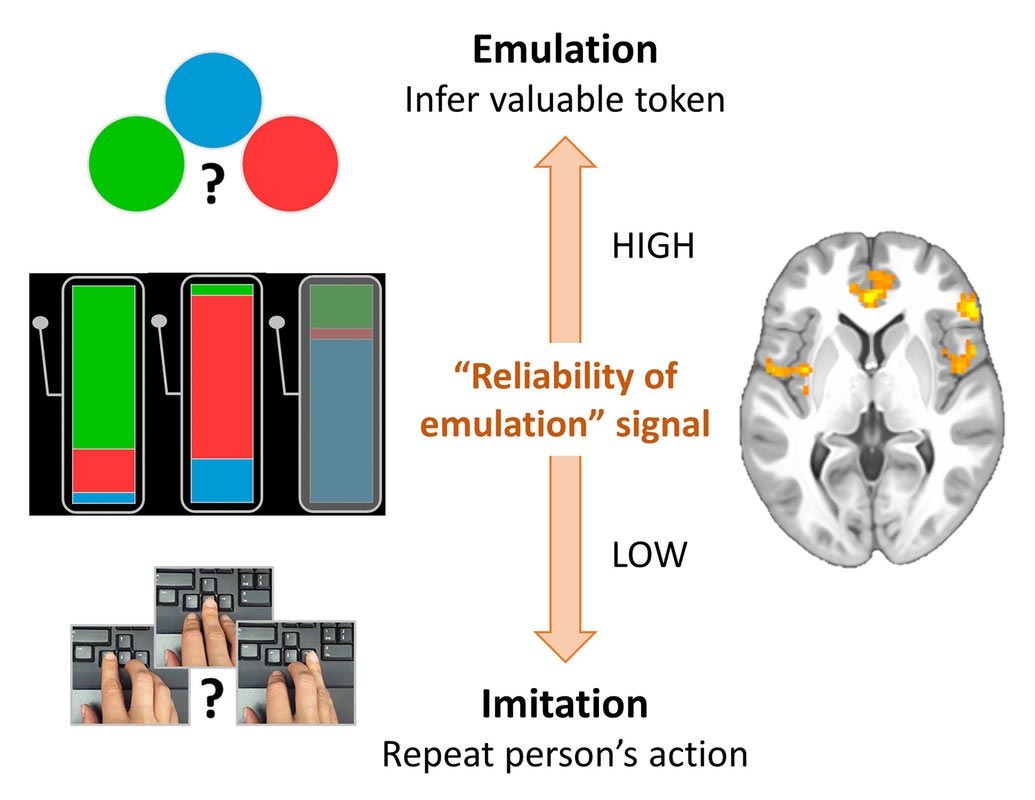
It has long been theorized that there are two types of observational learning: imitation and emulation. Imitation is when one person copies another person’s behaviors to achieve the same goal. For example, if you watch the numbers a person dials to open a safe so that you, too, can open it. Emulation, on the other hand, occurs when someone watches another person achieve a goal, infers their goals, and then works to achieve those same goals without copying the other person’s actions. In this case, you might watch the person open the safe, see there are valuables inside, and then later cut it open with a saw.

A new study conducted at Caltech has shown how the brain chooses between the two neural systems responsible for each of these kinds of learning. The study, which appears in the journal Neuron, reveals for the first time how the brain chooses which strategy to employ when faced with an observational learning task.

The research was led by Caroline Charpentier, a postdoctoral scholar in neuroscience who works in the lab of John O’Doherty, professor of psychology in the Division of the Humanities and Social Sciences.

“Depending on the context, sometimes imitation works best, and sometimes emulation is more reliable. Here we wanted to show whether and how the brain can keep track of both strategies in parallel and adaptively pick the best strategy in a given context,” Charpentier says.

In the study, participants were placed in a functional magnetic resonance imaging (fMRI) machine so their brain activity could be monitored while they performed an observational learning task. Once in the machine, they were presented with virtual slot machines that would dispense three colors of tokens: red, green, or blue. Only one of those token colors had monetary value at a given time, but the participants were not told which color that was. The only information they were provided directly was the probability that a particular slot machine would dispense a token of a given color.

Brain Imitation Emulation

In most of the trials, the participants were asked to observe another person play the slot machines, and were told that this person had full knowledge of which color was valuable. By watching the other person pick which slot machine to play, they could gain information that would help improve their chances of receiving a valuable token when it was their turn to play.

However, because it was important for the researchers to discern which observational learning strategy the participants were using when they played the slot machine after watching the other people take a turn, the researchers created two different trial scenarios. In one scenario, the participant was permitted to play the same slot machine as the person they had been observing. Since they played the same machine, the participant could mimic the behavior of the other person and thus engaged in imitative observational learning. In the other scenario, the participant could not play the same machine, which prevented them from simply imitating the other player’s actions and forced them to use an emulation learning strategy.

Charpentier says the fMRI data showed that each of these strategies correlated with activity in specific parts of the brain.

“Imitation tends to rely on regions that we refer to as the mirror system of the brain, which is active both when someone performs an action, such as grabbing an object off the table, or when they watch someone else perform that same action,” she says. “The emulation strategy mapped more to the mentalizing network, which is used for inferring another person’s thoughts and goals, or basically putting yourself in someone else’s shoes and trying to think what they would think.”

Charpentier adds that once the research team had completed the participants’ brain scans, they were able to build a mathematical model of how participants learn from the observed player and chooses between the slot machines. The model suggests that the decision of which strategy to employ is determined by how reliable the emulation strategy is, and results show evidence for this “reliability of emulation” signal in several brain areas.

“If emulation is reliable, these regions are more active and emulation is more likely to be used, while if emulation is not reliable or too uncertain these regions are less active and we prefer imitation,” she says. “In other words, our behavior is a mix of both strategies and the brain can weigh in on which one is best at any point in time.”

Charpentier says that, going forward, she would like to investigate the interactions of the regions of the brain involved in observational learning, or their so-called functional connectivity. In addition, she would like to see if the brain follows a similar model for choosing between other types of learning: if, for example, a person has to choose between learning from experience or learning from observation.

Reference: “A Neuro-computational Account of Arbitration between Choice Imitation and Goal Emulation during Human Observational Learning” by Caroline C. Charpentier, Kiyohito Iigaya and John P. O’Doherty, 17 March 2020, Neuron.
DOI: 10.1016/j.neuron.2020.02.028
bioRxiv: 10.1101/828723

The paper, titled, “Neuro-computational account of arbitration between choice imitation and goal emulation during human observational learning,” appears in the March 17 issue of Neuron. Charpentier’s co-authors include Kiyohito Iiyaga and John O’Doherty. Funding for the research was provided by the National Institute of Mental Health (Caltech Conte Center for the Neurobiology of Social Decision-Making).

https://insideevs.com/news/409201/tesla-cybertruck-lead-future-electric-pickup-trucks/

Tesla’s Cybertruck has created a stir in the auto industry.

EDITOR’S NOTE: This article comes to us courtesy of EVANNEX, which makes and sells aftermarket Tesla accessories. The opinions expressed therein are not necessarily our own at InsideEVs, nor have we been paid by EVANNEX to publish these articles. We find the company’s perspective as an aftermarket supplier of Tesla accessories interesting and are happy to share its content free of charge. Enjoy!

Posted on EVANEX on April 11, 2020 by Iqtidar Ali

Legacy automakers are trying to introduce their own all-electric pickup truck competitors in order to stem customer demand that looks to be shifting, suddenly, to the Silicon Valley contender. Once considered the bread and butter of Detroit’s finest, pickup trucks could be going electric and Tesla has the (very real) possibility of becoming a major player.

Tesla Cybertruck

Above: Tesla’s disruptive new pickup, the Cybertruck (Source: Tesla)

That said, another upstart, Rivian, also introduced their own R1T electric pickup truck to the masses. But the buzz hasn’t been anything like Cybertruck. Tesla’s low poly diagonal design has completely disrupted the pickup truck segment and captured the imagination of the industry. Sure, the Cybertruck cannot perform the R1T Tank Turn, but a spec-for-spec comparison of both electric pickups reveals a significant advantage for Elon Musk’s wild, sci-fi creation.

It’s worth noting, however, that Rivian has received multiple investment rounds from backers like Ford and Cox Automotive accumulating around $1.5 billion in total. In addition, a contract for 100,000 electric delivery vans from Amazon gives Rivian a good chance at (some) future success. Unfortunately, COVID-19 has pushed back Rivian’s production.

So what about competition from Big Auto? GM announced the Hummer EV that the US automaker intends to reveal (pending COVID-19 delays) on May 20th of this year. The Hummer EV has some impressive performance specs noted on GMC’s website such as 0-60 in 3.0s, up to 1,000 hp, and 11,000 lb-ft of torque capacity — but it starts at $70,000 and production is expected to start (earliest) by 2022.

Keep in mind, by 2022, it’s conceivable quite a few Cybertrucks will be selling in the United States. GMC’s price point will also present a potential stumbling block. Tesla’s Cybertruck pricing starts at only $39,900 for Single Motor, $49,900 for Dual-Motor AWD, and $69,900 for the Tri-Motor AWD variant. Therefore, Cybertruck’s loaded version will be roughly equal to the Hummer EV’s base price.

In the following video, the host of the YouTube channel Two Bit da Vinci, Ricky, discusses the line-up of planned electric pickup trucks coming to market: Rivian R1T, Dongfeng Rich 6 EV (NISSAN), Bollinger B2, Ford F-150 EV, Lordstown Endurance, Atlis XT, GMC Hummer EV, Neuron EV, Nikola BadgerKarma Pickup Truck, and Tesla Cybertruck. In order to identify a few standouts, let’s highlight some notable launches (both from startups and legacy automakers).

Above: Cybertruck and the rise of electric pickup trucks (YouTube: Two Bit da Vinci)

First, the boxy Bollinger B2 claims to be the world’s most capable electric pickup truck but it has yet to be tested. Granted, the specs of the B2 are impressive but it only has 200 miles of range. The Cybertruck’s range starts at 250 miles for base RWD variant, 300+ miles for Dual, and 500+ miles for the Tri-Motor version.

Meanwhile, Nissan is partnering with Chinese automaker Dongfeng and is producing a low-priced electric pickup truck that can go up to 175 miles on a single charge. It’s an affordable, pollution-free truck — a good choice for Chinese customers as the chances of Cybertruck reaching the Chinese market soon remain slim — this could be a good option (in the Chinese market) until then.

Ford F-150 EV prototypes have been spotted getting tested in the wild, a good sign indeed. However, we haven’t heard much since the initial buzz on a specific launch timeline, range, and other vital information. We’ll have to wait and see if the electric variant of the F-150 is able to dent some of the 500,000+ Tesla Cybertruck reservations — to do this, Ford will need to hurry up and start production soon.

Don’t forget: the Tesla Cybertruck can be produced at only 15-20% of capital expenditure (CapEx) compared to the gasoline-powered Ford F-150 according to Sandy Munro (a seasoned vehicle teardown expert) — that’s why the Cybertruck’s starting price is so low compared to to the other electric pickup trucks.

===

Written by: Iqtidar Ali. An earlier version of this article was originally published on X Auto.

EDITOR’S NOTE: This article comes to us courtesy of EVANNEX, which makes and sells aftermarket Tesla accessories. The opinions expressed therein are not necessarily our own at InsideEVs, nor have we been paid by EVANNEX to publish these articles. We find the company’s perspective as an aftermarket supplier of Tesla accessories interesting and are happy to share its content free of charge. Enjoy!

https://www.infoq.com/news/2020/04/amazon-aws-deepcomposer-ga/

Amazon Announces General Availability of AWS Deepcomposer

LIKEDISCUSSPRINT

Recently, Amazon announced the general availability of Deepcomposer, a service in AWS, which provides developers with a creative way to learn Machine Learning (ML). Deepcomposer is a machine learning-enabled keyboard for developers, and available for purchase.

At re:Invent last year, Amazon launched AWS Deepcomposer as a preview, and it is generally available now with a few new features. These features include:

  • Learning Capsules: providing developers with tutorials to learn Generative AI in easy-to-consume, bite-sized modules.
  • In-Console Training: enabling developers to train their generative models in the AWS DeepComposer console, without having to write a single line of machine learning code.
  • Rhythm Assist: aligns musical notes users play on the keyboard to the closest beat.

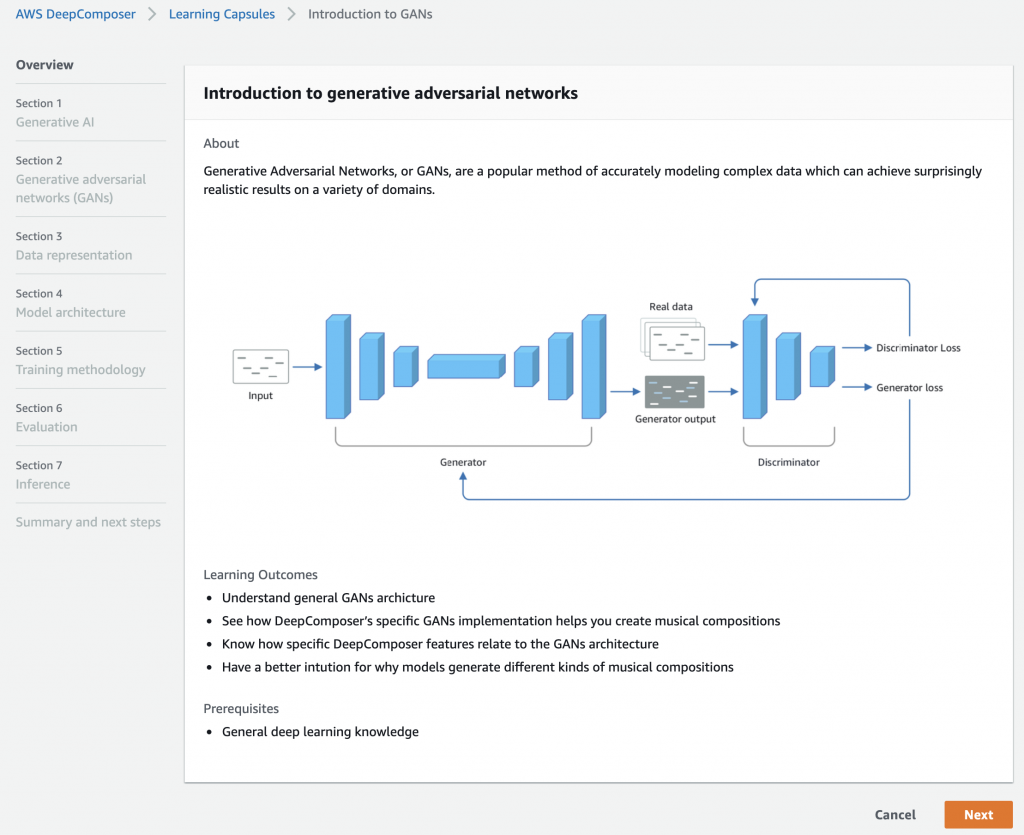
Deepcomposer belongs to the same family of AWS hardware as DeepLens and DeepRacer with focus on teaching developers specific machine learning capabilities. With Deepcomposer, the goal is to allow developers to learn about generative adversarial networks (GAN), a neural network architecture explicitly built to generate new samples from an existing data set.

Julien Simon, artificial intelligence & machine learning evangelist for EMEA, states in a blog post on the GA of Deepcomposer:

Until now, developers interested in growing skills in GANs haven’t had an easy way to get started. In order to help them regardless of their background in ML or music, we are building a collection of easy learning capsules that introduce key concepts, and how to train and evaluate GANs. This includes a hands-on lab with step-by-step instructions and code to build a GAN model.

Source: https://aws.amazon.com/blogs/aws/aws-deepcomposer-now-generally-available-with-new-features/

A GAN puts different neural networks against each other to produce original digital works based on sample inputs, for instance, from the Deepcomposer keyboard. With Deepcomposer service, users can train and optimize GAN models to create original music. For example, a user plays a short melody using the keyboard or on-screen one, and the service then automatically generates a backing track based on your choice of musical style.

Gillian Armstrong, a solution architect at Liberty IT, wrote in a medium.com post:

The DeepComposer Studio has a range of ways of interacting with it, so people of all levels (and people moving through levels) can get to work right away. DeepComposer needs two inputs to work:

  • A short piece of music
  • A machine learning model (this is what will be used to create the composition)

Lastly, customers can now try Deepcomposer out on an AWS free tier and buy the keyboard for $99 at Amazon.com. Moreover, the keyboard is currently only available in the US with access to the AWS Deepcomposer Console from the US East region. Note that AWS customers can also use Deepcomposer without the keyboard. Further pricing details for consuming the service is available on the pricing page.

https://www.dcrainmaker.com/2020/04/quick-how-to-garmin-wearable-heart-rate-broadcasting-to-apps.html

Quick How-To: Garmin Wearable Heart Rate Broadcasting to Apps

DSC_3680

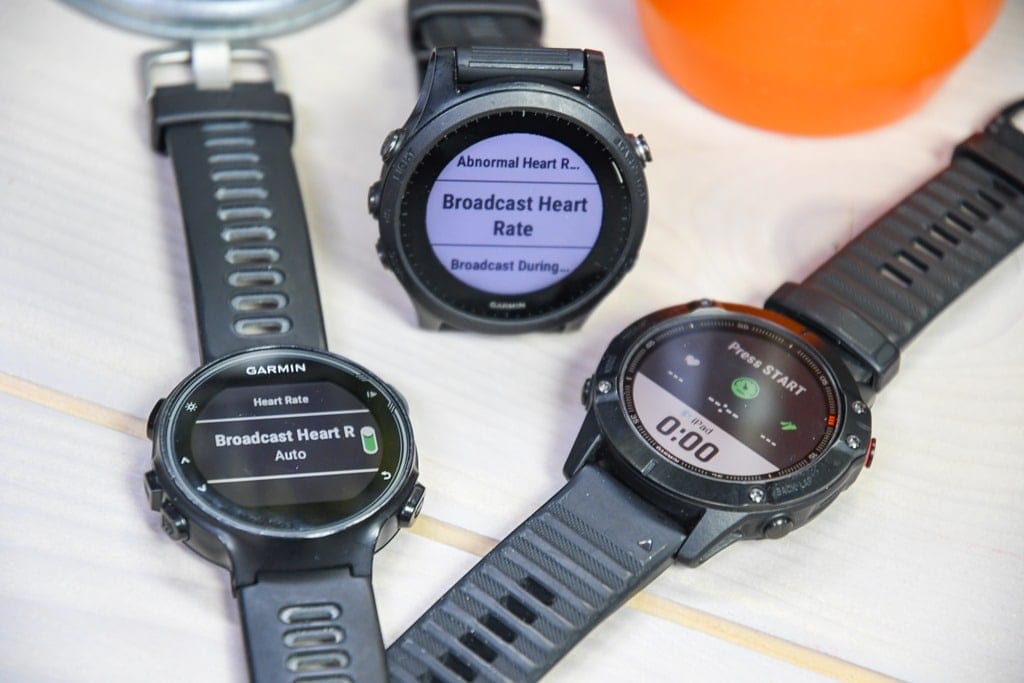
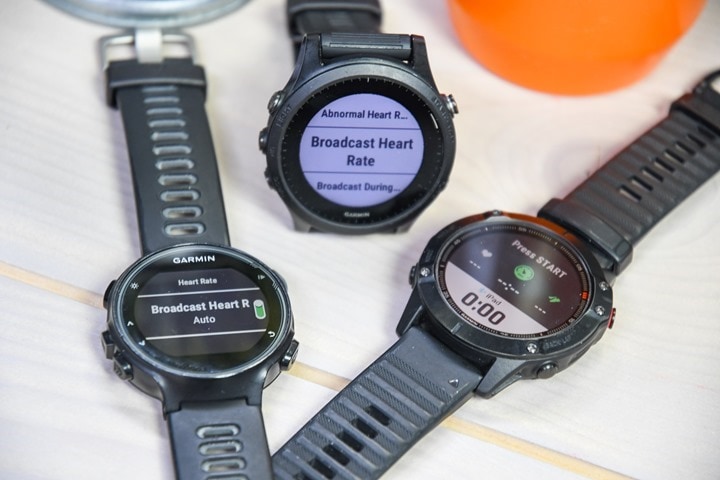
If you’re spending a bunch more time lately indoors using fitness apps to maintain your sanity you might not realize that you can broadcast your heart rate right from your Garmin watch straight to your favorite app – thus skipping the need for a separate heart rate strap/sensor. Garmin has long been one of the few device makers to actually allow this, but if you’ve got a COROS watch or the new Timex R300 you can also do the same. More on those details at the end of the post.

Garmin offers two modes for broadcasting heart rate:

1) Over ANT+ (for virtually every wearable ever from them)
2) Over Bluetooth Smart (for most newer 2019/2020 wearables)

The modes vary a bit, so I’ll quickly run through how to do it in both modes. In general, if you’re using a phone/tablet/Apple TV/Mac, it’s going to be easier to do via Bluetooth Smart. Whereas if you’re using a PC it’s going to be easier to do via ANT+ (again, generally). This also works on most exercise gear too, even a Peloton bike (which accepts both ANT+ & Bluetooth Smart HR connections).

Now, the point of this series is quick tips – not DCR-length crazy tips. So, here’s a video I put together that shows the tip in 5 minutes:

Or, you can simply scroll on down below for the written details for each watch/broadcasting type.

BLUETOOTH BROADCASTING:

If you’ve got a newer Garmin watch, you’re in luck. Those support Bluetooth Smart transmission using a new ‘Virtual Run’ profile. While designed for running on a treadmill (as it also includes running pace and cadence), it actually works just fine for any activity you want – including cycling on Zwift. I detailed the whole feature here in a post a few months ago.

This function is *only* available on newer Garmin wearables, likely due to hardware architecture limitations on older chipsets. Here’s what’s supported:

Supported watches: Garmin Forerunner 245, Forerunner 945, Fenix 6 Series (it might also work with the Tactix Charlie and Quatix 6 Series, but I don’t have either)

If you don’t have one of the above watches, you’ll need to use the ANT+ broadcasting method down below. Or, if you found this post a year or so in the future and have some mysterious new watch not listed above, it probably supports this method.

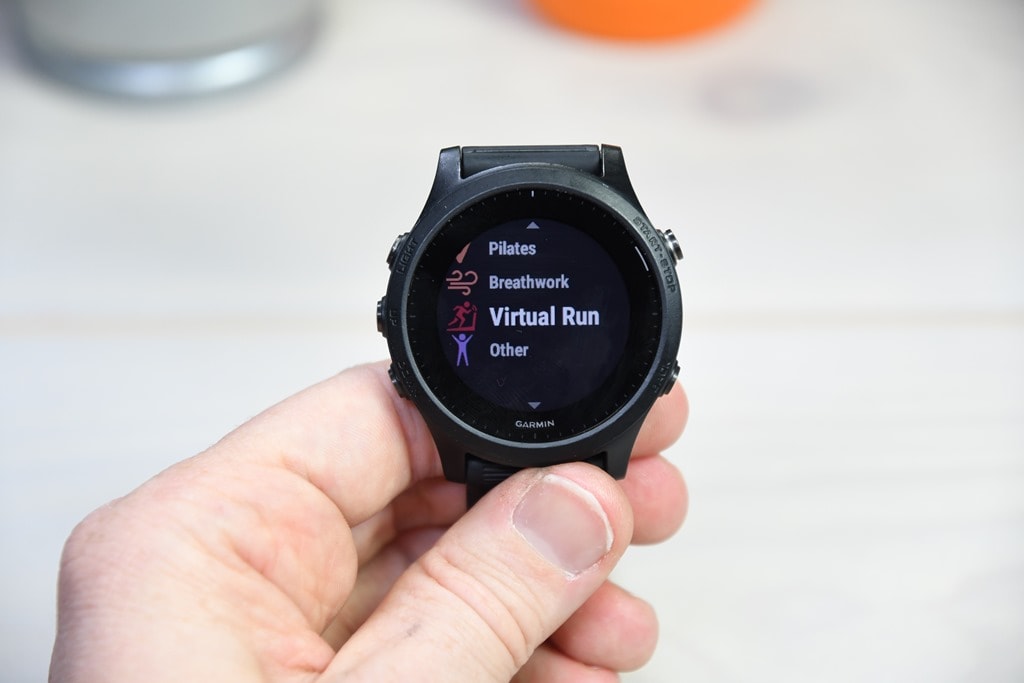
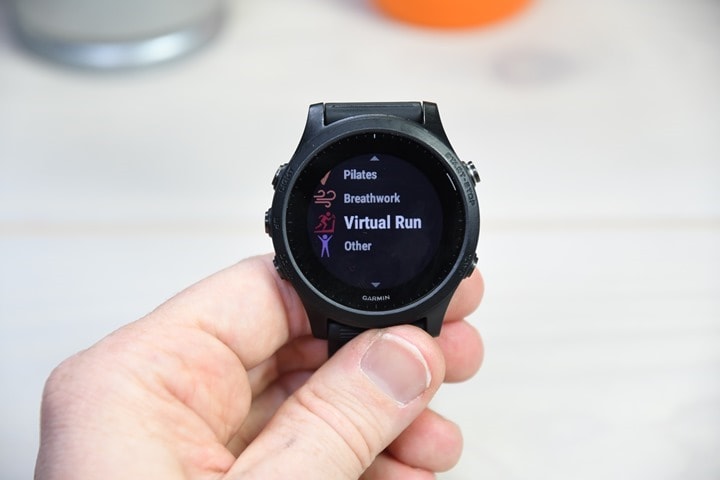
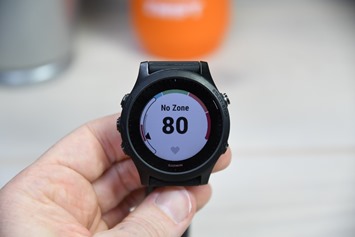
To enable it, on your watch go to start a new sport, so press the upper right button once, then scroll all the way down until you find ‘Virtual Run’ (you might have to add it by first pressing the “+” option at the bottom of the list):
DSC_3682

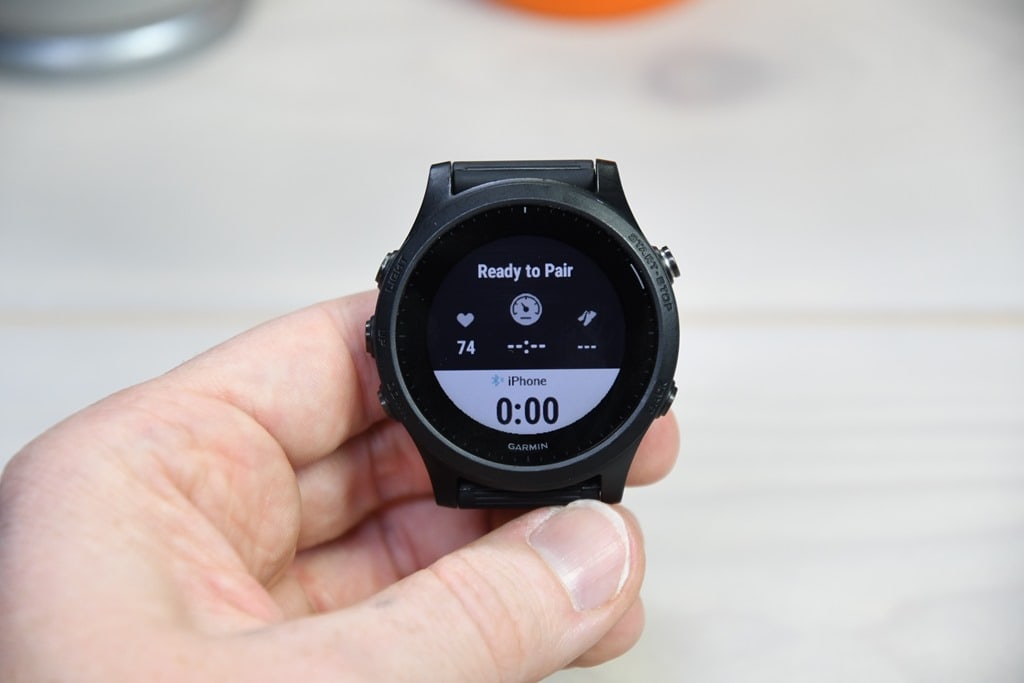
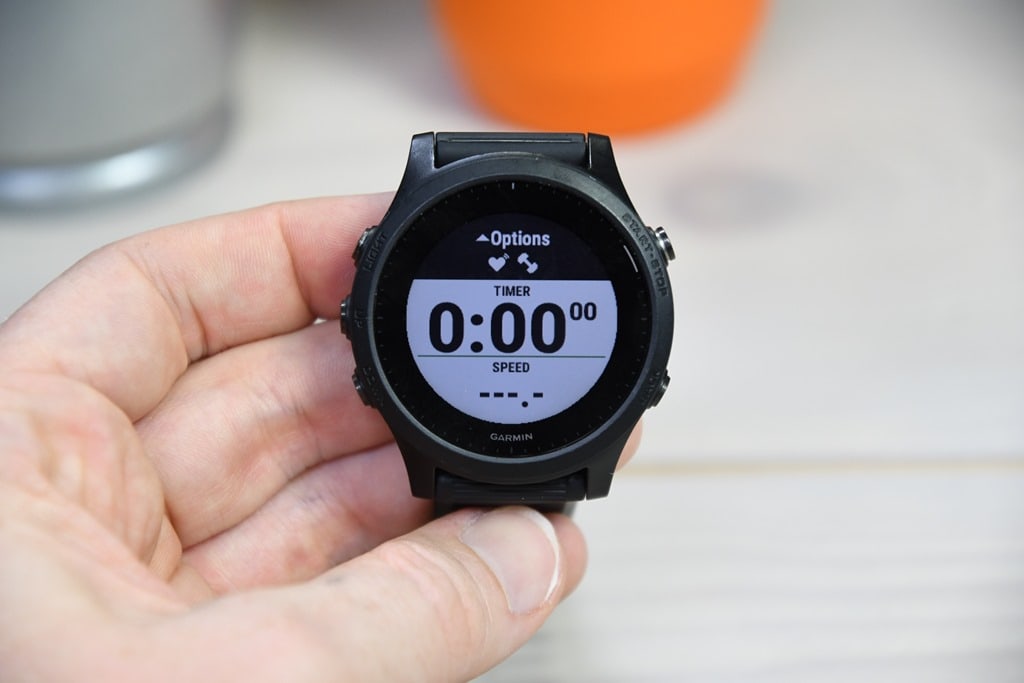
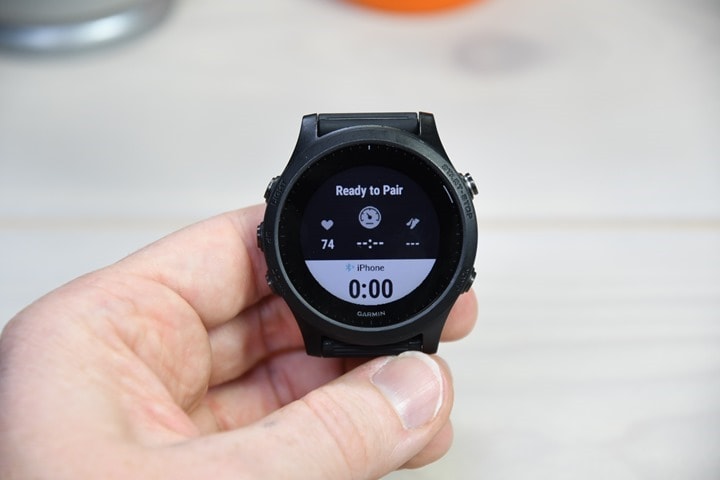
Once you’ve got Virtual Run selected, press the down arrow past the informational message to select OK. At this point you’ll be at a screen like this:
DSC_3684

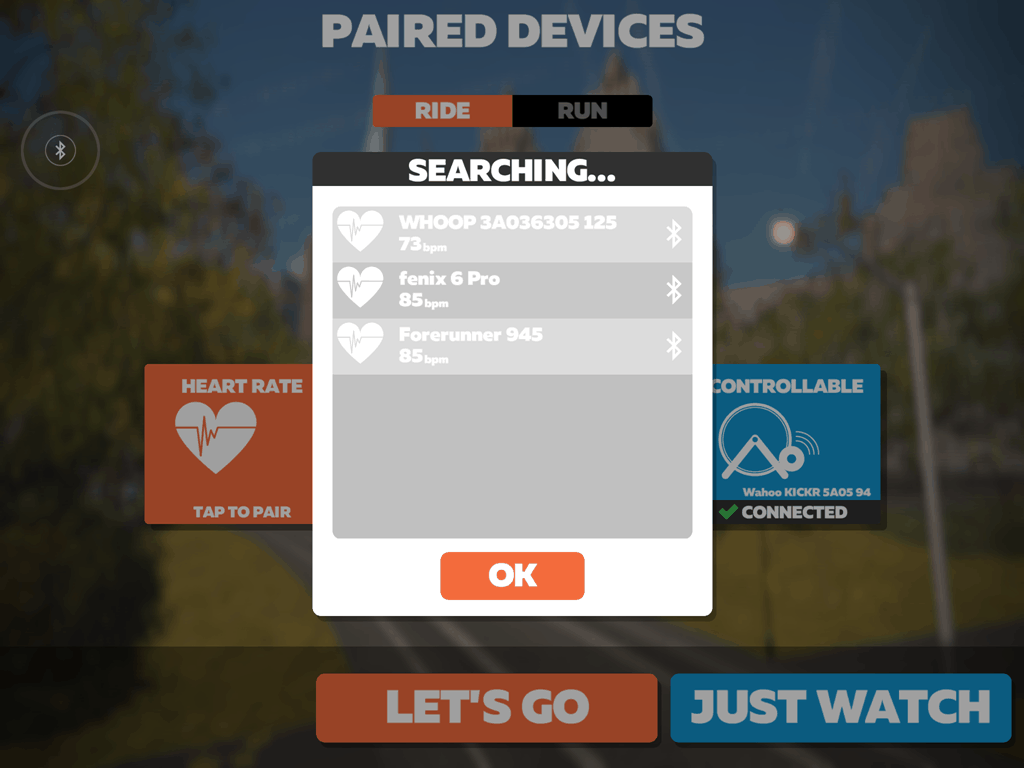
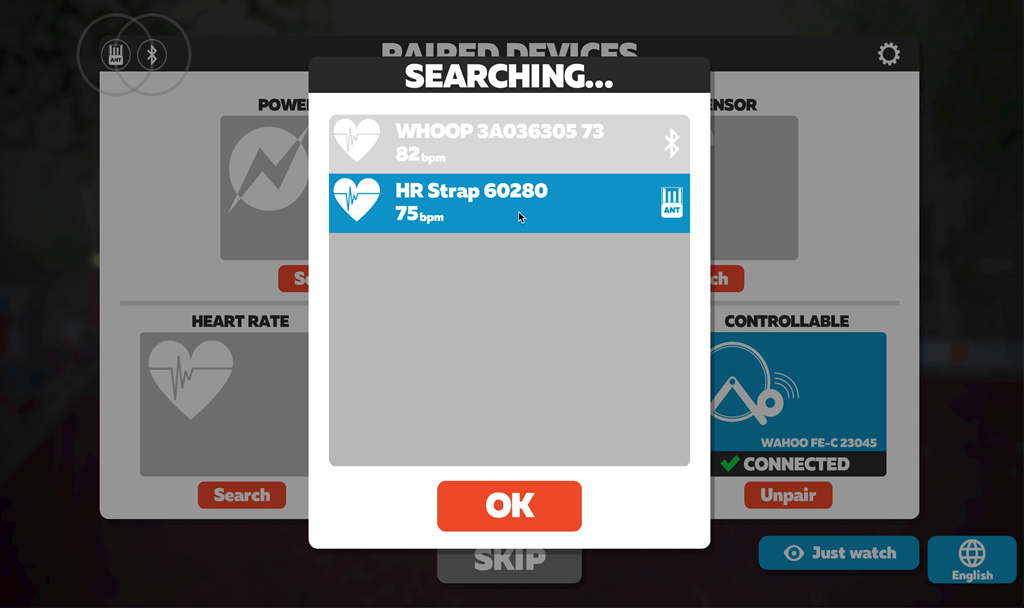
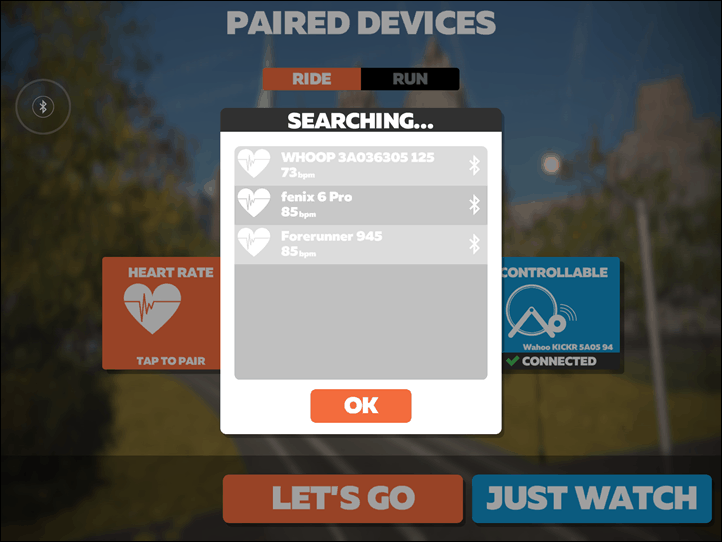
Now, simply open up your app of choice, and you should see the Garmin watch listed, by the name of the watch itself:
IMG_1615

Just select that as usual, and you’re good to go!

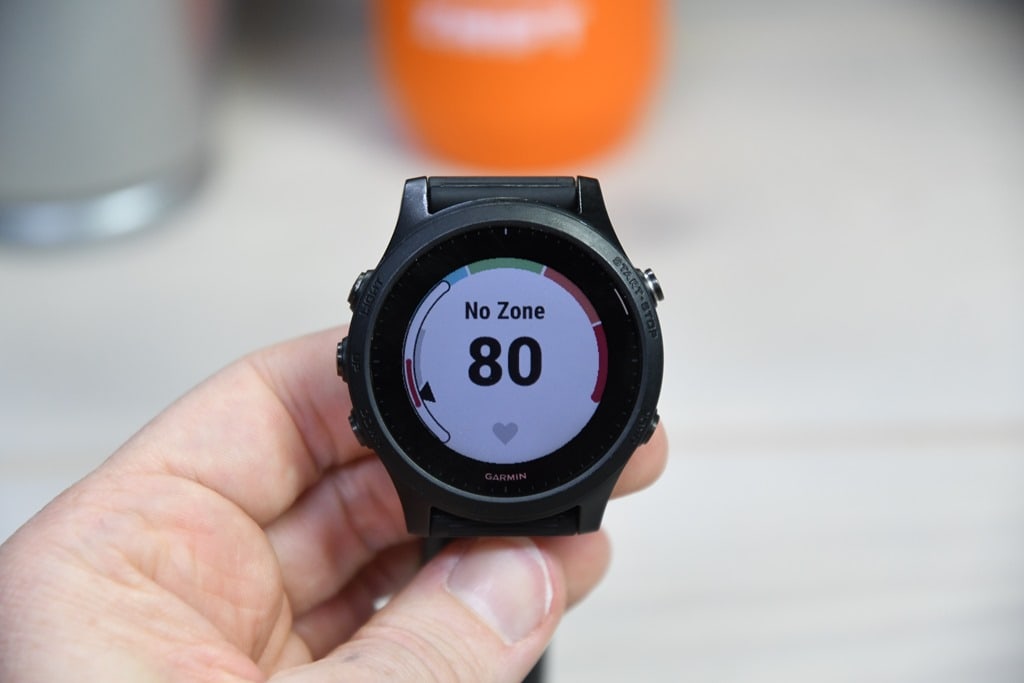
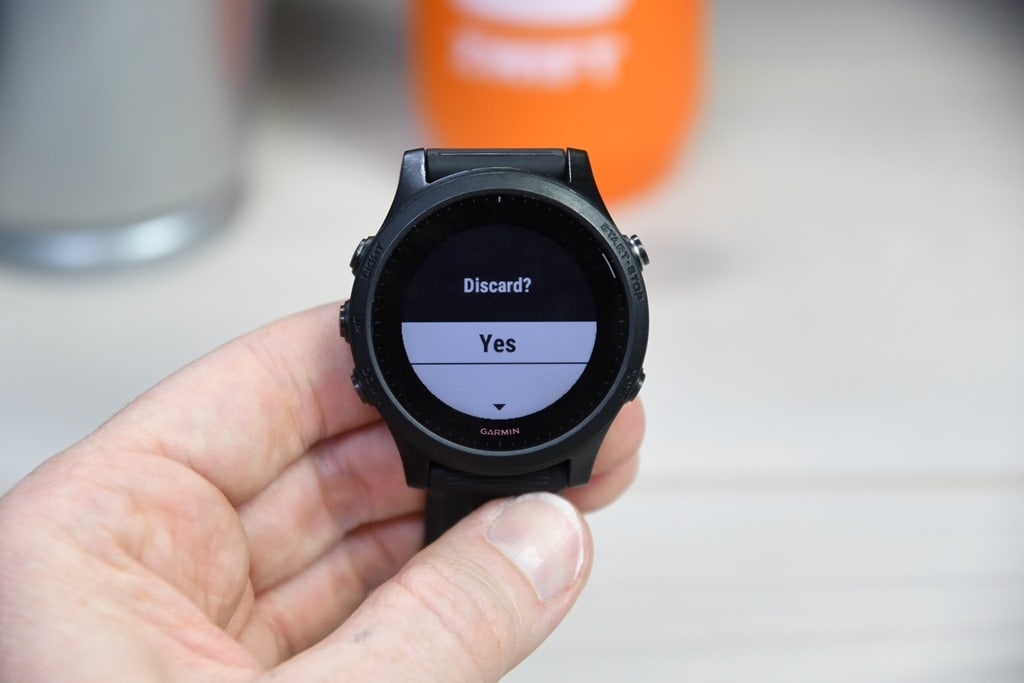
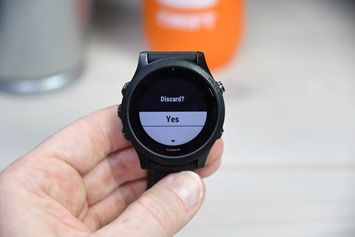
Meanwhile, on the Garmin watch, you’ll likely want to start the activity. You can discard this later on, but otherwise that pairing window times out after about 30-40 minutes. Whereas if you simply start the activity it’ll broadcast in the background. Then afterwards just stop and discard it.
DSC_3686 DSC_3689

Now the only downside to this is that if you wanted to record a legit cycling activity (including connecting to a power meter or cycling sensors), you can’t do that in the Virtual Run mode. Which in turn means that if you wanted to record aforementioned legit activity so that it shows up as a legit workout in your training log so you get all the physiological training load metrics updated – it won’t do that.

For that, you should use the ANT+ broadcasting method. However, I did ask Garmin whether they’ll simply enable Bluetooth Smart broadcasting in a similar manner to the existing ANT+ method (or implement a virtual cycling option), and they said it’s already in the cards. But they don’t have an exact timeframe for when such a software update might happen. So until then, we’ll have to make do with the above method.

And indeed, I’ve used it a number of times in a pinch. Obviously there can be downsides to optical HR sensors, but I find that accuracy on an indoor cycling trainer tends to be very good (primarily because there’s no road vibration, or running cadence to deal with). Again, it’s an option.

ANT+ BROADCASTING:

Don’t have the fanciest new Garmin? No worries, you can still do this via ANT+ instead. Virtually every Garmin wearable ever made supports this. The steps might vary slightly, but they’ve been doing this for years upon years, even with the cheapest wearables.

The downside with ANT+ of course is that it won’t work on iOS or Apple TV devices (but will on many Android devices). If you’ve got a PC or Mac, you’ll need an ANT+ USB adapter, which if you Zwift you might have anyway already. It works natively on Peloton bikes (but not just the digital app), as they support ANT+ heart rate connections.

The basics steps below are basically the same on any Garmin wearable. Now technically there’s two ways to do this with ANT+:

A) Ad-hoc broadcasting only when you want it
B) Turn on broadcasting every time you start a workout

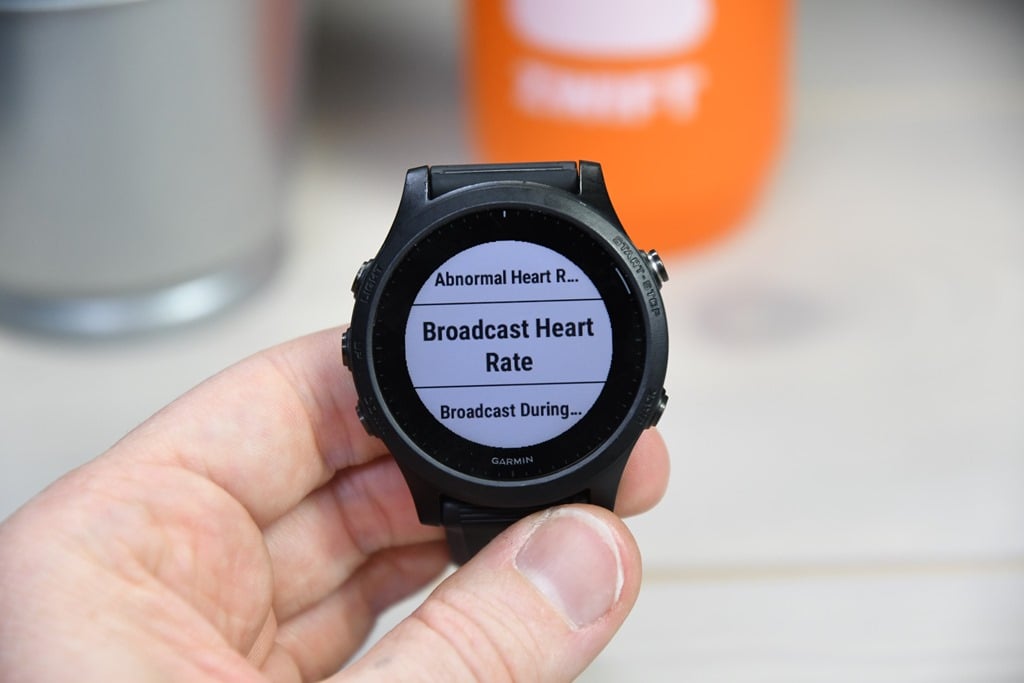
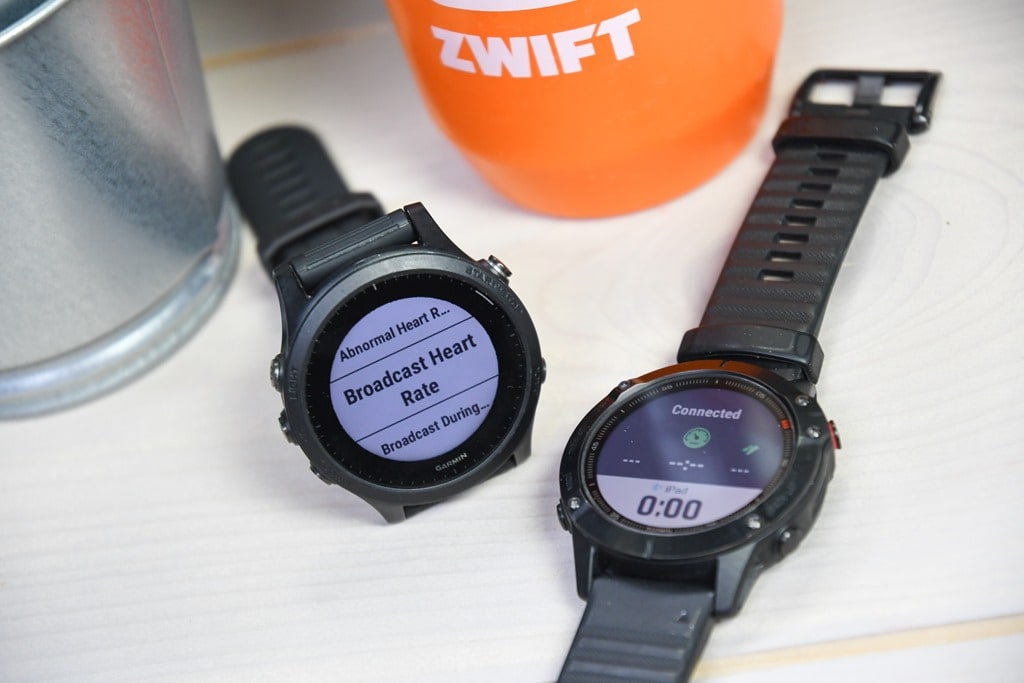
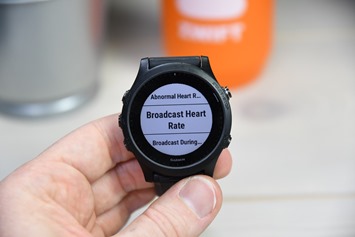
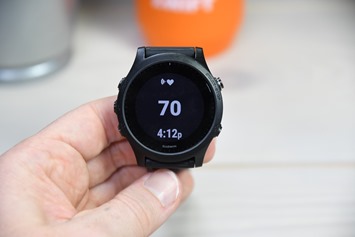
I’ll show you the ad-hoc steps, and then give you the one-line option for turning it on every time you start a sport. Hold down the middle settings button > Sensors & Accessories (in some watches you can skip this menu) > Wrist Heart Rate > Broadcast Heart Rate:
DSC_3694 DSC_3695

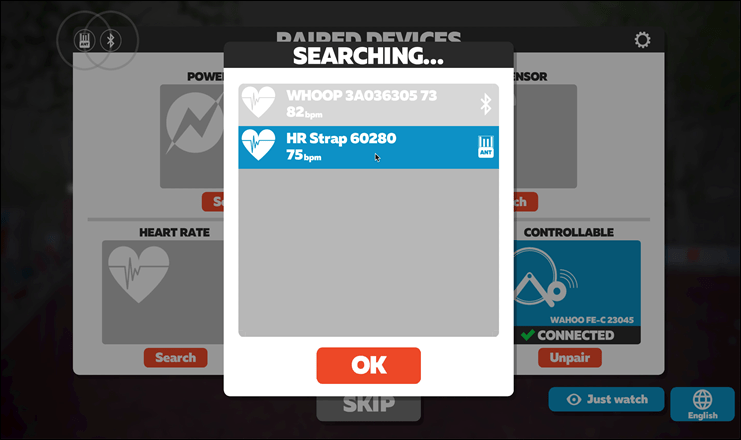
Now, this will be broadcasting your heart rate over ANT+, so you can see it easily from any app compatible with ANT+. For example, here it is on a MacBook with an ANT+ adapter. Note the ANT+ icon, and it even has a unique ANT+ ID that’ll always remain the same (so it’ll automatically connect next time, just like any other HR strap).
vlcsnap-2020-04-09-16h27m27s894

When you’re done, you’ll simply hit the escape button to end the broadcast.

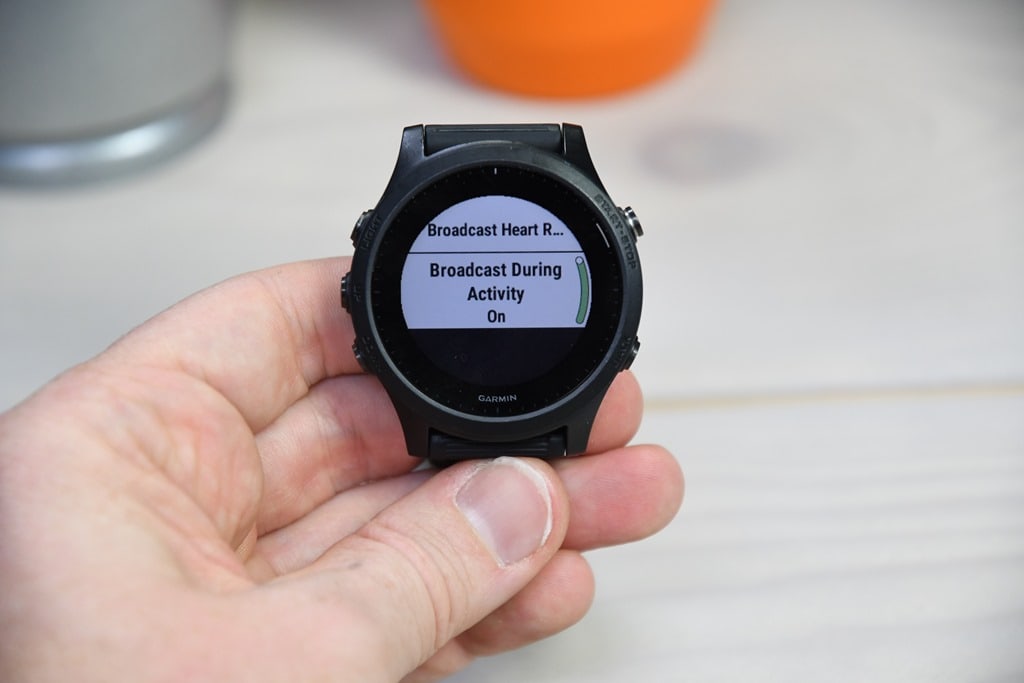
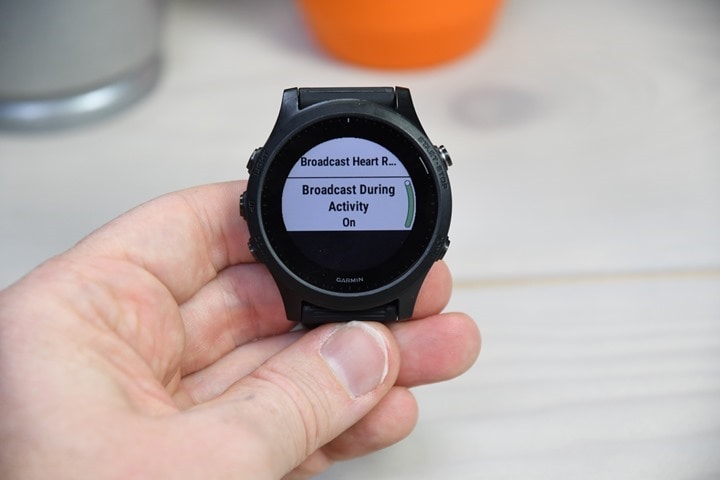
But my favorite option is to simply enable it anytime I start a workout (no matter the type). The battery impact here is negligible. Again, it’s under Settings > Sensors & Accessories (or skipped again on some watches) > Wrist Heart Rate > Broadcast During Activity set to ‘On’:
DSC_3697

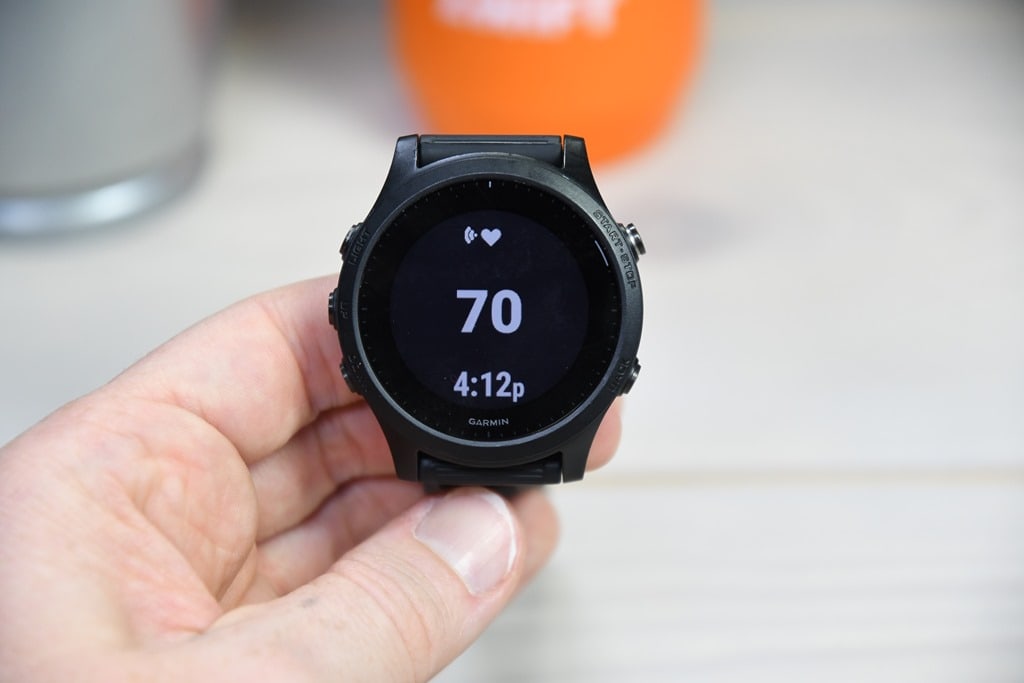
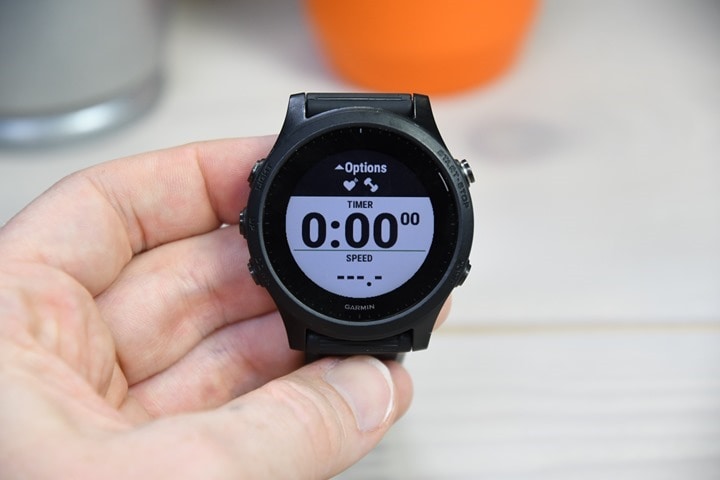
And now if you go to start a workout you’ll notice the HR icon has a little transmission signal coming off of it:
DSC_3698

That’s it – the result is the same and it’ll be seen in any apps/devices that support ANT+. This can also be used to pair to bike computers like a Garmin Edge, Wahoo ELEMNT series, or basically anything. Super practical if you forgot your HR strap or such.

WRAP-UP:
DSC_3677

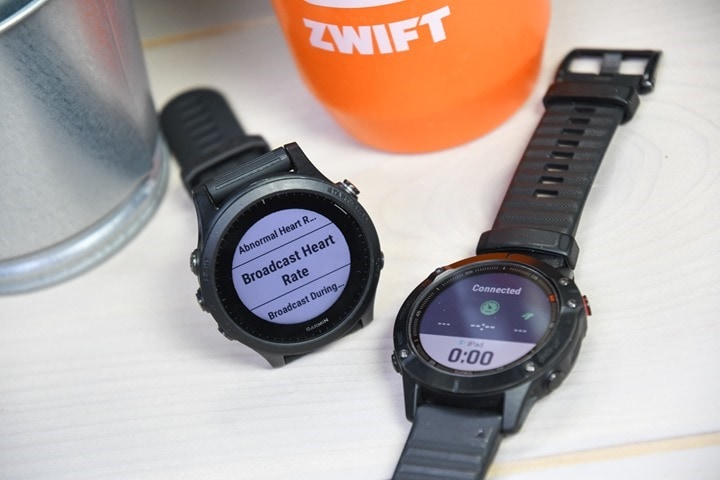
Finally, as I mentioned earlier, there are some other watches that can broadcast your optical HR out as well. They are as follows:


Timex Ironman R300 GPS Watch: To enable this, press the middle button > Settings > Workout > Broadcast HR > Set to ‘ON’ (though in practice, I’m struggling a bit to make this work, so got some more research to do there.)

Whoop 3.0: While not a watch per se, this wearable will broadcast your HR over Bluetooth Smart once enabled from the app. It’ll then remain on at all times for when an app wants to connect to it. It doesn’t materially impact battery life since it only transmits it once required by the app.

Whereas devices from Apple, Fitbit, Suunto, Samsung, and countless others don’t broadcast your HR. Notably, while some Polar wearables do broadcast your HR on some older watches, it really only works reliably with other Polar gear. I wouldn’t recommend using it for non-Polar connectivity.

With that – hopefully you found this post useful, and the shorter format helpful as well for these sort of brief how-to type items.


https://mspoweruser.com/echo-dot-3rd-gen-discounted-amazon/

Deal Alert: Echo Dot (3rd Gen) price is back to its record low

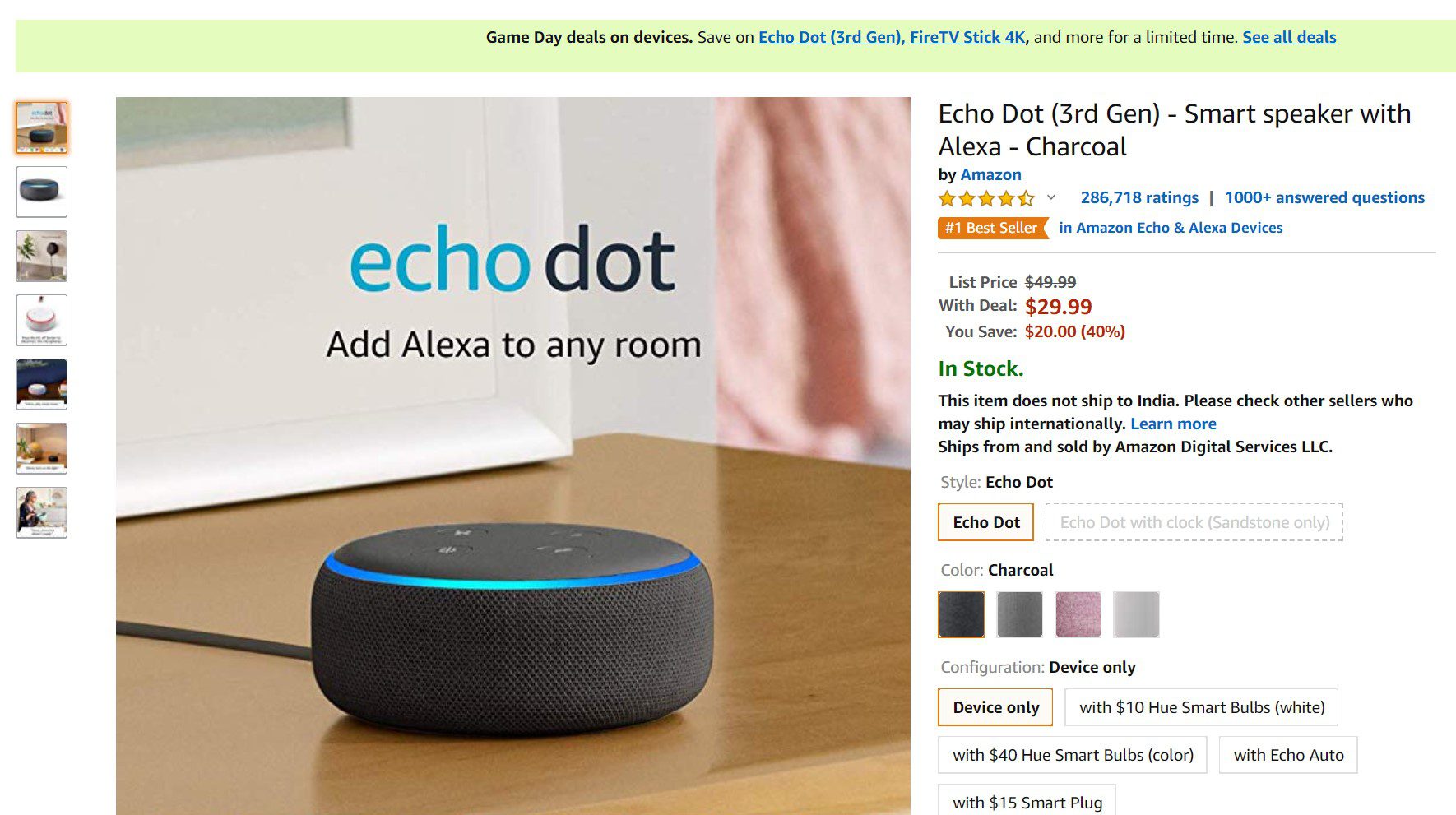
If asking digital assistants to play music, answer questions, read stories, and tell jokes is your thing, then Amazon Echo Dot is definitely a great product and in many aspects, it’s even better than what rivals are currently offering. It’s easy to recommend even more so because the discount on the third-gen Echo Dot is back again at Amazon, so it’s now easier for you to make the purchase.

Third generation Amazon Echo Dot is now selling at a price point of $29.99, down from its original price point of $49.99 at Amazon. So, if you cash in on the deal today, you’ll be paying $20 less than the original price point. The deal is available for a limited time only, so you better make the purchase right now.

Deal Alert: Echo Dot (3rd Gen) price is back to its record low 1

Amazon has a decent collection of music, but in case you want to invest in other music subscriptions,

Echo Dot comes with fabric design and improved speaker for richer and louder sound. You’ll also be able to stream songs from Amazon Music, Apple Music, Spotify, Sirius XM, and others.

https://bigthink.com/mind-brain/videoconferencing?rebelltitem=4#rebelltitem4

4 weird things that happen when you videoconference

If you surreptitiously pick your nose, chances are that everyone can see you doing it.

As the COVID-19 pandemic forces many U.S. colleges and universities to move their courses online, connecting online via video is now having its moment.

Family, friends, neighbors and even TV talk-show hosts are now meeting and broadcasting from home. Meanwhile, Microsoft, Google and Zoom are struggling to meet the demand for their videoconferencing services.

People have long noticed, however, that some peculiar things happen in videoconferencing. A magazine mentioned its “bizarre intimacy.” Jaron Lanier, who is considered the “father of virtual reality,” once remarked that it “seems precisely configured to confound” nonverbal communication.

As an educational technology researcher, I have explored these and other subtle but strange elements of videoconferencing. I do this through phenomenology, the study of lived and embodied experience.

I seek to understand why certain issues arise when technology is introduced to educational settings and to suggest ways to deal with them.

Here are four odd things that happen when you’re engaged in a videoconference.

1. Eye contact is lacking

First, and probably most obviously, meeting by video interferes with eye contact. This is due to a simple technical limitation: There’s no way to put the camera and the display screen in the same spot. When you look at the camera on your device, you give the impression you’re looking someone in the eye. However, when you look at their eyes on screen, you appear to be looking away.

Phenomenology and psychology both emphasize the importance and complexity of eye contact.

“In eye contact you not only observe the eyes of the other person,” observes author and philosophy professor Beata Stawarska, but this other person is also “attending to your attention while you are attending to hers.”

This extends to multiple levels of awareness, as philosopher Maurice Merleau-Ponty observes: “I look at him. He sees that I look at him. I see that he sees it. He sees that I see that he sees it.” Merleau-Ponty adds that as a result, “there are no longer two consciousnesses” in a moment of locked eye contact, “but two mutually enfolding glances.”

For Merleau-Ponty, these kinds of experiences are a part of what he calls our embodied reversibility: I see, hear and experience others as they see, hear and experience me.

2. Looking awry

Here’s a warning a pair of researchers gave about making a video guest presentation in a classroom: “Even if… you are not ‘on,’ you are on-screen, and probably larger than life-size. If you surreptitiously pick your nose, chances are that everyone can see you doing it.”

Sitting in front of a webcam and computer, the guest-presenter sees a room full of students. But the students see a talking head on a projection screen, showing every blemish or imperfection. Instead of sitting or facing one another reciprocally, “face to face,” we find ourselves looking up, down or sideways at the sometimes much-larger-than-life image of those we see and speak with online.

3. Feeling watched

Without overt eye contact and embodied reciprocity, people who videoconference can sometimes feel silently scrutinized or surveilled. A person may worry: Exactly how does the unblinking camera eye show me to others?

“Though we may pretend to be looking at another person when we FaceTime or Zoom,” journalist Madeleine Aggeler observes, “really we’re just looking at ourselves – fussing with our hair, subtly adjusting our facial expressions, trying to find the most flattering angle at which to hold our phones.” Videoconferencing can be a bit like the distracting or enervating experience of talking while constantly glancing ourselves in a mirror.

4. Squelching voices

The long-lived tagline of the Verizon network, “Can you hear me now?” is a question associated with technology. Face to face, we are able to monitor our speaking as a result of our own vocal projection and the acoustic environment. And we do this based on the assumption of acoustic reversibility: that others hear the world as we do.

Online, this is not necessarily the case. Our voices might break up as they are compressed and transmitted, a noise in the background might overtake us or our mic might simply be set to “mute.” By its very nature, sound, unlike vision, is relatively undirected. Face to face, it is enveloping and shared. Its disruption and interruption online can be as jarring as speaking with someone who refuses to make eye contact.

A new normal

Despite the odd ways that communication takes place in a videoconference, as a society, we’re about to get more accustomed to this mode of communication. There are many websites full of tips on how to make the most of our videoconferencing experience.

Among other things, these tips advise us to place the camera at eye level to appear naturally positioned, to use a clean, well-lit space to be clearly visible and to wear a headset to maximize audio quality. But no matter what we do to have a smooth videoconference experience, video will lack the “mutual enfolding” of the senses that, as Merleau-Ponty knew, comes with meeting in the flesh.

Norm Friesen, Professor of Educational Technology, Boise State University

This article is republished from The Conversation under a Creative Commons license. Read the original article.

https://www.androidpolice.com/2020/04/10/samsung-will-shut-down-its-s-voice-virtual-assistant-in-june/

Samsung will shut down its S Voice virtual assistant in June


Samsung’s first shot at a voice assistant was S Voice, an incredibly mediocre product that debuted with the Galaxy S3. It was later preinstalled on most Samsung devices produced from 2012 to 2017, and was finally replaced by the marginally-better Bixby assistant starting with the Galaxy S8. S Voice has remained functional all this time, but that won’t be true for much longer.

Samsung told SamMobile that the S Voice digital assistant will be discontinued on June 1st, 2020. After that point, all queries will be answered with “I’m unable to process your request.”

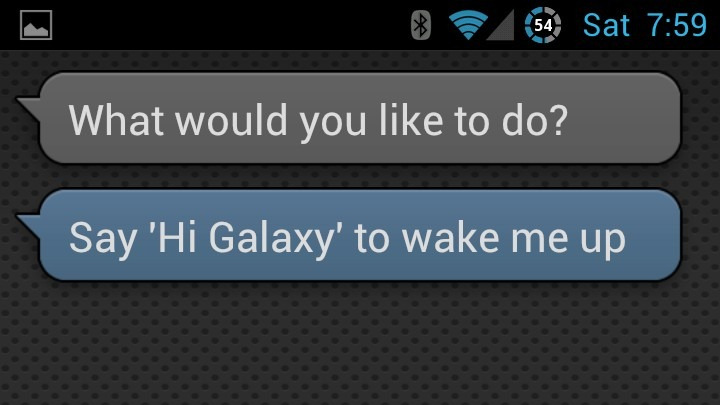
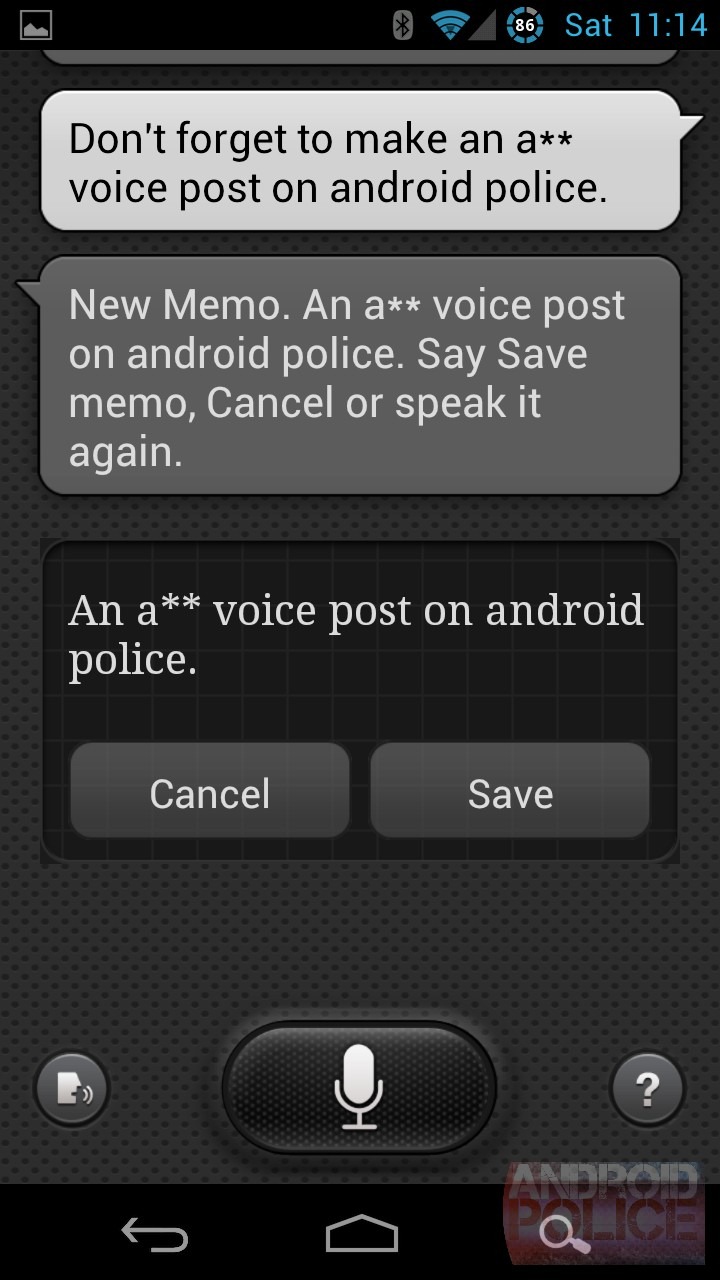
Screenshots from our original hands-on with S Voice in 2012

It’s unlikely that anyone will miss S Voice, since most of the devices it was installed on will still be able to use Google Assistant (or at least the older Google Search). However, some of Samsung’s older wearables that were never updated to use Bixby will be stuck with no voice assistant. Sorry, Galaxy Gear owners.