Image by THAIS VARELA / StocksySeptember 12, 2020 — 9:04 AMShare on:
We’ve all had those mornings when you can’t seem to shake the grogginess—even if you got a full eight hours of sleep. And if it’s happening on a consistent basis, you’re no doubt wondering what can be done.
The answer may lie in deep and REM sleep—specifically, how much of it you’re getting. And as it turns out, the number of hours you’re asleep isn’t necessarily associated with how much deep sleep you’re getting. Here’s why the later sleep stages are so essential to achieving restful and restorative sleep, plus how to get more of them.
Why REM sleep is so important for energized mornings.
We cycle through four stages of sleep every night, each with a different function. There’s Stage 1, as you drift off; Stage 2, or light sleep; Stage 3, which is deep sleep; and finally Stage 4, or REM sleep.
In deep sleep, the body repairs cells and promotes muscle and tissue growth. And in REM sleep, which happens to be the sleep stage in which we dream, the brain is believed to consolidate memories.
According to board-certified family medicine doctor Robert Rountree, M.D., these sleep stages are crucial to wake up feeling rested. “In my opinion, it’s not the total hours you’re in bed; it’s how much deep sleep and how much REM sleep you’re getting,” he tells mbg co-founder Jason Wachob on the mbg podcast. “Some people can be in bed for six hours and get two hours of deep and two hours of REM—those people are my heroes.”
Because, unfortunately, some of us have more difficultly achieving deep sleep and REM sleep than others. Whether because of issues like insomnia or anxiety, certain medications, even drinking before bed—the list goes on. Luckily, there are a few things we can do to help our bodies get into deeper sleep every night.ADVERTISEMENT
How to get more REM sleep.
To ease into a deep, restorative night’s sleep, your body and nervous system need to be able to relax. This will help you not only fall asleep faster but stay asleep and cycle through the sleep stages effectively. One way to help do this is with a magnesium supplement.
“That’s kind of the starter. It’s tried and true,” Rountree says of magnesium on the podcast. “We’ve been using magnesium to help people sleep forever.”
Other tips to help stay asleep and wake up refreshed include:
putting your phone down at least an hour before bed
When we don’t get quality REM and deep sleep, we’ll feel it—and nothing throws off a day like waking up groggy. But with a good bedtime routine, the right supplement, and a consistent sleep schedule, it’s possible for our bodies to get back to a good night’s sleep.If you are pregnant, breastfeeding, or taking medications, consult with your doctor before starting a supplement routine. It is always optimal to consult with a health care provider when considering what supplements are right for you.
Sarah Reganmindbodygreen Editorial AssistantSarah Regan is a writer, registered yoga instructor, and Editorial Assistant at mindbodygreen. She received her bachelor’s in broadcasting and mass communication from SUNY Oswego, and…
Role of protein in development of new hearing hair cells
Finding could lead to future treatments for hearing loss
Date:September 11, 2020Source:University of Maryland School of MedicineSummary:Researchers have conducted a study that has determined the role that a critical protein plays in the development of hair cells. These hair cells are vital for hearing. Some of these cells amplify sounds that come into the ear, and others transform sound waves into electrical signals that travel to the brain.Share: FULL STORY
Researchers at the University of Maryland School of Medicine (UMSOM) have conducted a study that has determined the role that a critical protein plays in the development of hair cells. These hair cells are vital for hearing. Some of these cells amplify sounds that come into the ear, and others transform sound waves into electrical signals that travel to the brain. Ronna Hertzano, MD, PhD, Associate Professor in the Department of Otorhinolaryngology Head and Neck Surgery at UMSOM and Maggie Matern, PhD, a postdoctoral fellow at Stanford University, demonstrated that the protein, called GFI1, may be critical for determining whether an embryonic hair cell matures into a functional adult hair cell or becomes a different cell that functions more like a nerve cell or neuron.
The study was published in the journal Development, and was conducted by physician-scientists and researchers at the UMSOM Department of Otorhinolaryngology Head and Neck Surgery and the UMSOM Institute for Genome Sciences (IGS), in collaboration with researchers at the Sackler School of Medicine at Tel Aviv University in Israel.
Hearing relies on the proper functioning of specialized cells within the inner ear called hair cells. When the hair cells do not develop properly or are damaged by environmental stresses like loud noise, it results in a loss of hearing function.
In the United States, the prevalence of hearing loss doubles with every 10-year increase in age, affecting about half of all adults in their 70s and about 80 percent of those who are over age 85. Researchers have been focusing on describing the developmental steps that lead to a functional hair cell, in order to potentially generate new hair cells when old ones are damaged.
Hair cells in the inner ear
To conduct her latest study, Dr. Hertzano and her team utilized cutting-edge methods to study gene expression in the hair cells of genetically modified newborn mice that did not produce GFI1. They demonstrated that, in the absence of this vital protein, embryonic hair cells failed to progress in their development to become fully functional adult cells. In fact, the genes expressed by these cells indicated that they were likely to develop into neuron-like cells.
“Our findings explain why GFI1 is critical to enable embryonic cells to progress into functioning adult hair cells,” said Dr. Hertzano. “These data also explain the importance of GFI1 in experimental protocols to regenerate hair cells from stem cells. These regenerative methods have the potential of being used for patients who have experienced hearing loss due to age or environmental factors like exposure to loud noise.”
Dr. Hertzano first became interested in GFI1 while completing her M.D., Ph.D. at Tel Aviv University. As part of her dissertation, she discovered that the hearing loss resulting from mutations in another protein called POU4F3 appeared to largely result from a loss of GFI1 in the hair cells. Since then, she has been conducting studies to discover the role of GFI1 and other proteins in hearing. Other research groups in the field are now testing these proteins to determine whether they can be used as a “cocktail” to regenerate lost hair cells and restore hearing.
“Hearing research has been going through a Renaissance period, not only from advances in genomics and methodology, but also thanks to its uniquely collaborative nature among researchers,” said Dr. Herzano.
The new study was funded by the National Institute on Deafness and Other Communication Disorders (NIDCD) which is part of the National Institutes of Health (NIH). It was also funded by the Binational Scientific Foundation (BSF).
“This is an exciting new finding that underscores the importance of basic research to lay the foundation for future clinical innovations,” said E. Albert Reece, MD, PhD, MBA, Executive Vice President for Medical Affairs, UM Baltimore, and the John Z. and Akiko K. Bowers Distinguished Professor and Dean, University of Maryland School of Medicine. “Identifying the complex pathways that lead to normal hearing could prove to be the key for reversing hearing loss in millions of Americans.”
Maggie S. Matern, Beatrice Milon, Erika L. Lipford, Mark McMurray, Yoko Ogawa, Andrew Tkaczuk, Yang Song, Ran Elkon, Ronna Hertzano. GFI1 functions to repress neuronal gene expression in the developing inner ear hair cells. Development, 2020; 147 (17): dev186015 DOI: 10.1242/dev.186015
University of Maryland School of Medicine. “Role of protein in development of new hearing hair cells: Finding could lead to future treatments for hearing loss.” ScienceDaily. ScienceDaily, 11 September 2020. <www.sciencedaily.com/releases/2020/09/200911200012.htm>.
July 1, 2020 — Scientists are whispering the secrets of a simpler way to generate the sensory cells of the inner ear. Their approach uses direct reprogramming to produce sensory cells known as ‘hair cells,’ due to …
Dec. 11, 2017 — Sensory hair cells in the inner ear combine into hair bundles to convert sound waves into electrical signals. Both single-cell and organ-wide directionality are critical for hearing, but these two …
June 29, 2017 — Although the basic outlines of human hearing have been known for years — sensory cells in the inner ear turn sound waves into the electrical signals that the brain understands as sound — the …
Oct. 15, 2015 — Right now, there is no way to reverse hearing loss, largely because auditory hair cells, which sense sound and relay that information to the brain, do not regenerate. A new study, however, has found …FROM AROUND THE WEB
Below are relevant articles that may interest you. ScienceDaily shares links with scholarly publications in the TrendMD network and earns revenue from third-party advertisers, where indicated.
When the first Raspberry Pi computer launched in 2012, there was nothing quite like it on the market: a $35 single-board computer designed for education, home use, or development projects.
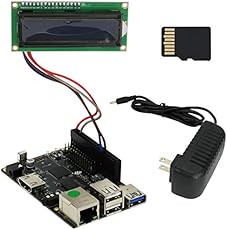
This little PC may not be quite as powerful as a current-gen Raspberry Pi 4 computer, but it’s powered by a chip that outperforms the previous-gen Raspberry Pi 3 in most benchmarks. And unlike most Raspberry Pi devices, the starting price for the Iconikal computer includes accessories including a power supply and microSD card.
Update: The Iconikal Rockchip RK3328 single board computer is now sold out at Amazon.
The computer also comes with a small 16 x 2 pixel serial LCD display, and the computer itself features:
1.5 GHz RK3328 ARM Cortex-A53 quad-core processor
Mali-450MP2 graphics
1GB LPDDR3 memory
Gigabit Ethernet
HDMI
3.5mm A/V jack
1 x USB 3.0 port
2 x USB 2.0 ports
Raspberry Pi-compatible 40-pin GPIO header
The system comes with a 16GB microSD card, but it supports cards up to 256GB. There’s a 5V/3A power adapter that plugs into a dedicated power jack (rather than a USB port), and measuring 85mm x 56mm (about 3.4″ x 2.2″), the Iconikal single-board computer is about the same size as a Raspberry Pi Model B device.
One things this little PC doesn’t have? Built-in support for wireless connectivity. If you want to use WiFi or Bluetooth, your best bet is probably to add a USB adapter.
According to Amazon reviewers, while the computer is sold under the Iconikal brand, it’s actually a product from Network Security company Recon Sentinal. But based on the pictures in the Amazon listing, this may actually be a ROCK64single-board computer sold under a different name (and at a lower price).
The ROCK64 is a little PC from Pine64 that features similar specs, but which supports up to 4GB of RAM and sells for $25 – $45.
Several of the pictures on the Amazon product page show the ROCK64 name on the front and back of the printed circuit board. And one image is identical to the one Pine64 uses to show the size of the ROCK64 when placed next to a credit card.
The good news is that this means software that works with the ROCK64 will most likely work on the Iconikal/Recon Sentinal computer, including builds of the Armbian, Debian, LibreElec, SlackWare, and Android operating systems.
Liliputing’s primary sources of revenue are advertising and affiliate links (if you click the “Shop” button at the top of the page and buy something on Amazon, for example, we’ll get a small commission).
But there are several ways you can support the site directly even if you’re using an ad blocker and hate online shopping.
Join the Conversation
5 Comments
Your email address will not be published. Required fields are marked *
Are you looking for the best chatbot software for your site?
Chatbots allow you to free up time by automatically answering common customer questions. They can also be used to generate leads, improve user experience, and make more sales.
In this article, we have handpicked the best AI chatbots software for your WordPress site to improve customer experience and boost conversions.
ChatBot allows you to easily make chatbots using their drag and drop chatbot builder. You don’t need to do any coding or have any special technical skills.
It even comes with pre-built templates that you can use as a starting point to quickly get your AI ChatBot up and running. These templates include different scenarios like selling products, customer service, recruitment, bookings, and more.
ChatBot integrates with your WordPress website and can be used along with top live chat software well as other popular apps that you may be using to grow your business.
ChatBot is also a great chatbot for Facebook messenger powered by the same AI-driven software. This gives you a powerful tool to retarget customers on Facebook, collect data, and spend money wisely on Facebook ads.
They offer a free 14-day trial (no credit card required) which helps you try it out before choosing a paid plan.
Integrating ChatBot within our own businesses is a big priority for us currently. ChatBot is a great tool for us because it lets us seamlessly forward users to our live support teams where needed.
Pricing: ChatBot costs from $50 per month, which includes 1 active chatbot and 1000 chats per month.
ManyChat is a Facebook messenger chatbot builder. With more than 1.3 Billion people using Facebook Messenger, it allows you to have a wider reach and more powerful retargeting options on the Facebook platform.
In simpler words, it helps you make sales, decrease cart abandonment, capture leads, and more by using Facebook Messenger.
It comes with a simple drag and drop interface which makes it super easy to set up a chatbot for your Facebook page. You can automatically welcome new users, point them to products, schedule messages, respond to specific keywords, and much more.
Pricing: ManyChat has a free plan that you can use to get started. This includes basic quick-start templates, 2 drip sequences, and up to 10 tags for audience segmentation. The premium plan has unlimited drip sequences and tags, plus split testing, buy buttons, and more.
Freshchat allows you to build chatbots for WhatsApp, Messenger, Apple Business Chat, mobile, and web.
It is powered by Freddy, their artificial intelligence algorithm. It is designed to detect intent and engage with the customer, rather than simply being intended to free up the time of your live chat agents.
Using their machine learning technology, Freshchat can even provide you with a list of customer and prospect questions that need precise or better answers.
Pricing: You will need Freshchat’s ‘Forest’ plan for enterprises to use their chatbot. This isn’t cheap, at $69 per user per month when billed monthly.
Drift lets you combine live chat and an automated chatbot, like many of the tools on this list. It also integrates with the most popular CRMs and email marketing services.
Drift allows you to proactively start conversations with customers that are already engaged with the products or services on your website. It is designed to use conversations for conversions and allows you to create scenarios that help you get more sales.
It offers integrations with many third-party tools such as Zendesk, Help Scout, and more.
Drift is more suitable for fairly large businesses, and the pricing reflects that. If you’re just starting to make money online, we recommend that you try one of the other tools on our list.
Pricing: Drift costs from $400/month billed annually. This includes 5 users. (There is a free plan available too, but that doesn’t have the chatbot features.)
Chatfuel is a powerful chatbot platform for Messenger, Facebook, and Instagram. You don’t need any coding knowledge or previous experience to use it.
Lots of different companies use Chatfuel, including large brands like Adidas, T-Mobile, LEGO, TechCrunch, and more.
You can use your bot to increase sales, to qualify leads, or to provide answers to frequently asked questions. This lets you save a lot of time for your customer service team.
There is plenty of documentation on the Chatfuel website to help you build a bot easily. This includes advice on how to make sure you follow Facebook’s rules for using a Messenger bot.
Pricing: Chatfuel costs from $15/month, with no user limit. There’s also a free plan that offers a fully-featured bot and up to 50 users.
MobileMonkey lets you create bots using their OmniChat™ technology. These bots work in web chat, in Messenger, and even through SMS text messages.
This saves you time and money creating different bots using different tools. You can create a single bot and use it across multiple platforms.
Your customer service team can easily respond to messages. MobileMonkey has desktop and mobile apps that give you a single inbox to easily monitor and respond to messages from different channels.
It also offers integrations with third-party software that you may already be using such as CRM software, email marketing service, webinar provider, and more.
Pricing: MobileMonkey costs from $14.25/month, billed annually, for an unlimited number of leads. There’s also a free version with unlimited leads but fewer features.
Tars is a tool that lets you create conversational landing pages. Essentially, this means replacing a traditional landing page with a chatbot.
It lets you easily qualify leads. Tars is particularly well optimized for mobile users, providing a natural and easy chatbot conversation.
Making a chatbot is quite straight forward using Tars. You can either create a conversation workflow from scratch, or you can use a pre-built template.
Pricing: Tars costs from $83.25/month, billed annually. There’s no free plan, but you can take a free 14-day trial (no credit card required).
Tidio is a live chat platform powered by chatbots. It allows you to communicate your clients by using web and mobile friendly chatbot, Facebook Messenger chatbot, and more.
It comes with an easy dashboard and a mobile app to answer all user inquires at any time from anywhere. You can also use automation as much as you like to answer customer questions and design funnels that lead to conversions.
You can use a chatbot template or create your own chatbot scenarios based on keywords and customer behavior on your site. It is easy to use and integrate with your eCommerce platform, email marketing, and help desk software.
Pricing: Starting from $18 per month. They have a free plan too but it does not include chatbots.
Zendesk Chat is part of Zendesk, a popular customer support platform for businesses. It has features that let you handle support tickets, chat live with your customers, and more.
You can use automated messages within Zendesk Chat, such as triggering messages based on what your customers are doing. You can also optimize your messages by testing which ones have a high engagement rate.
You can even integrate it with other chatbot tools if you want more advanced chatbot features.
Pricing: Zendesk Chat costs from $14 per agent per month, when billed annually. You can take a 14 day free trial (no credit card details needed). There’s also a free Lite version, which only lets you have 1 agent and 1 chat at a time.
Quriobot is a simple chatbot that has a free plan, making it a good option for small companies on a tight budget.
Like other chatbot software, it has a simple drag and drop interface. You can either build conversations from scratch or use one of the available templates. You can also create several bots at once.
You can adjust Quriobot’s styling to fit your website’s color scheme and you can even add custom CSS if you want to.
Quriobot integrates with help desk software such as LiveAgent, if you want a complete solution that gives you a support desk, live chat, and more.
Pricing: Quriobot has a generous free plan that allows you up to 500 chats per month, with unlimited bots and organization members. If you want more chats per month, or if you want to remove the Quriobot branding, you need to pay from €9/month. (Quriobot’s pricing is in Euros.)
Intercom is a flexible tool that can be used as a chatbot or for live chat with an agent. You can use it to automate your marketing and to engage users.
Intercom’s whole approach is designed to be conversational, to help you build relationships. It’s easy to scale as your business grows, too.
With Intercom, you can personalize your chatbot’s interactions with customers. You can filter and target customers based on what they do (or don’t do) and you can group them into segments based on their attributes and behavior.
Intercom integrates with email marketing services, Slack, Google Analytics, CRM software, and more.
Pricing: Intercom’s Start package costs from $39/month. However, to use the chatbot features, you need at least the Growth plan from $99/month. You can take a free 14 day trial of either of these plans (credit card details are required).
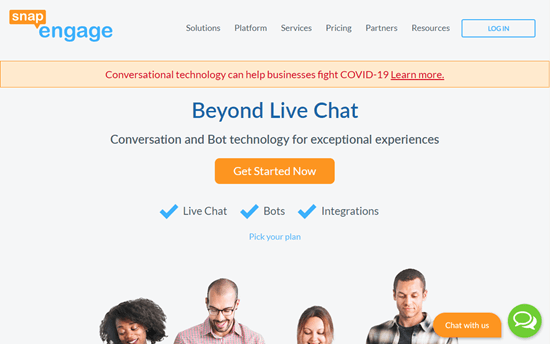
SnapEngage is designed to help you with both sales and support. You can use it on your WordPress site. It also integrates with Facebook Messenger, and other popular software.
It comes with ready-to-use bots, such as the Info-Capture and the Answer Bot. You can also create custom bots using the custom bot API.
If you run a healthcare site, then SnapEngage offers ‘Health Engage’ to provide secure, HIPAA-compliant chatbots, live chat, and SMS messaging.
Pricing: SnapEngage costs from $16 per user per month (with a minimum of 3 users), billed annually. Their HealthEngage option costs from $26 per user per month, again with a minimum of 3 users.
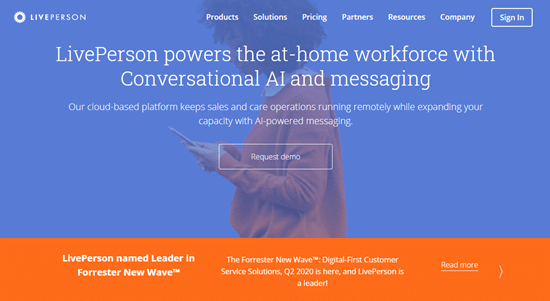
LivePerson offers live chat software, as you might expect from their name. You can also use it to create automated conversation flows using a chatbot.
Your chatbots can connect potential buyers to a live agent, send offers based on the customer’s interests, and even schedule appointments or meetings. Customers can also check on their order status, find out their account balance, and get answers to billing or payment questions.
As well as integrating with your WordPress site, LivePerson can be used on Facebook, Twitter, and more.
Pricing: LivePerson doesn’t provide a standard scale of prices. Instead, you need to contact them for a quote.
Ada is a chatbot that can tailor its responses and recommendations based on the customer’s information, intent, and interests. It’s designed to be simple to use, so that your support team can set everything up. There’s no coding involved.
You can also integrate Ada with your live chat so that customers can move seamlessly from the chatbot to a live agent. It also integrates with your team calendar to schedule appointments and bookings.
Pricing: Ada doesn’t provide prices upfront. Instead, you need to chat with the sales team or request a demo to find out how much it will cost you.
Our Pick: Best Chatbot Software
For most businesses, we recommend ChatBot.com as the best AI chatbot software because it’s easy to use and comes with pre-made workflows.
They also offer many built-in integrations with third-party marketing services, and the pricing is fairly affordable compared to other solutions.
If you’re looking for alternatives, then please take a look at FreshChat or Drift.
We hope this article helped you learn about the best AI chatbots software for your WordPress site. You might also want to take a look at our guides to the best live chat software and best business phone services for small businesses.
Like most web browsers, the Google Maps mobile app has the option to go incognito, which you can use when you want to search for locations or navigate privately.
When you use Incognito mode, anything you do with Google Maps won’t be saved to your Google account.
In addition, Google Maps won’t be able to offer any features that rely on personalization with your Google account – so it won’t know your home and work locations, have access to your location history, or remember any places you have pinned or bookmarked.
How to go incognito on Google Maps
Incognito mode works exactly the same on both iPhone and Android.
1. Start the Google Maps app on your phone.
2. Tap your account avatar in the upper right corner of the screen.
If you’re using Google Maps on a web browser rather than on the mobile app, you can open an incognito window through your browser to achieve the same effect.
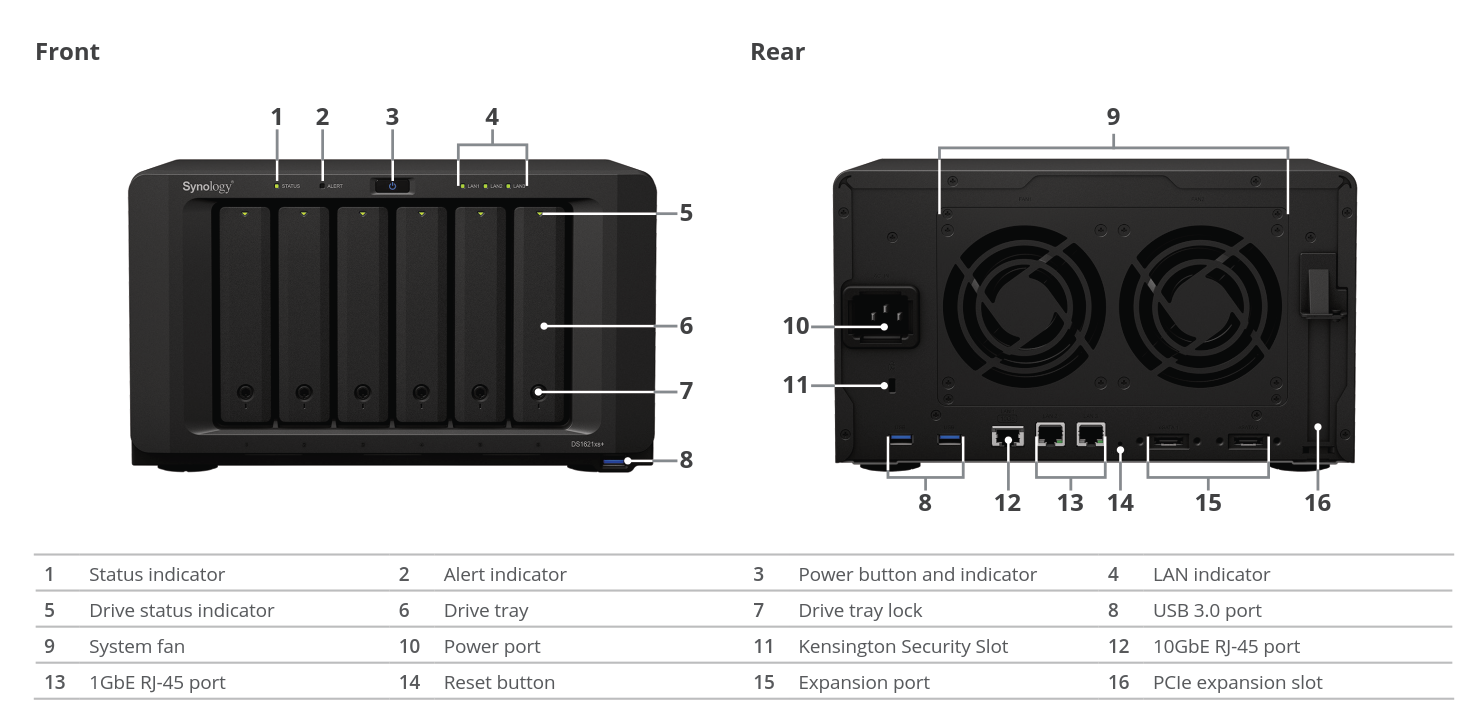
Synology is one of the top-tier vendors in the commercial off-the-shelf (COTS) network-attached storage (NAS) market for SOHOs, SMBs, and SMEs, with QNAP being the other major player. While QNAP has a wide variety of hardware platforms to choose from in each market segment, Synology has been big on segmentation – restricting Xeon CPUs and native 10GbE to their rackmount offerings. Only their Annapurna Labs SoC-based desktop units have had 10G SFP+ support till now. That changed recently with the introduction of the DS1621xs+.
The Synology DS1621xs+ uses a Broadwell-DE Xeon-D processor (D-1527) – These SoCs are a better fit for storage platforms compared to the networking-focused Skylake-D SKUs. The 6 built-in 3.5″ hot-swappable drive bays are complemented by two M.2 2280 NVMe SSD slots. There are two 1 GbE LAN ports and a 10GBASE-T port. Two eSATA ports help the unit support two DX517 expansion chassis, allowing the unit to support a total of 16 bays.
On the software side, similar to all other x86 NAS units from Synology, the DS1621xs+ also comes with support for both ext4 and btrfs internal volumes. Synology claims read speeds of up to 3100 MBps with additional 10G NICs in the expansion slots.
It is heartening to see Synology finally introduce 10GBASE-T NAS units in the desktop form-factor. The DSM software carries some unique applications (like the Synology Office suite) that QNAP doesn’t currently have in their QTS operating system. On the other hand, QNAP’s hardware variety – particularly in terms of NBASE-T and 10GbE support even in their SOHO offerings is also attractive. Overall, it is good for consumers to have more options to choose from in the COTS NAS market.
Wireless device captures sleep data without using cameras or body sensors; could aid patients with Parkinson’s disease, epilepsy, or bedsores.Becky Ham | MIT News correspondentPublication Date:September 11, 2020 PRESS INQUIRIES
Caption:BodyCompass is the first home-ready, radio-frequency-based system to provide accurate sleep data without cameras or sensors attached to the body. It was developed by MIT researchers led by Dina Katabi and Shichao Yue.Credits:Image: Christine Daniloff, MIT
MIT researchers have developed a wireless, private way to monitor a person’s sleep postures — whether snoozing on their back, stomach, or sides — using reflected radio signals from a small device mounted on a bedroom wall.
The device, called BodyCompass, is the first home-ready, radio-frequency-based system to provide accurate sleep data without cameras or sensors attached to the body, according to Shichao Yue, who will introduce the system in a presentation at the UbiComp 2020 conference on Sept. 15. The PhD student has used wireless sensing to study sleep stages and insomnia for several years.
“We thought sleep posture could be another impactful application of our system” for medical monitoring, says Yue, who worked on the project under the supervision of Professor Dina Katabi in the MIT Computer Science and Artificial Intelligence Laboratory. Studies show that stomach sleeping increases the risk of sudden death in people with epilepsy, he notes, and sleep posture could also be used to measure the progression of Parkinson’s disease as the condition robs a person of the ability to turn over in bed.
“Unfortunately, many patients are completely unaware of how they sleep at night or what position they end up after a seizure,” says Dong Woo Lee, an epilepsy neurologist at Brigham and Women’s Hospital and Harvard Medical School, who was not associated with the study. “A body monitoring system like BodyCompass would move our field forward in allowing for baseline monitoring of our patients to assess their risk, and when combined with an alerting/intervention system, could save patients from sudden unexpected death in epilepsy.”
In the future, people might also use BodyCompass to keep track of their own sleep habits or to monitor infant sleeping, Yue says: “It can be either a medical device or a consumer product, depending on needs.”
Other authors on the conference paper, published in the Proceedings of the ACM on Interactive, Mobile, Wearable and Ubiquitous Technologies, include graduate students Yuzhe Yang and Hao Wang, and Katabi Lab affiliate Hariharan Rahul. Katabi is the Andrew and Erna Viterbi Professor of Electrical Engineering and Computer Science at MIT.
Restful reflections
BodyCompass works by analyzing the reflection of radio signals as they bounce off objects in a room, including the human body. Similar to a Wi-Fi router attached to the bedroom wall, the device sends and collects these signals as they return through multiple paths. The researchers then map the paths of these signals, working backward from the reflections to determine the body’s posture.
For this to work, however, the scientists needed a way to figure out which of the signals were bouncing off the sleeper’s body, and not bouncing off the mattress or a nightstand or an overhead fan. Yue and his colleagues realized that their past work in deciphering breathing patterns from radio signals could solve the problem.
Signals that bounce off a person’s chest and belly are uniquely modulated by breathing, they concluded. Once that breathing signal was identified as a way to “tag” reflections coming from the body, the researchers could analyze those reflections compared to the position of the device to determine how the person was lying in bed. (If a person was lying on her back, for instance, strong radio waves bouncing off her chest would be directed at the ceiling and then to the device on the wall.) “Identifying breathing as coding helped us to separate signals from the body from environmental reflections, allowing us to track where informative reflections are,” Yue says.
Reflections from the body are then analyzed by a customized neural network to infer how the body is angled in sleep. Because the neural network defines sleep postures according to angles, the device can distinguish between a sleeper lying on the right side from one who has merely tilted slightly to the right. This kind of fine-grained analysis would be especially important for epilepsy patients for whom sleeping in a prone position is correlated with sudden unexpected death, Yue says.
Lee says “it is becoming apparent that patients do not like wearing devices, they forget to wear it, they decrease comfort, battery life is short, and data transfer may be difficult. A non-wearable contactless device like the BodyCompass would overcome these issues.”
BodyCompass has some advantages over other ways of monitoring sleep posture, such as installing cameras in a person’s bedroom or attaching sensors directly to the person or their bed. Sensors can be uncomfortable to sleep with, and cameras reduce a person’s privacy, Yue notes. “Since we will only record essential information for detecting sleep posture, such as a person’s breathing signal during sleep,” he says, “it is nearly impossible for someone to infer other activities of the user from this data.”
An accurate compass
The research team tested BodyCompass’ accuracy over 200 hours of sleep data from 26 healthy people sleeping in their own bedrooms. At the start of the study, the subjects wore two accelerometers (sensors that detect movement) taped to their chest and stomach, to train the device’s neural network with “ground truth” data on their sleeping postures.
BodyCompass was most accurate — predicting the correct body posture 94 percent of the time — when the device was trained on a week’s worth of data. One night’s worth of training data yielded accurate results 87 percent of the time. BodyCompass could achieve 84 percent accuracy with just 16 minutes’ worth of data collected, when sleepers were asked to hold a few usual sleeping postures in front of the wireless sensor.
Along with epilepsy and Parkinson’s disease, BodyCompass could prove useful in treating patients vulnerable to bedsores and sleep apnea, since both conditions can be alleviated by changes in sleeping posture. Yue has his own interest as well: He suffers from migraines that seem to be affected by how he sleeps. “I sleep on my right side to avoid headache the next day,” he says, “but I’m not sure if there really is any correlation between sleep posture and migraines. Maybe this can help me find out if there is any relationship.”
For now, BodyCompass is a monitoring tool, but it may be paired someday with an alert that can prod sleepers to change their posture. “Researchers are working on mattresses that can slowly turn a patient to avoid dangerous sleep positions,” Yue says. “Future work may combine our sleep posture detector with such mattresses to move an epilepsy patient to a safer position if needed.”
Smart contact lenses are a sci-fi trope, but they may also offer hope for sufferers of certain kinds of debilitating eye ailments. That’s the goal of new research into a a tunable, low-powered iris embedded in a smart contact lens.
It’s a good example of the growing role of nanotechnology in human augmentation and therapeutics. The human iris controls pupil size in response to light, a critical function that allows the retina to take in appropriate sensory information. Too much light and the world is washed out, too little and it’s veiled in darkness. A host of eye diseases and deficiencies inhibit the iris from responding appropriately, including aniridia and keratoconus. Light sensitivity, similarly, is a painful debilitation and is often associated with chronic migraine.
Researchers at Imec, an innovation hub based in Belgium, along with partners like CMST, a Ghent University-affiliated research group, the Instituto de Investigación Sanitaria Fundación Jiménez Díaz in Madrid, Spain, and Holst Centre have been developing an low-powered wearable solution. The contact lens’s iris aperture is tunable thanks to an integrated liquid crystal display (LCD) that manipulates concentric rings.
“By combining our expertise on miniaturized flexible electronics, low-power ASIC design and hybrid integration, we have demonstrated the capacity to develop a solution for people who suffer from iris deficiencies, higher order aberrations and photophobia, a common yet debilitating symptom seen in many neuro-ophthalmic disorders,” says researcher prof. Andrés Vásquez Quintero at Imec. “Our smart contact lens can control the level of incoming light mimicking a human iris and offering a potential solution to vision correction – by expanding depth-of-field with automatic control of pupil size. This way, our approach can surpass current solutions to combat human eye iris deficiencies. Its beneficial optical effects will be further clinically validated and developed into a medical device.”
Utilizing an ultra-low power design, the lens can be used for an entire day without a recharge. The research was presented in the Nature-affiliated publication Scientific Reports and demonstrates the lens’ potential in expanding visual sharpness, decreasing optical aberrations, and reducing the amount of light entering the eye in a dynamic manner.
“It is imec’s aim to create added value for the society and bring our research to the market,” says Luc Van den hove, president and CEO of Imec. “We are convinced that this artificial iris prototype has all the potential to become a game changer in ophthalmic treatment. Therefore, we have launched an incubation project together with imec.xpand to fully support the team’s ambition to mature and validate the technology and support their efforts to commercialize via a strong business case as a spin-off.”
Research transfer is an area of emphasis for Imec, which plans to develop the prototype into a medical device. The first step is validation with patients and volunteers
Advances in natural language processing (NLP) driven by the BERT language model and transformer models have produced SOTA performances in tasks such as speech recognition and powered a range of applications including voice assistants and real-time closed captioning. The widespread deployment of deep neural networks for on-device speech recognition however remains a challenge, particularly on edge devices such as mobile phones.
In a new paper, researchers from the University of Waterloo and DarwinAI propose novel attention condensers designed to enable the building of low-footprint, highly-efficient deep neural networks for on-device speech recognition on the edge. The team demonstrates low-precision “TinySpeech” deep neural networks comprising such attention condensers and tailored specifically for limited-vocabulary speech recognition.
While there has been increased research focus on efficient network design in recent years, there are still limitations to what can be achieved using existing deep convolutional neural network design patterns, says DarwinAI Chief Research Scientist and the paper’s first author Alexander Wong. Motivated to move beyond these limitations, the researchers developed attention condensers as a new building block for such networks.
Attention condensers are stand-alone architectures that allow a deep learning model to focus on what’s important, facilitating more effective and trustworthy decisions, DarwinAI CEO Sheldon Fernandez told Synced. The proposed attention condensers are self-attention mechanisms that learn and produce a condensed embedding characterizing joint local and cross-channel activation relationships and perform selective attention accordingly.
Unlike self-attention mechanisms designed for deep convolutional neural networks that depend heavily on existing convolution modules, these attention condensers act as self-contained, stand-alone modules enabling more efficient deep neural networks.
Each attention condenser consists of a condenser layer C, which condenses input activations V to a lower dimension; an embedding structure E, for characterizing cross-dimensional activation relationships; an expansion layer X, which expands the embedding to a higher dimension; a scale S for controlling the contribution of self-attention; and a selective attention mechanism F for imposing selective attention on V. By learning such embeddings with significantly reduced dimensions, the attention condensers strike a balance between modelling efficiency and computational efficiency.
Architecture of an attention condenser
The researchers leveraged their attention condensers within a machine-driven design exploration strategy to create what they call “TinySpeech networks.” In experiments using the Google Speech Commands benchmark dataset for limited-vocabulary speech recognition, these TinySpeech networks demonstrated significantly lower architectural and computational complexity compared to previously proposed deep neural networks designed for limited-vocabulary speech recognition.
TinySpeech architectures for limited-vocabulary speech recognition
“The key takeaways from this research is that not only can self-attention be leveraged to significantly improve the accuracy of deep neural networks, it can also have great ramifications for greatly improving efficiency and robustness of deep neural networks,” Wong told Synced.
Given the promising early results, the researchers say they will explore the use of attention condensers in building highly-efficient deep neural networks for other NLP tasks, in areas such as visual perception and drug discovery, and for empowering various ultra-low-power TinyML technologies.
The paper TinySpeech: Attention Condensers for Deep Speech Recognition Neural Networks on Edge Devices is on arXiv.
This report offers a look at how China has leveraged artificial intelligence technologies in the battle against COVID-19. It is also available on Amazon Kindle. Along with this report, we also introduced a database covering additional 1428 artificial intelligence solutions from 12 pandemic scenarios.
Picture the scene: you have a Raspberry Pi configured to run on your network, you power it up headless (without a monitor), and now you need to know which IP address it was assigned.https://www.youtube.com/embed/XbJ5vT8FvXU?feature=oembed
Matthias came up with this solution, which makes your Raspberry Pi blink its IP address, because he used a Raspberry Pi Zero W headless for most of his projects and got bored with having to look it up with his DHCP server or hunt for it by pinging different IP addresses.
How does it work?
A script runs when you start your Raspberry Pi and indicates which IP address is assigned to it by blinking it out on the device’s LED. The script comprises about 100 lines of Python, and you can get it on GitHub.
Easy peasy GitHub breezy
The power/status LED on the edge of the Raspberry Pi blinks numbers in a Roman numeral-like scheme. You can tell which number it’s blinking based on the length of the blink and the gaps between each blink, rather than, for example, having to count nine blinks for a number nine.
Blinking in Roman numerals
Short, fast blinks represent the numbers one to four, depending on how many short, fast blinks you see. A gap between short, fast blinks means the LED is about to blink the next digit of the IP address, and a longer blink represents the number five. So reading the combination of short and long blinks will give you your device’s IP address.
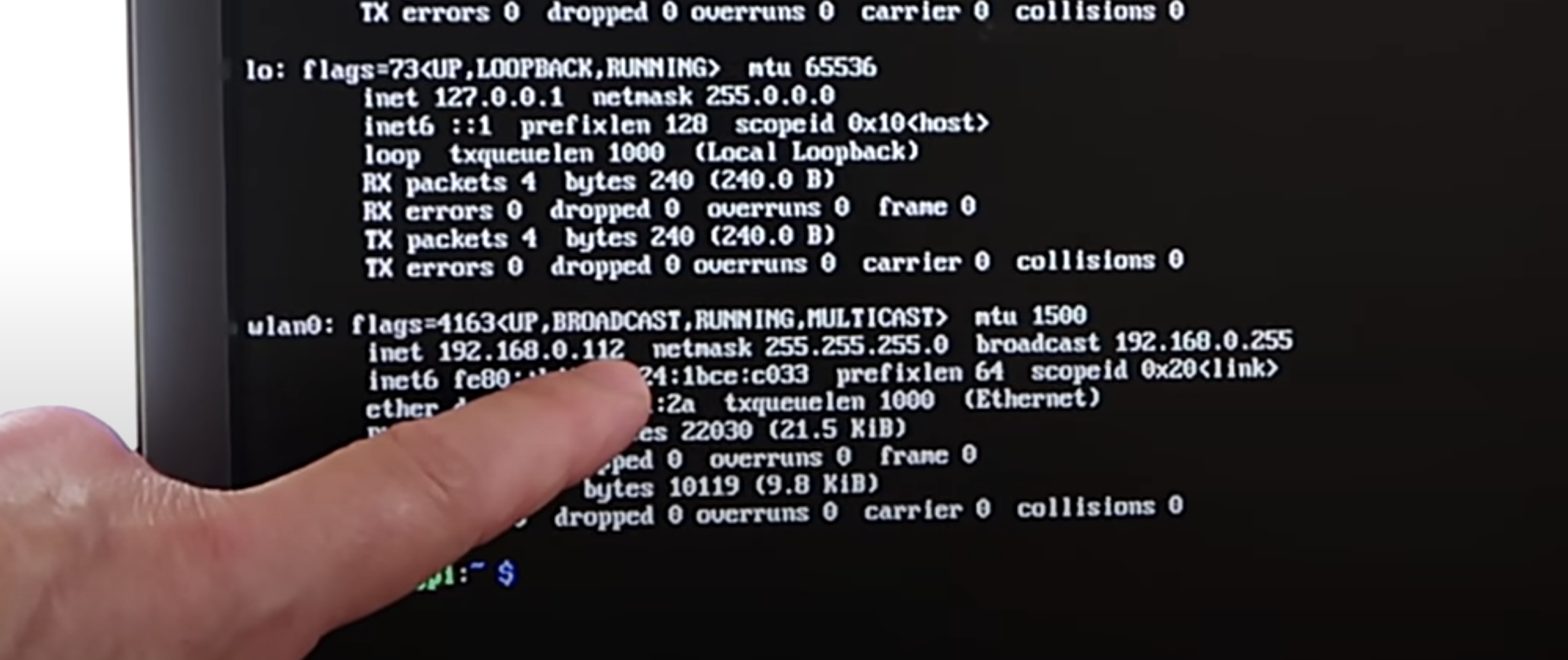
You can see this in action at this exact point in the video. You’ll see the LED blink fast once, then leave a gap, blink fast once again, then leave a gap, then blink fast twice. That means the device’s IP address ends in 112.
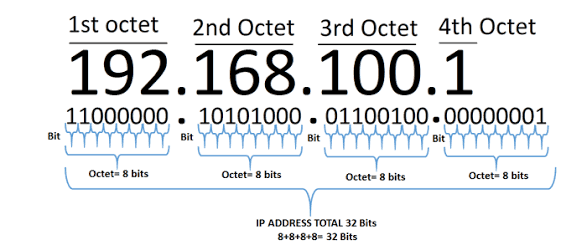
What are octets?
Luckily, you usually only need to know the last three numbers of the IP address (the last octet), as the previous octets will almost always be the same for all other computers on the LAN.
The script blinks out the last octet ten times, to give you plenty of chances to read it. Then it returns the LED to its default functionality.
Which LED on which Raspberry Pi?
On a Raspberry Pi Zero W, the script uses the green status/power LED, and on other Raspberry Pis it uses the green LED next to the red power LED.
The green LED blinking the IP address (the red power LED is slightly hidden by Matthias’ thumb)
Once you get the hang of the Morse code-like blinking style, this is a really nice quick solution to find your device’s IP address and get on with your project.

 by
by 

















 © Dean Mitchell/Getty Images It’s easy to go Incognito in Google Maps. Dean Mitchell/Getty Images
 © Dave Johnson/Business Insider Incognito mode is always just two taps away. Dave Johnson/Business Insider
 © Dave Johnson/Business Insider You can tell you’re in Incognito mode by the icon that replaces your account avatar. Dave Johnson/Business Insider
 © Dave Johnson/Business Insider You can turn off Incognito mode easily. Dave Johnson/Business Insider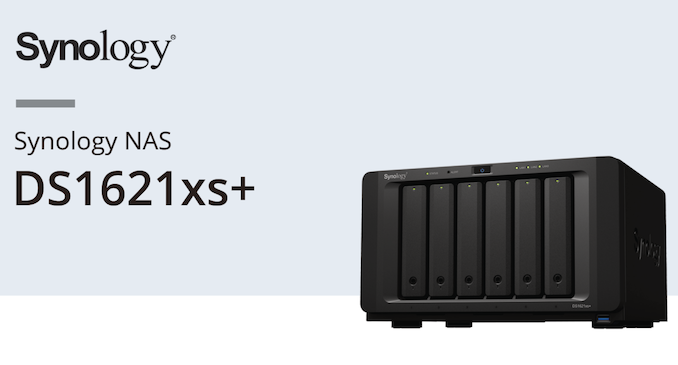






 Bruce's Blog
